This section covers Abacus budget optimisation workflows for fitted
PanelMMM models. It explains the low-level optimisation wrapper, how to
inspect optimisation outputs.
For the higher-level planner service and Dash UI, see
Scenario Planning.
Pages
Budget Optimisation - How to run
PanelBudgetOptimizerWrapper, set bounds and masks, and define spend over a
future window.
Interpreting Optimisation - How to read the
allocation output, inspect simulated response samples, and use the pipeline
optimisation artefacts.
Scenario Planning - How to compare current, manual,
and fixed-budget optimised scenarios with the planner service and optional
Dash UI.
Subsections of Optimisation
Budget Optimisation
Use PanelBudgetOptimizerWrapper when you want to optimise spend for a fitted
PanelMMM over a future date window.
The wrapper builds a synthetic future dataset for the requested window, swaps
the model’s channel_data for an optimisation variable, and then calls the
generic BudgetOptimizer. If you want to compare several plans in total
horizon spend units, see Scenario Planning.
What the optimiser maximises
For PanelBudgetOptimizerWrapper, optimize_budget() defaults to:
The optimiser therefore maximises the average posterior response of the chosen
response variable, subject to your budget bounds and constraints.
Budget units
The low-level wrapper uses per-period spend units.
budget is the total spend across all optimised cells for one model period.
The returned allocation has no date dimension, so Abacus repeats that
allocation across the optimisation window.
If the window has num_periods=8 and you pass budget=100_000, the
simulated spend over the full horizon is 800_000 before any carryover
effects are applied.
This is different from Scenario Planning, which
treats total_budget and manual allocations as total horizon spend and
converts them to per-period units internally.
The Stage 70 pipeline optimisation uses the same units as the low-level
wrapper because it passes optimization.total_budget directly to
PanelBudgetOptimizerWrapper.optimize_budget(...).
Required inputs
Input
What Abacus expects
Notes
model
A fitted PanelMMM with idata.posterior
The optimiser needs posterior draws and model graph variables.
start_date, end_date
A future window at the model’s observed date frequency
Abacus infers num_periods from the training data frequency.
allocation is an xarray.DataArray over the non-date budget dimensions.
For a model with dims=("geo",), the result dims are typically
("geo", "channel").
Bounds and masks
budget_bounds
Use budget_bounds to cap spend for each optimised cell.
If the budget has only one non-date dimension, you can pass a dict such as
{"tv": (0.0, 50_000.0), "search": (0.0, 30_000.0)}.
For panel budgets, pass an xarray.DataArray with dims
(*budget_dims, "bound"), where "bound" contains "lower" and "upper".
If you omit budget_bounds, Abacus warns and uses (0, total_budget) for
every optimised cell.
Abacus reindexes DataArray bounds to the model’s internal coordinate order,
so the input coordinate order does not need to match exactly.
budgets_to_optimize
Use budgets_to_optimize to choose which cells can move.
The mask must be a boolean xarray.DataArray over the budget dimensions.
Unoptimised cells are fixed at zero in the returned allocation.
If you omit the mask, Abacus optimises every cell where the fitted model has
non-zero historical channel_contribution information.
If your mask includes True for a cell where the model has no information,
Abacus raises ValueError.
Time distribution across the window
Use budget_distribution_over_period to flight each allocation cell over time
instead of repeating the same spend every period.
The object must be an xarray.DataArray with:
dims exactly ("date", *budget_dims)
one date weight per optimisation period
weights that sum to 1 across the date dimension for every budget cell
Use the same budget_distribution_over_period again when you call
sample_response_distribution(),
otherwise you will optimise one spend path and simulate another.
For response simulation through the wrapper, the date coordinates can be:
integer positions 0 .. num_periods - 1, or
exact dates that match the optimisation window
Constraints and solver controls
default_constraints=True adds the default equality constraint:
sum(allocation) == budget
This is enabled by default and emits a warning so you can see that the default
constraint set is active.
You can also pass:
extra SciPy minimise keyword arguments directly to optimize_budget(...) to
tweak the underlying solver call
callback=True to get a third return value with per-iteration objective,
gradient, and constraint diagnostics
YAML note for the pipeline runner
If you run optimisation through the structured pipeline, configure the
optimization block in YAML:
In this pipeline path, optimization.total_budget uses the wrapper contract
described above: it is passed straight to optimize_budget(...) as
per-period spend, not total horizon spend.
Common pitfalls
Passing a total horizon budget to optimize_budget(...). Divide by
wrapper.num_periods first, or use Scenario Planning.
Passing dict bounds for a panel budget. Dict bounds only work when the budget
dims are just ("channel",).
Omitting a budget dimension from budget_distribution_over_period. The
distribution must include every budget dim, not just the one you want to vary.
Forgetting that response_variable must exist in the fitted optimisation
graph.
Using one budget distribution for optimisation and a different one for
response simulation.
allocation is an xarray.DataArray over the non-date budget dimensions.
Model shape
Typical allocation dims
Meaning
No extra panel dims
("channel",)
One optimised value per channel
dims=("geo",)
("geo", "channel")
One value per (geo, channel) cell
dims=("geo", "brand")
("geo", "brand", "channel")
One value per (geo, brand, channel) cell
The values are in the wrapper’s per-period units. Unoptimised cells are
present and set to zero.
result
result is SciPy’s OptimizeResult. The fields you will usually inspect are:
Field
Meaning
success
Whether the solver converged
status
SciPy status code
message
Human-readable solver message
fun
Final objective value
nit
Number of iterations
x
The optimised flat parameter vector
If success is False, Abacus raises MinimizeException unless you opt in to
return_if_fail=True on the underlying BudgetOptimizer.
callback_info
When callback=True, Abacus records one entry per solver iteration. Each entry
includes:
x
fun
jac
constraint_info when constraints are active
Use this when you need to diagnose solver behaviour rather than just consume the
final allocation.
Simulate the optimised plan
The optimiser itself returns only the allocation. To estimate spend paths and
contributions over the requested window, call sample_response_distribution().
Set noise_level=0.0 when you want the spend path to match the requested
allocation exactly.
What response_samples contains
The wrapper builds a synthetic future dataset, samples posterior predictive
draws, and then merges the requested allocation and simulated spend path back
into the result.
response_samples therefore contains:
Variable
Source
Meaning
allocation
Added by the wrapper
Requested allocation without a date dimension
One variable per channel
Added by the wrapper
Simulated spend path over the future dates
mmm.output_var
Posterior predictive sample
Model output variable
channel_contribution
Posterior predictive sample
Channel contribution on model scale
total_media_contribution_original_scale
Posterior predictive sample
Total media contribution on the original target scale
If you pass additional_var_names, Abacus also includes those variables when
they exist in the model graph.
Carryover and evaluation window
include_carryover=True changes how Abacus builds the synthetic future window.
Abacus extends the generated dates by adstock.l_max periods.
It then zeroes the tail spend rows after the requested window.
The extra dates let posterior predictive sampling include lagged effects from
the planned spend.
This is why the simulated dataset can cover a longer evaluated window than the
requested start_date to end_date range, while still preserving the same
total spend.
Plot the result
The plotting helpers under mmm.plot are designed to work directly with the
response dataset returned by the wrapper.
split_by="geo" or another dimension to create separate subplots
original_scale=True to prefer original-scale contribution variables when
they are available
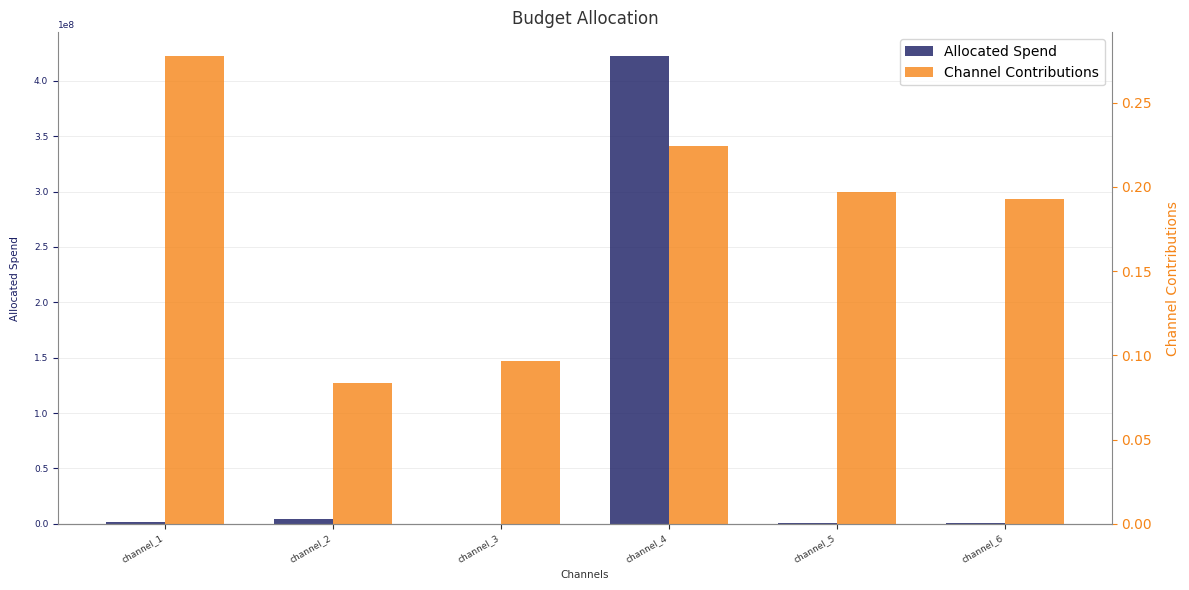
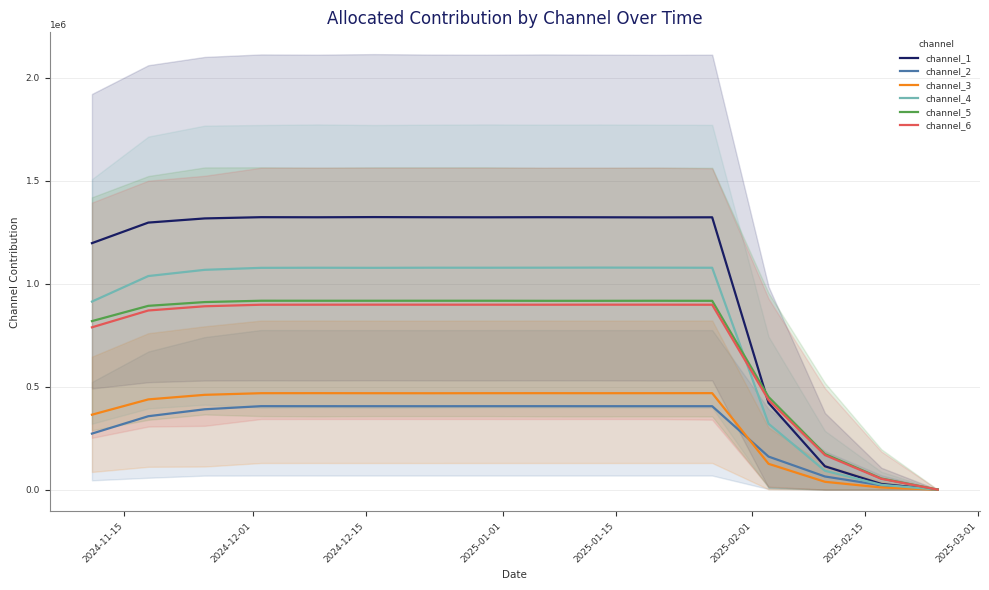
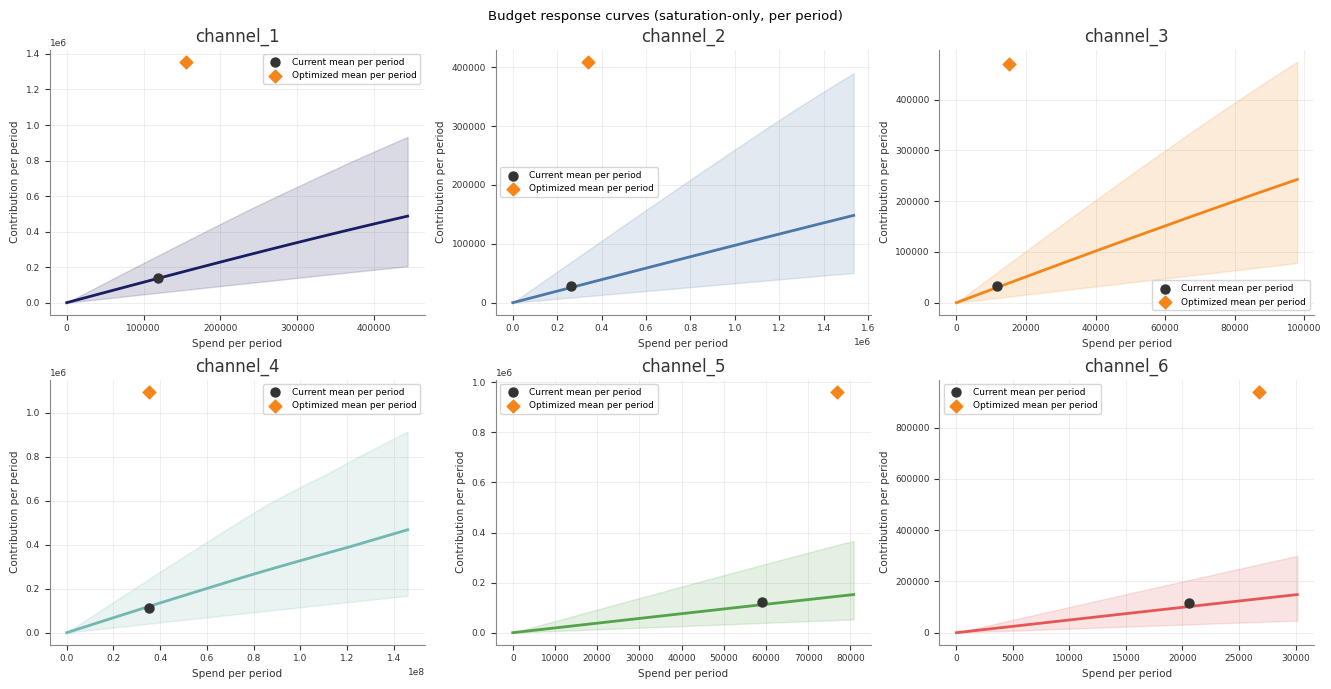
Example optimisation output:
Read the Stage 70 pipeline artefacts
If you run optimisation through python -m abacus.pipeline.runner, Stage 70
writes both the low-level optimiser output and several interpretation files.