Interpreting Optimisation
After you run budget optimisation, you usually work with three outputs:
- the allocation
DataArray - the SciPy
OptimizeResult - a simulated response dataset from
sample_response_distribution()
This page explains how to read each one.
Read the optimiser output
PanelBudgetOptimizerWrapper.optimize_budget(...) returns:
If you set callback=True, it returns a third value:
allocation
allocation is an xarray.DataArray over the non-date budget dimensions.
| Model shape | Typical allocation dims | Meaning |
|---|---|---|
| No extra panel dims | ("channel",) |
One optimised value per channel |
dims=("geo",) |
("geo", "channel") |
One value per (geo, channel) cell |
dims=("geo", "brand") |
("geo", "brand", "channel") |
One value per (geo, brand, channel) cell |
The values are in the wrapper’s per-period units. Unoptimised cells are present and set to zero.
result
result is SciPy’s OptimizeResult. The fields you will usually inspect are:
| Field | Meaning |
|---|---|
success |
Whether the solver converged |
status |
SciPy status code |
message |
Human-readable solver message |
fun |
Final objective value |
nit |
Number of iterations |
x |
The optimised flat parameter vector |
If success is False, Abacus raises MinimizeException unless you opt in to
return_if_fail=True on the underlying BudgetOptimizer.
callback_info
When callback=True, Abacus records one entry per solver iteration. Each entry
includes:
xfunjacconstraint_infowhen constraints are active
Use this when you need to diagnose solver behaviour rather than just consume the final allocation.
Simulate the optimised plan
The optimiser itself returns only the allocation. To estimate spend paths and
contributions over the requested window, call sample_response_distribution().
Set noise_level=0.0 when you want the spend path to match the requested
allocation exactly.
What response_samples contains
The wrapper builds a synthetic future dataset, samples posterior predictive draws, and then merges the requested allocation and simulated spend path back into the result.
response_samples therefore contains:
| Variable | Source | Meaning |
|---|---|---|
allocation |
Added by the wrapper | Requested allocation without a date dimension |
| One variable per channel | Added by the wrapper | Simulated spend path over the future dates |
mmm.output_var |
Posterior predictive sample | Model output variable |
channel_contribution |
Posterior predictive sample | Channel contribution on model scale |
total_media_contribution_original_scale |
Posterior predictive sample | Total media contribution on the original target scale |
If you pass additional_var_names, Abacus also includes those variables when
they exist in the model graph.
Carryover and evaluation window
include_carryover=True changes how Abacus builds the synthetic future window.
- Abacus extends the generated dates by
adstock.l_maxperiods. - It then zeroes the tail spend rows after the requested window.
- The extra dates let posterior predictive sampling include lagged effects from the planned spend.
This is why the simulated dataset can cover a longer evaluated window than the
requested start_date to end_date range, while still preserving the same
total spend.
Plot the result
The plotting helpers under mmm.plot are designed to work directly with the
response dataset returned by the wrapper.
Useful options:
dims={...}to filter a panel slicesplit_by="geo"or another dimension to create separate subplotsoriginal_scale=Trueto prefer original-scale contribution variables when they are available
Example optimisation output:
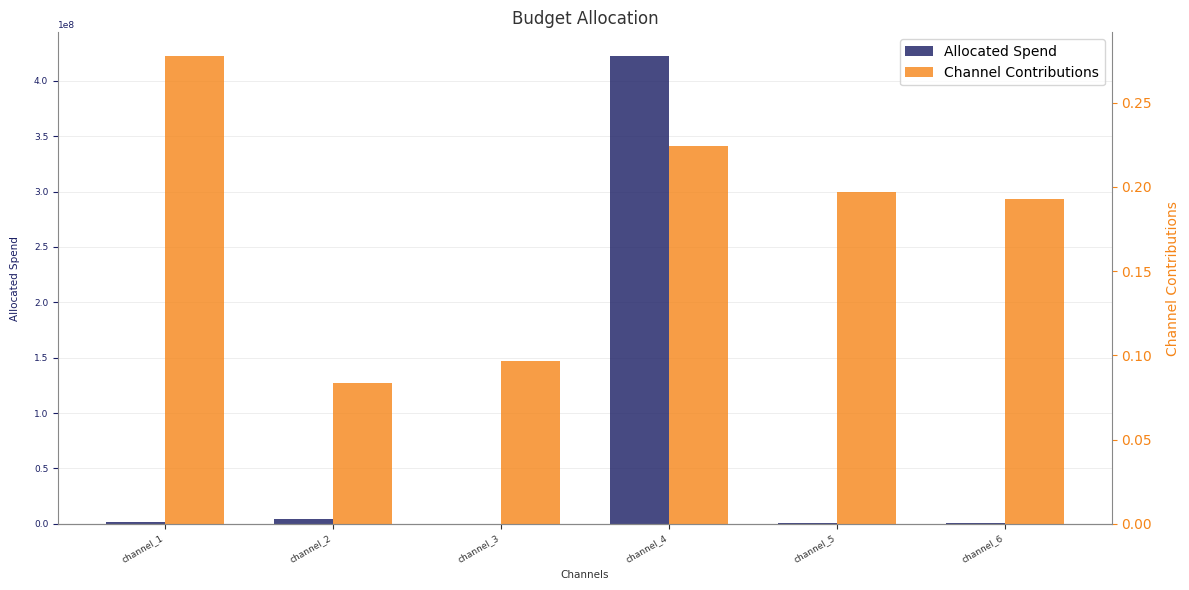
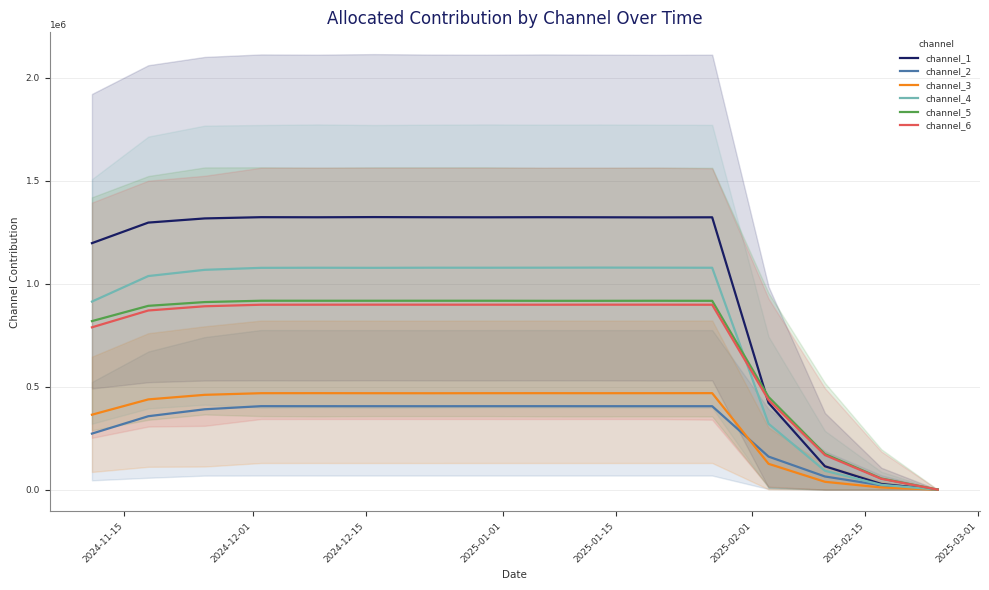
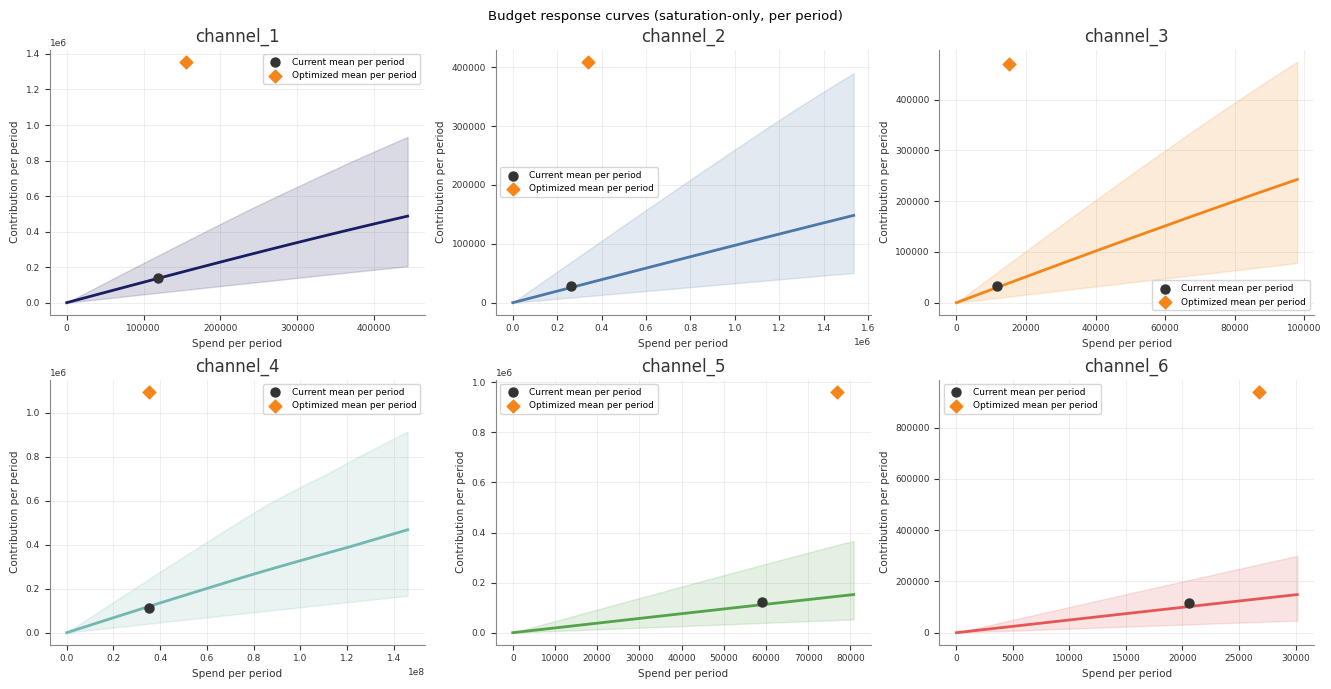
Read the Stage 70 pipeline artefacts
If you run optimisation through python -m abacus.pipeline.runner, Stage 70
writes both the low-level optimiser output and several interpretation files.
| File | What it contains |
|---|---|
optimized_allocation.nc / optimized_allocation.csv |
The allocation returned by the optimiser |
response_distribution.nc |
The simulated response dataset for that allocation |
optimize_result.json |
Solver status, message, objective value, and iteration count |
budget_summary.csv |
Current versus optimised totals |
budget_response_points.csv |
Per-channel current versus optimised spend, contribution, and efficiency summaries |
budget_impact.csv |
Delta between current and optimised channel summaries |
budget_bounds_audit.csv |
Current spend, scaled reference spend, bounds, optimised spend, and bound checks |
budget_roi_cpa.csv |
Channel efficiency summaries using the model’s efficiency metric |
budget_response_curves.csv |
Saturation-only response curve summaries |
budget_mroi.csv |
Marginal efficiency estimates at the current and optimised spend points |
The stage also writes plots for allocation, contribution over time, response curves, impact, bounds audit, and ROI or CPA summaries.
These Stage 70 spend figures use the same units as the low-level wrapper: per-period spend, not total horizon spend.
Practical checks
Before you use an optimised plan, check:
result.successandresult.message- whether the allocation matches your intended budget units
- whether
budget_bounds_audit.csvor your own checks show any bound issues - how much of the gain comes from reallocation versus carryover assumptions
- whether the point lies on a sensible part of the response curve, not just on the edge of a bound
For multi-plan comparison in total horizon units, use Scenario Planning.