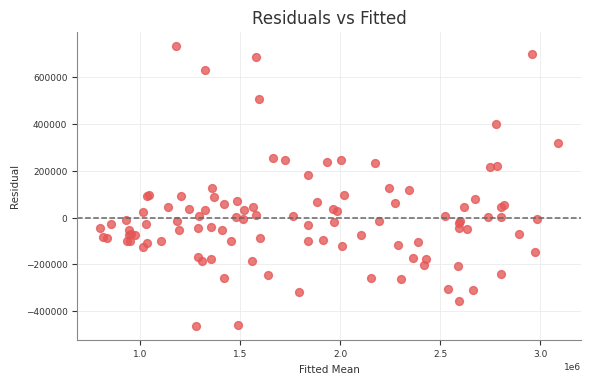
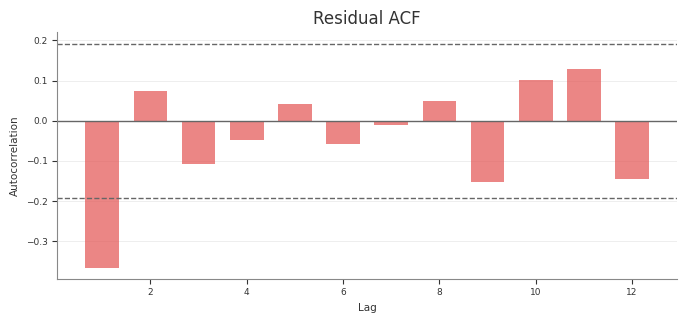
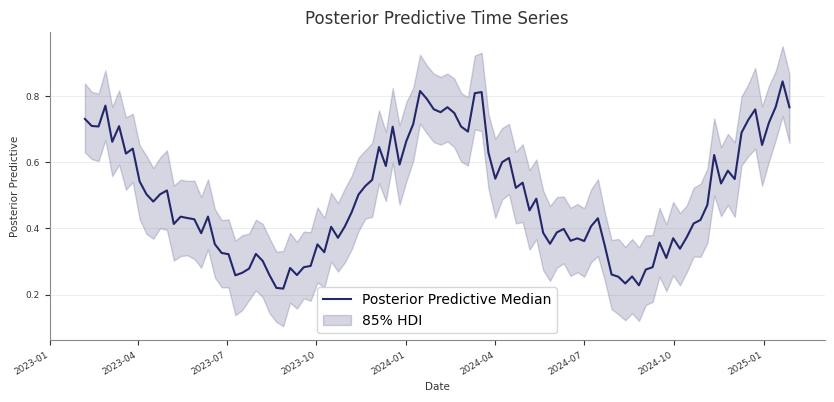
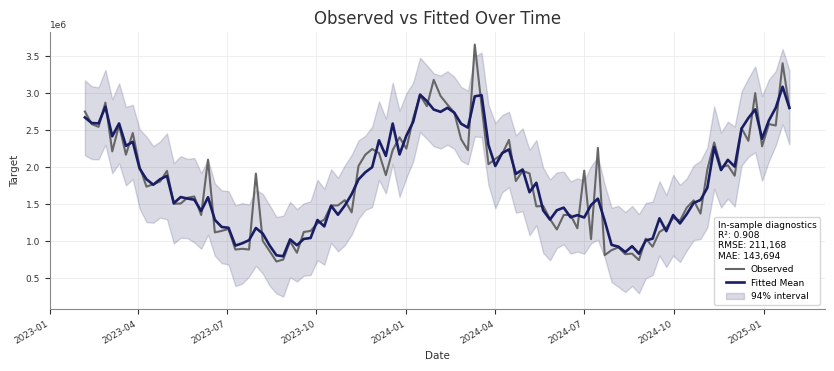
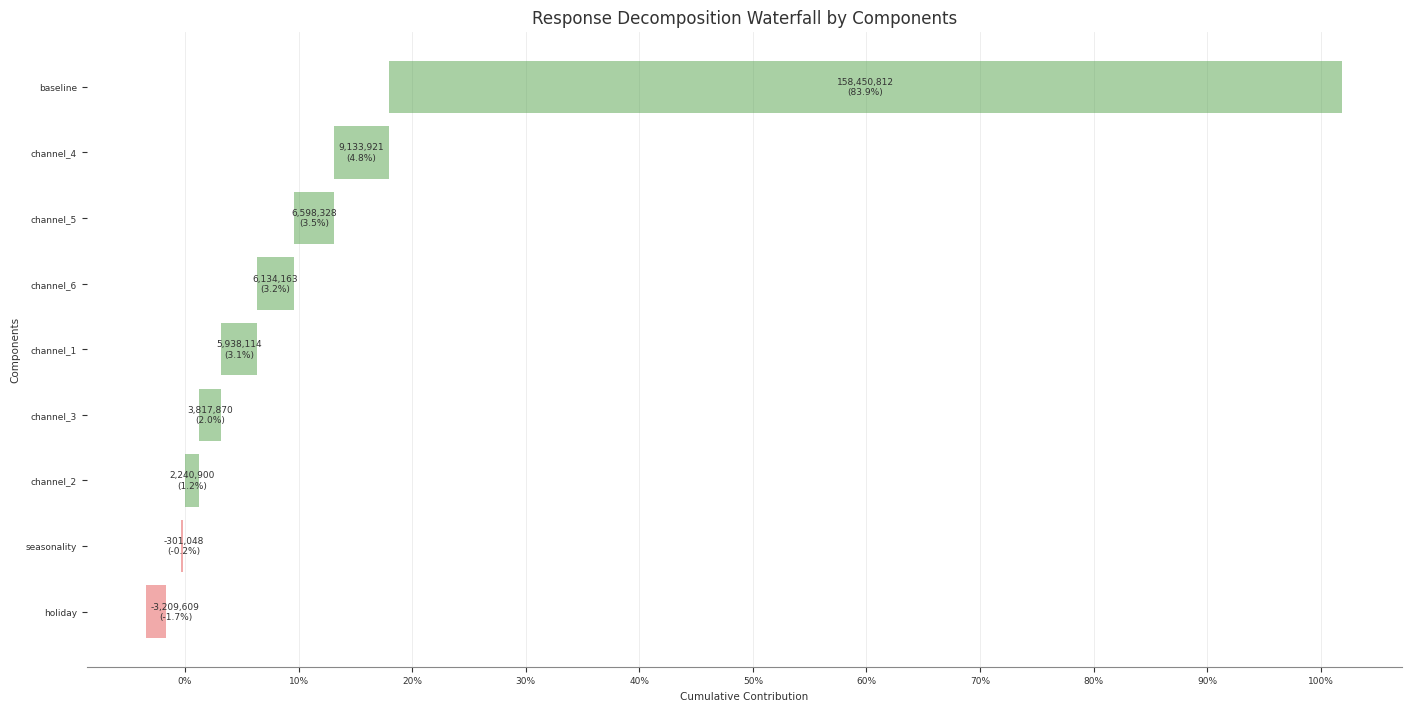
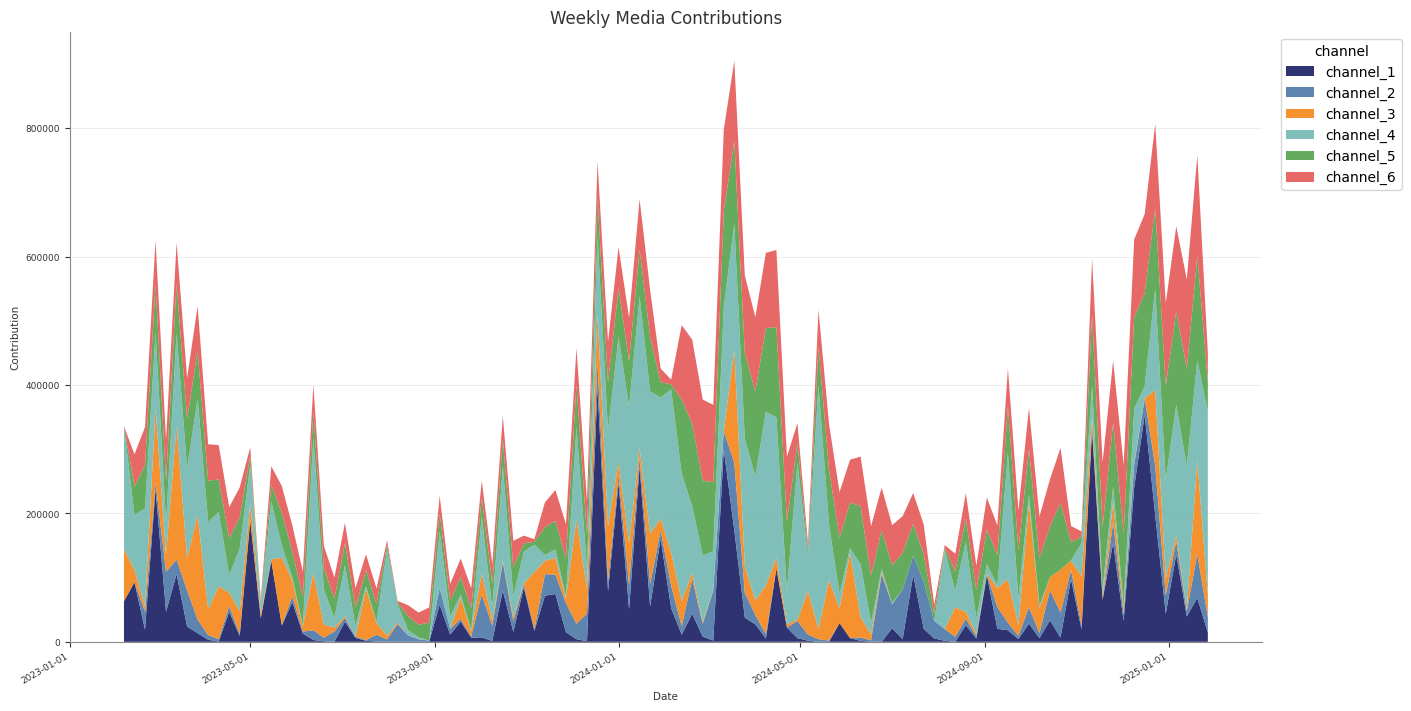
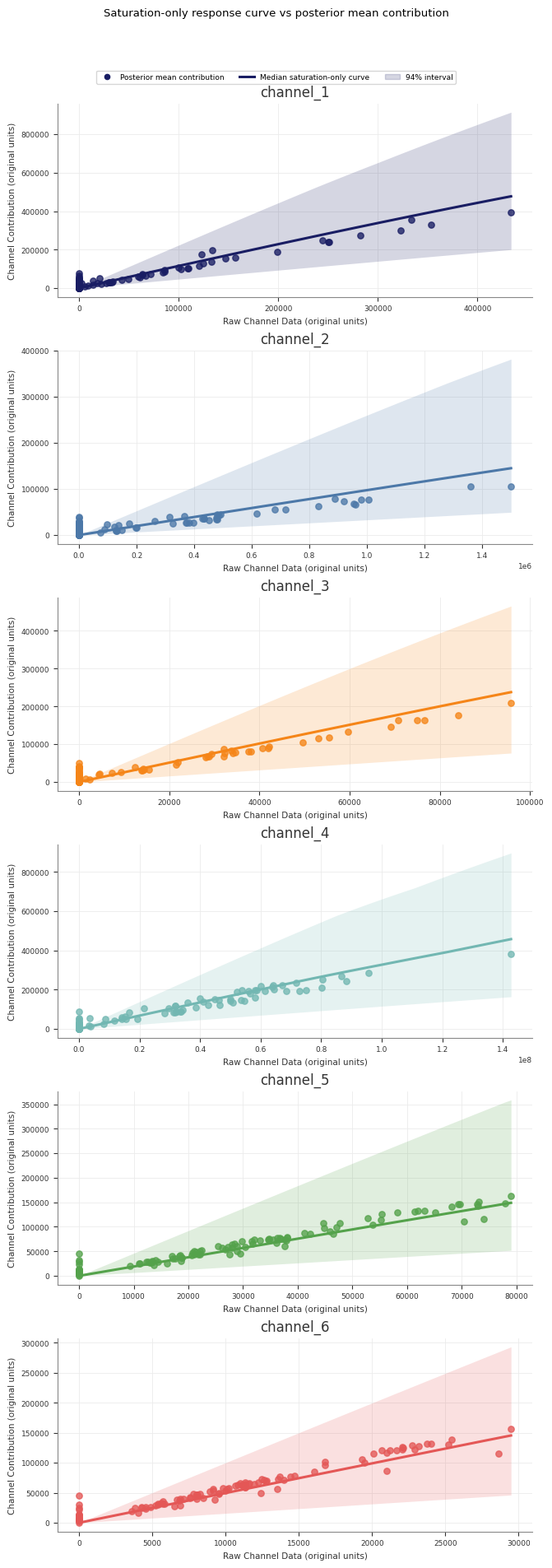
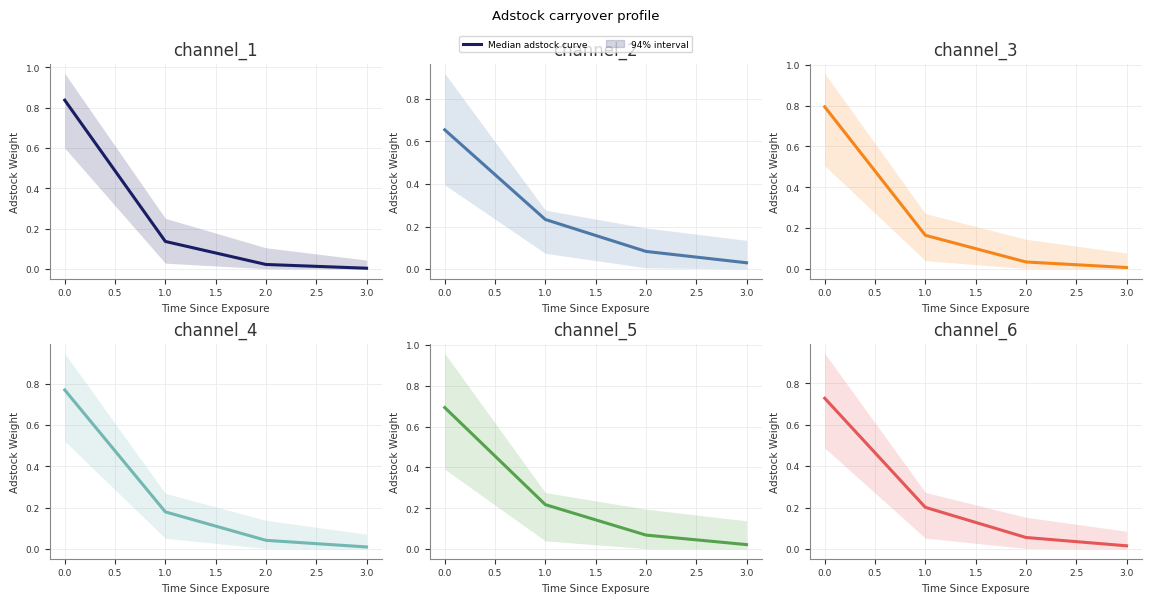
Abacus is a Bayesian MMM library built on PyMC and PyTensor. It provides PanelMMM for multi-market panel modelling, structured YAML-driven configuration, a staged pipeline runner, and budget optimisation — all designed for reproducible, production-grade MMM workflows.
For a real end-to-end verification path, use the repo smoke target:
make smoke_mmm
If you are working on the repo itself, the main local verification commands
are:
make testmake verify_local
make verify_package
Runtime defaults for restricted environments
Some local runs need writable cache directories. If you hit PyTensor compiledir
or cache-permission issues, export the same defaults used by the repo
verification scripts:
This page shows the fastest direct path from a pandas dataset to a fitted
PanelMMM.
If you have not prepared your dataset yet, read
Data Preparation first.
Load a dataset
The repository includes bundled demo datasets under data/demo/. The
timeseries bundle is the simplest starting point because it has no extra panel
dimensions.
The bundled demo config at data/demo/timeseries/config.yml is a working
starting point. It already points to a combined dataset with
data.dataset_path.
If you rely on data.dataset_path, either split the combined dataset in Python
before fitting, or load it once in Python and pass the same X and y into
both build_mmm_from_yaml(...) and fit(...).
Optional top-level YAML blocks
The builder recognises several optional top-level sections in addition to
data, target, and media.
Key
Purpose
dimensions
Panel-dimension columns such as geo or brand
scaling
Optional scaling rules for target and channels
effects
Additive effects to attach before model build
priors
Model-level priors passed into PanelMMM
fit
Sampler defaults used by the runner or by Python overrides
holidays
Holiday/event configuration applied before build
original_scale_vars
Add original-scale deterministic variables after build
inference_data
Attach existing inference data if the file exists
calibration
Apply calibration steps after the model is built
Override config values from Python
Use model_kwargs when you want to keep most settings in YAML but override a
subset from Python.
For example, you can override the fit config for a lighter quickstart run:
model_kwargs takes precedence over the YAML defaults.
Next steps
Read Quickstart: Pipeline Runner if you want staged
artefacts and manifests instead of an in-memory fit only.
Read Data Preparation for dataset column and
layout requirements.
Quickstart: Pipeline Runner
Use the pipeline runner when you want a full staged run instead of only an
in-memory model fit.
The runner writes:
a run manifest
copied and resolved config files
fitted model artefacts
posterior predictive assessment outputs
decomposition, diagnostics, and response-curve artefacts
Fastest first run: bundled demo
From the repository root, the quickest way to see a real structured run is the
demo launcher:
python3 runme.py --demo timeseries
Other bundled demos are:
geo_panel
geo_brand_panel
List them explicitly with:
python3 runme.py --list-demos
runme.py is a convenience wrapper around the structured pipeline. It resolves
the demo config under data/demo/<demo_name>/config.yml and runs the pipeline
for you.
This section explains how to prepare X and y for PanelMMM.
It covers the required columns, how panel rows are organised when you use
dims, and how Abacus scales channels and the target before fitting.
Pages
Input Data Requirements — Required X and y
inputs, column roles, alignment rules, and common input errors.
Panel Data Layout — How to structure rows for no
panel dims, one dim such as geo, or multiple dims such as geo and
brand.
Scaling and Preprocessing — What Abacus
scales automatically, how Scaling works, and what to preprocess yourself.
y as a pandas.Series named target_column, or a one-dimensional NumPy
array of the same length as X
X must contain the date column, all media columns, and any configured
control_columns or dims columns. y carries only the target values.
Role
Where it must be present
Required
Notes
date_column
X
Yes
Normalise to datetimes or parseable date strings.
channel_columns
X
Yes
Every listed channel column must exist in X.
target_column
y
Yes
y.name should match target_column.
control_columns
X
No
If configured, every listed control column must exist in X.
dims
X
No
One column per configured panel dimension, such as geo or brand.
X and y
When you call fit(X, y) or build_model(X, y):
Keep the target out of X.
Keep X and y row-aligned.
If both are pandas objects, keep the same index on both. The shared
regression builder checks index equality before fitting.
If you pass y as a NumPy array, its length must match len(X).
For panel models, each date_column + dims combination must appear
exactly once. Duplicate rows are rejected.
Abacus uses target_column as the target name throughout the panel reshape.
If y is a Series, its name must match target_column.
Date column
date_column is required in X.
Abacus expects calendar dates, not integer date codes. In practice:
Use datetime64[ns] where possible.
Parse string dates with pd.to_datetime(...) before fitting when you use the
Python API.
Do not rely on numeric date values such as 0, 1, 2. Pandas can interpret
them as offsets from the Unix epoch, which is usually not what you want.
The YAML builder normalises X[date_column] with pd.to_datetime(...) after
loading the dataset. Direct Python use does not add an equivalent preprocessing
step for you.
Channel columns
channel_columns is a required constructor argument and must be a non-empty
list.
Each listed channel:
must be present in X
must be fully observed for every row you pass into fit or posterior
prediction; Abacus does not silently convert missing channel values to zero
should represent the raw media variable that you want the adstock and
saturation transformations to consume
Target column
target_column names the dependent variable. It defaults to "y", but you can
set a different name such as "sales" or "conversions".
For direct Python use:
pass the target as y
name the Series with target_column
keep the target fully observed; missing target values are rejected rather
than zero-filled
For combined-file YAML or pipeline flows:
keep the target column in the source dataset
Abacus splits it out of the combined dataset before fitting
Control columns
control_columns is optional.
If you configure it, every listed control column must be present in X.
Controls stay in the design matrix as separate regressors; they are not part of
y.
Like channels, configured controls must be fully observed for every row passed
into fit or posterior prediction.
One tabular file containing both predictors and the target column
Pipeline runner with dataset_path
Same as above
Pipeline runner with x_path and y_path
Separate feature and target files; the runner extracts target_column from the target file
Abacus also has an internal alignment helper that can work with a MultiIndex
target Series indexed by [date_column, *dims], but that is mainly used in
fit-data rebuild and load flows. For normal fitting, keep y row-aligned with
X.
Missing date_column, channel, control, or dimension columns in X
Passing a ySeries whose name does not match target_column
Passing pandas X and y with different indexes
Passing a NumPy y with a different length from X
Passing duplicate panel rows or incomplete panel slices for a given date
Passing missing observed channel, control, or target values and expecting
Abacus to treat them as structural zeroes
Expecting the YAML builder or pipeline to find a target column that is not
present in the combined dataset
Leaving date values as numeric codes instead of normalising them first
Panel Data Layout
This page explains how PanelMMM expects panel rows to be organised in X.
For the column-level contract, see
Input Data Requirements.
What “panel” means in Abacus
In Abacus, a panel dataset repeats the same time axis across one or more
categorical dimensions in dims.
Each row represents:
one date_column value
one combination of dims values, if any
one set of channel and optional control values for that slice
With no extra panel dims, each date appears once. With dims=("geo",), each
date appears once per geo. With dims=("geo", "brand"), each date appears
once per geo + brand combination.
How dims work
Pass panel dimensions when you construct the model:
Abacus converts the pandas inputs into xarray datasets before building the
PyMC model.
Input role
Internal variable
xarray dims
X[channel_columns]
_channel
(date, *dims, channel)
X[control_columns]
_control
(date, *dims, control)
y
_target
(date, *dims)
The channel and control dimensions come from the configured column names,
not from row values.
Rectangularity, duplicates, and missing rows
Abacus builds xarray coordinates from the unique values it sees in:
date_column
each configured dimension column
the configured channel or control names
That has three practical consequences:
Keep the panel rectangular. Provide one row for every expected
date_column + dims combination.
Use explicit zeroes for structural no-spend or no-activity rows.
Keep declared channel, control, and target values observed within those rows.
Abacus rejects missing metric cells instead of silently converting them to
zeroes.
Do not use missing rows to mean “unknown”. Abacus validates panel shape
before reshape and raises an error if panel cells are missing.
Abacus also requires each date_column + dims combination to appear exactly
once. It does not aggregate duplicates for you. If you have duplicate rows,
deduplicate or aggregate them before fitting or posterior prediction.
Sorting and uniqueness
Sort your data before fitting:
first by date_column
then by each entry in dims
Abacus keeps dates in the order they appear in X, and time-varying features
infer time resolution from adjacent rows. A sorted dataset makes the time axis
deterministic and easier to reason about.
Also make sure that each date_column + dims combination appears once in the
prepared table, and that every expected panel slice is present for every date.
DataFrame versus MultiIndex handling
For normal fitting:
use a regular DataFrame for X
keep date_column and any dims as columns in that DataFrame
use a row-aligned Series for y
Abacus does have internal helpers that can align a MultiIndex target Series
indexed by [date_column, *dims], but that is not the main user-facing data
preparation pattern for fit().
Practical checklist
One row per date_column + dims combination
No duplicate rows for the same panel cell
Same set of dates for every panel slice
Explicit zeroes for true zero activity
No missing observed channel, control, or target values
Abacus scales channels and the target automatically before it builds the PyMC
graph for PanelMMM. This page explains what is scaled, how the Scaling
configuration works, and what you still need to preprocess yourself.
What Abacus scales automatically
Abacus computes scales from the reshaped xarray dataset immediately before model
construction.
Variable role
Automatic scaling
Notes
Target (y)
Yes
Divided by target_scale before the likelihood is built.
Channels (channel_columns)
Yes
Divided by channel_scale before adstock and saturation.
Controls (control_columns)
No
Controls enter the model on their original scale.
Date and dims columns
No
These define coordinates, not modelled numeric inputs.
Abacus stores the resulting scalers in the model as xarray data:
The YAML builder supports the same workflow through original_scale_vars:
original_scale_vars:- channel_contribution- y
original_scale_vars adds extra original-scale deterministic variables. It
does not change how the model is fit.
What Abacus does not preprocess for you
Abacus does not automatically:
scale controls
impute missing data in a domain-aware way
reinterpret missing observed channel, control, or target values as zeroes
sort the dataset for you
repair non-rectangular panel layouts
tolerate duplicate panel rows or incomplete panel slices
coerce Python-API dates to datetimes before fitting
Practical preprocessing advice
Before fitting:
normalise date_column with pd.to_datetime(...)
sort by date_column and then by dims
make panel gaps explicit instead of leaving missing rows
ensure every date_column + dims panel cell appears exactly once
impute missing observed channel, control, and target values before fitting or
posterior prediction instead of relying on implicit zero-fill
decide whether controls should be centred, standardised, log-transformed, or
otherwise prepared before they go into control_columns
choose scaling dims deliberately instead of relying on the default when you
use panel data
Common pitfalls
Expecting the default scaling to be per-group when it actually pools across
the configured panel dims
Adding date to VariableScaling.dims; Abacus rejects this
Forgetting that controls are left on their original scale
Treating VariableScaling.dims as dimensions to keep rather than dimensions
to reduce across
Assuming original_scale_vars changes fitting scale rather than adding extra
outputs
For the input table shape that scaling operates on, see
Panel Data Layout.
Model Specification
This section explains how PanelMMM is defined: the model structure, media
transforms, priors, panel dimensions, optional time variation, and calibration
hooks.
Pages
Model Overview - The actual PanelMMM mean structure,
scaled-space formulation, and optional components.
Adstock and Saturation - Supported media
transforms, their priors, and the adstock_first composition order.
Priors and Configuration - Default prior keys,
model_config, transform-prior overrides, and directional control priors.
Time-Varying Parameters - How
time_varying_intercept and time_varying_media use SoftPlusHSGP.
Seasonality and Trends - Built-in yearly
seasonality plus custom Fourier, trend, and event effects.
Panel Dimensions - How dims change the shape of the
data and parameters.
Calibration - Lift-test and cost-per-target calibration for
a built model.
Subsections of Model Specification
Model Overview
PanelMMM is an additive Bayesian marketing mix model built in PyMC. This page
describes the model structure that Abacus actually builds.
For input layout, see Data Preparation. For
individual configuration surfaces, see the other pages in this section.
Core structure
At fit time, Abacus builds the model mean in scaled target space as:
mu =
  intercept_contribution
  + sum(channel_contribution over channel)
  + sum(control_contribution over control), if control_columns are configured
  + mundlak_contribution, if use_mundlak_cre=True
  + yearly_seasonality_contribution, if yearly_seasonality is enabled
  + any additional mu_effects
The observed target is then attached through the configured likelihood
distribution with mu=mu.
What is scaled and what is not
Before the PyMC graph is built:
channel data is scaled according to Scaling.channel
the target is scaled according to Scaling.target
controls are not scaled automatically
That means media and target priors operate on the model scale, not directly on
the original business units. For the scaling surface, see
Scaling and Preprocessing.
Model components
Component
Built when
Shape
intercept_contribution
Always
effectively ("date", *dims) in the model mean
channel_contribution
Always
("date", *dims, "channel")
control_contribution
control_columns is set
("date", *dims, "control")
mundlak_contribution
use_mundlak_cre=True
dims
yearly_seasonality_contribution
yearly_seasonality is set
("date", *dims)
Additional additive effects
You add entries to mu_effects
("date", *dims)
Abacus also adds total_media_contribution_original_scale automatically as a
deterministic on the original target scale.
Media path
Each channel column goes through the configured media transform path:
scale channel input
apply adstock and saturation through forward_pass(...)
optionally apply a time-varying media multiplier
contribute the result through channel_contribution
Use controls for non-media regressors such as price, macro indicators, or
competitor measures. Controls are configured with control_columns and use
gamma_control priors from model_config.
Panel dimensions
dims adds extra indexing axes such as geo, brand, or market.
With dims=("geo",), the model is indexed over date and geo. With
dims=("geo", "brand"), it is indexed over date, geo, and brand.
Abacus does not automatically add hierarchical pooling just because dims is
set. By default, parameters are indexed over the configured panel coordinates.
If you want hierarchical shrinkage across those coordinates, encode it in the
priors you pass to transforms or model_config.
PanelMMM requires one adstock transform and one saturation transform. Abacus
applies them inside the model graph rather than as a fixed preprocessing step.
Transform priors also appear in model_config under prefixed variable names.
For example:
adstock_alpha
adstock_lam
adstock_k
saturation_lam
saturation_beta
That means you can override transform priors centrally through the top-level priors
if you prefer. See Priors and Configuration.
Choose the composition order
adstock_first is part of the model specification, not a plotting choice.
The current public YAML schema does not expose adstock_first; it uses the
library default. If you need to change the composition order, use the Python
API.
Use adstock_first=True when you want the model to interpret carryover before
diminishing returns. Use False when you want each period’s spend to saturate
before the carryover step.
The code path is explicit:
True -> saturation(adstock(x))
False -> adstock(saturation(x))
Common pitfalls
Forgetting that l_max is required for adstock classes
Assuming dims automatically change transform priors even when you have
already set explicit incompatible dims on the transform
Using adstock_first=False without a substantive reason
Treating transform priors as if they were on original business units rather
than the model scale
The builder appends these effects before calling build_model(...).
Choosing between built-in and custom seasonality
Use yearly_seasonality when you need a compact built-in annual effect.
Use FourierEffect when you need:
weekly seasonality
monthly seasonality
multiple seasonal effects together
custom Fourier prefixes or priors
Common pitfalls
Adding effects after the model has already been built
Using event effect dims that do not include the required prefix
Treating yearly_seasonality and a custom yearly Fourier effect as if they
were separate concepts when they are both additive seasonal terms
Next steps
Read Time-Varying Parameters if you want trend
or media behaviour to vary smoothly over time.
Read Calibration if you want to constrain the specification
with external measurements.
Priors and Configuration
Abacus uses model_config to control priors on the underlying PyMC variables.
Transform priors can be configured either on the transform objects themselves or
through their prefixed variable names in model_config.
Abacus parses these mappings into runtime Prior or HSGPKwargs objects.
Transform priors and prefixed names
Transform parameters appear in the model under prefixed variable names.
Examples:
adstock alpha -> adstock_alpha
saturation lam -> saturation_lam
saturation beta -> saturation_beta
So you can override transform priors in either of these ways:
pass priors={...} to the transform object
override the prefixed variable in model_config
Use one style consistently within a project if you want the configuration to be
easy to read.
Directional control priors
Controls are the right place for exogenous drivers whose effect may be
negative, such as competitor spend, competitor price pressure, or supply-side
disruptions. By default, control coefficients remain unrestricted.
The current public YAML schema does not expose control_impacts or
control_sign_policy. If you need directional control settings today, use the
Python API for that part of the specification.
Constraints for directional controls
When control_impacts is configured, Abacus expects:
gamma_control and gamma_control_mundlak to be Normal or
TruncatedNormal
scalar numeric mu and sigma values for those priors
the prior dims to include "control"
If you violate those assumptions, model build fails with a validation error.
Time-varying configuration keys
When you enable a boolean time-varying effect, Abacus uses these model_config
keys:
intercept_tvp_config
media_tvp_config
Those keys can be:
an HSGPKwargs instance
a dict with HSGPKwargs fields
a dict in SoftPlusHSGP.parameterize_from_data(...) style, such as
{"ls_lower": 1, "ls_upper": 10}
dims tells PanelMMM which extra categorical axes exist alongside date.
With no extra dims, the model is indexed by:
date
channel
optionally control
With dims=("geo",), the model is indexed by:
date
geo
channel
optionally control
With dims=("geo", "brand"), it is indexed by:
date
geo
brand
channel
optionally control
What changes inside the model
Setting dims changes the coordinates and parameter shapes used in the PyMC
graph.
Quantity
No extra dims
dims=("geo",)
channel_data
("date", "channel")
("date", "geo", "channel")
target_data
("date",)
("date", "geo")
channel_contribution
("date", "channel")
("date", "geo", "channel")
control_contribution
("date", "control")
("date", "geo", "control")
intercept prior dims by default
()
("geo",)
Reserved names
Do not use these names in dims:
date
channel
control
fourier_mode
Abacus rejects them because they are reserved for internal coordinates.
dims does not imply automatic pooling
This is the most important modelling point.
By default, dims gives you parameters indexed by the panel coordinates, but
not automatic hierarchical shrinkage across those coordinates.
For example:
the default intercept prior is Normal(..., dims=dims)
transform priors default to (*dims, "channel")
control coefficients default to (*dims, "control")
Those defaults create per-slice parameters. If you want hierarchical pooling
across geo, brand, or another dimension, you need to encode that in the
priors you supply.
fit() returns an arviz.InferenceData object and also stores it on
mmm.idata.
What fit() does
When you call fit(X, y), Abacus:
checks that pandas X and y use the same index, if both are pandas
objects
builds the PyMC graph automatically if it has not been built already
merges sampler settings from the model’s sampler_config and your call-time
kwargs
runs pymc.sample(...)
computes deterministic variables and adds them to the posterior group
stores the training data in an InferenceData.fit_data group
writes model metadata into idata.attrs
That means fitted contribution variables such as channel_contribution,
intercept_contribution, and yearly_seasonality_contribution are available
in mmm.posterior after fitting when they are part of the configured model.
Configure the sampler
You can configure PyMC sampling in two places:
Where
Use it for
Precedence
sampler_config= in PanelMMM(...)
Stable defaults you want to reuse across fits
Lower
fit(..., **kwargs)
Run-specific overrides such as draws, chains, or random_seed
Higher
Abacus merges them so that explicit fit() kwargs win.
mmm=PanelMMM(date_column="date",target_column="revenue",channel_columns=["channel_1","channel_2"],adstock=GeometricAdstock(l_max=4),saturation=LogisticSaturation(),sampler_config={"draws":1000,"tune":1000,"chains":4,"target_accept":0.9,"progressbar":False,},)# Overrides draws from sampler_config, keeps target_acceptidata=mmm.fit(X,y,draws=500,random_seed=42)
Common sampler arguments
These are passed through to pymc.sample(...).
Argument
What it controls
draws
Posterior samples kept after tuning
tune
Warm-up or adaptation iterations
chains
Number of MCMC chains
cores
Number of worker processes used by PyMC
target_accept
HMC or NUTS acceptance target
progressbar
Whether PyMC shows a progress bar
random_seed
Sampling reproducibility
If you do not specify progressbar, Abacus defaults it to True unless your
sampler_config already sets it.
When to build first
For a standard workflow, call fit() directly.
Call build_model(X, y) first only when you need to inspect or modify the
graph before sampling. For example:
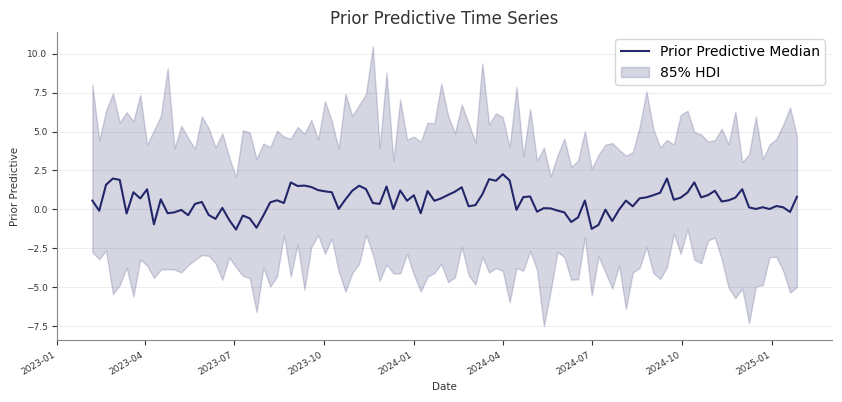
If you run prior predictive checks first and then call fit(), Abacus keeps
the existing prior and prior_predictive groups on mmm.idata.
That makes it practical to compare:
prior assumptions
posterior fit
posterior predictive behaviour
within one saved InferenceData object.
Common pitfalls
Skipping prior predictive checks and only noticing implausible priors after a
long fit
Treating prior predictive checks as a substitute for posterior predictive
assessment
Forgetting that sample_prior_predictive(...) returns extracted predictive
draws, while the full prior and prior_predictive groups are stored on
mmm.idata
Next steps
After the prior predictive behaviour looks reasonable, fit the model with
Fitting the Model.
Save and Load
Use save and load when you want to persist a fitted PanelMMM and rebuild it
later without redefining the whole model configuration in code.
save() writes the model’s InferenceData to NetCDF. load() reads that file,
recreates the PanelMMM configuration from stored metadata, restores
loaded.idata, and rebuilds the PyMC graph from the saved training data.
What Abacus stores
Abacus relies on more than the posterior draws for a full round trip.
Stored item
Why it matters
posterior and other InferenceData groups
Preserve sampled results
fit_data
Rebuild the model graph with the original training data
idata.attrs
Reconstruct PanelMMM init kwargs and validate compatibility
The stored attrs include both the shared model metadata and PanelMMM-specific
configuration such as:
date_column
channel_columns
target_column
target_type
dims
control_columns
control_impacts
adstock and saturation
adstock_first
yearly_seasonality
time_varying_intercept and time_varying_media
scaling
model_config
sampler_config
serialised mu_effects
save() behaviour
save(fname, **kwargs) is a thin wrapper over self.idata.to_netcdf(...).
Important constraints:
the model must already be fitted
self.idata must contain a posterior group
any extra kwargs are passed directly to InferenceData.to_netcdf(...)
If you call save() before fitting, Abacus raises:
RuntimeError: The model hasn't been fit yet, call .fit() first
load() and compatibility checks
By default, PanelMMM.load(...) validates that the saved file matches the
current model class and configuration:
loaded=PanelMMM.load("mmm.nc",check=True)
With check=True, Abacus verifies:
the saved model version
the saved model id derived from the serialised configuration
If those checks fail, Abacus raises DifferentModelError.
If you need to bypass those checks, you can set check=False:
loaded=PanelMMM.load("mmm.nc",check=False)
Use that only when you understand why the saved metadata does not match.
Load from an in-memory InferenceData
If you already have an InferenceData object, use load_from_idata(...)
instead of saving to disk first:
loaded=PanelMMM.load_from_idata(idata,check=True)
This is the same round-trip path that load() uses internally after reading
the NetCDF file.
Where build_from_idata() fits
build_from_idata(idata) is the lower-level rebuild step. It:
restores supported serialised mu_effects
reads idata.fit_data
splits that saved training data back into X and y
rebuilds the PyMC graph
You usually do not need to call build_from_idata() yourself because
load() and load_from_idata() already do it.
Round-trip limitations
Not every fitted object can be restored fully.
EventAdditiveEffect does not round-trip
Abacus does not deserialize EventAdditiveEffect because the original
df_events DataFrame is not stored in the saved attrs. In that case,
PanelMMM.load(...) fails fast while rebuilding the model.
Do not drop fit_data if you want to reload
Because rebuild uses idata.fit_data, do not save a partial file that omits
that group if you want to call PanelMMM.load(...) later.
But it is not a full PanelMMM round-trip artefact, because the saved file no
longer includes the training data needed for build_from_idata(...).
Practical advice
Use the default save() behaviour for round trips.
Keep check=True unless you have a specific compatibility reason not to.
Prefer PanelMMM.load(...) over loading NetCDF manually.
Refit or rebuild event effects explicitly rather than expecting saved event
state to deserialize.
Next steps
After loading a model, you can go straight to posterior predictive sampling,
diagnostics, decomposition, or optimisation using the restored idata and
rebuilt graph.
Post-Modeling
Use this section after fitting PanelMMM.
It covers posterior predictive checks, diagnostics, contribution analysis,
response curves, efficiency metrics, and the tabular summary surfaces that
Abacus exposes from fitted InferenceData.
Pages
Posterior Predictive: Sample fitted or future
predictions and compare them with observed data where available.
Diagnostics: Run design-matrix, MCMC, and predictive
diagnostics and export machine-readable reports.
Response Curves: Sample and summarise posterior
saturation and adstock curves, and understand the runner’s forward-pass
direct contribution artefacts.
ROAS and Metrics: Calculate ROAS, CPA-style metrics,
spend tables, and predictive error metrics.
Summary and Export: Work with MMMSummaryFactory,
HDI settings, time aggregation, and DataFrame export.
Subsections of Post-Modeling
Diagnostics
Abacus exposes diagnostics through mmm.diagnostics.
Use this surface to check the design matrix, posterior sampling quality, and
posterior predictive fit. For fitted-value plots and predictive sampling, see
Posterior Predictive.
Diagnostic surfaces
mmm.diagnostics provides three groups of checks.
Area
Summary method
Report method
What it covers
Raw input screening
design_summary(X)
design_report(X)
Collinearity, constants, and near-constant regressors on raw input columns
MCMC
mcmc_summary()
mcmc_report()
r_hat, ESS, divergences, BFMI, tree depth, acceptance rate
Predictive
predictive_summary()
predictive_report()
RMSE, MAE, NRMSE, NMAE, CRPS, residual moments
The summary methods return pandas DataFrames. The report methods return typed
report objects with a to_dict() method for JSON-ready export.
Raw input screening
Use design_summary(X) on the raw design matrix you want to inspect:
design_report(X) returns a compact roll-up with matrix rank, condition
number, maximum VIF, maximum absolute correlation, and lists of flagged
variables.
Screening requirements
Raw input screening requires:
all requested columns to exist in X
all checked columns to be numeric
Abacus raises a ValueError if a variable is missing or non-numeric.
The method names stay design_summary() and design_report(), but the
pipeline now treats them as raw input screening rather than transformed model
geometry.
The same pattern works for design_report(...) and predictive_report().
Pipeline outputs
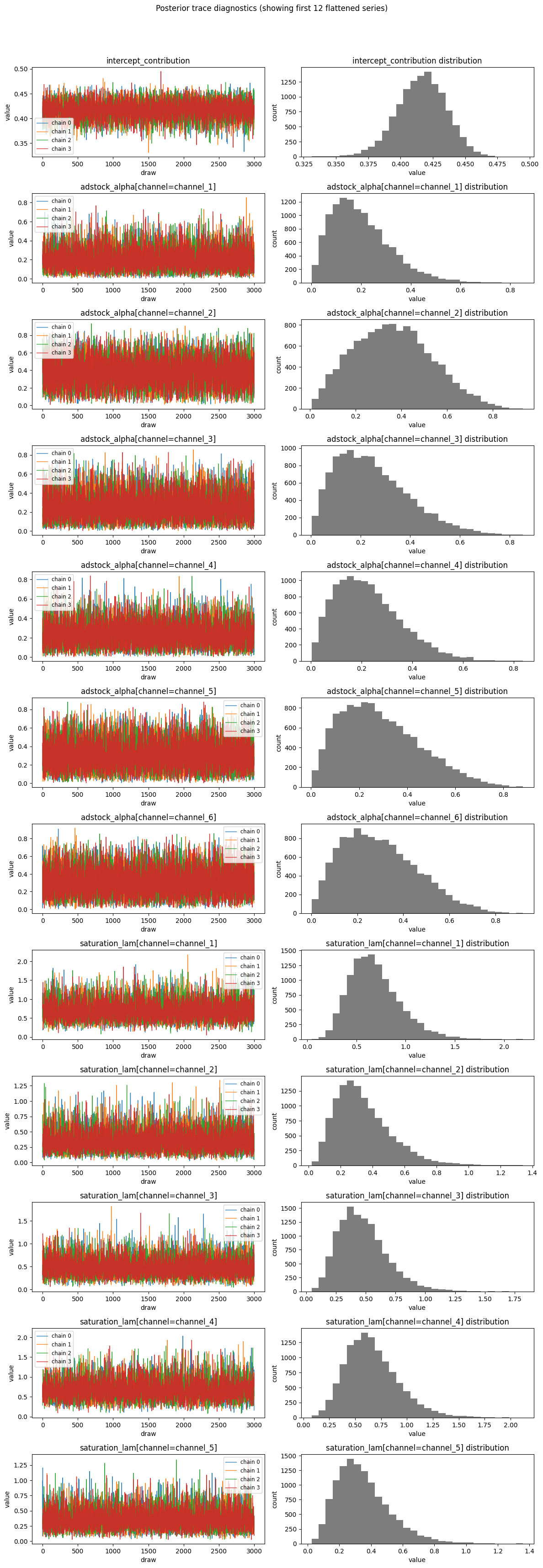
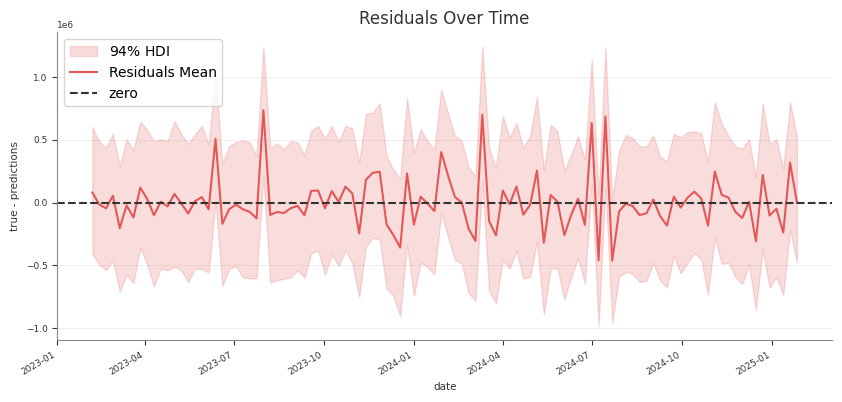
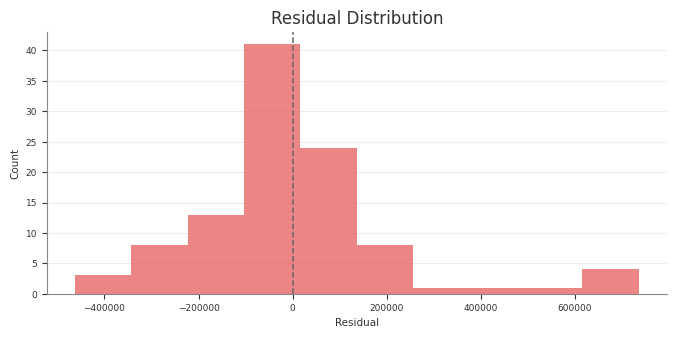
The pipeline diagnostics stage uses the same retained diagnostic surfaces to
write report tables and text summaries. If you run the pipeline, those stage
artefacts should match the behaviour documented here.
In the structured pipeline, the raw-input screening rows in
diagnostics_report.csv use the phase label raw_input_screening instead of
design so the machine-readable output matches the wording here.
Common pitfalls
Running mcmc_summary() or mcmc_report() before fitting
Running predictive diagnostics before sampling posterior predictive values
Passing non-numeric columns into design_summary(X)
Treating predictive diagnostics as a substitute for design or MCMC checks
Posterior Predictive Checks
Use posterior predictive draws to check in-sample fit and to generate
predictions for new rows that follow the fitted panel layout.
If you only want the returned samples and do not want to update mmm.idata,
set extend_idata=False.
Check training-fit values against observed data
For an in-sample check, pass the same design matrix you used for fitting. This
is the same pattern used by the pipeline’s Stage 30 training-fit assessment:
sample_posterior_predictive(...) does not take y. For a holdout or future
window, keep the actual target outside the model and align it yourself if you
want external evaluation.
Use include_last_observations correctly
Set include_last_observations=True when the forecast window needs lag history
for adstock carryover.
When enabled, Abacus:
prepends the last adstock.l_max training observations internally
samples posterior predictive values on the padded data
removes the prepended rows from the returned result
This only works when the input dates do not overlap with the training dates.
If they do overlap, Abacus raises a ValueError.
Practical guidance
Use the training X for fitted-versus-observed checks.
Use future-only dates for forward prediction.
Use the training-window refit pattern for blocked holdout validation.
Keep combined=True if you want a simpler sample dimension.
Use combined=False if you need explicit chain and draw dimensions.
Call sample_posterior_predictive(...) before using
mmm.diagnostics.predictive_summary() or mmm.summary.posterior_predictive().
Common pitfalls
Calling sample_posterior_predictive(...) without X
Expecting y to be passed into the predictive method
Using include_last_observations=True on dates that overlap with training
data
Forgetting that the returned object is extracted samples, while the stored
idata.posterior_predictive group keeps the native posterior predictive
structure
Contributions and Decomposition
Abacus stores additive contribution terms for fitted PanelMMM models and
exposes them through the data wrapper, summary tables, and plotting suite.
Use this page to inspect media, baseline, control, seasonality, and event
effects. For channel efficiency ratios built from media contributions, see
ROAS and Metrics.
Contribution surfaces
You can work with contributions at three levels.
Surface
Use it for
mmm.data
Raw xarray contribution samples
mmm.summary
DataFrames with posterior means, medians, and HDIs
mmm.plot
Time-series and waterfall visualisations
Read raw contribution samples
The lowest-level accessor is mmm.data.get_contributions(...):
identifying columns such as date, channel, control, and any panel
dims
mean
median
HDI bound columns such as abs_error_94_lower and abs_error_94_upper
mmm.summary.contributions(...) does not expose event effects. For event
effects, use mmm.data.get_contributions(include_events=True) or
mmm.summary.mean_contributions_over_time().
Create a wide decomposition table
Use mmm.summary.mean_contributions_over_time(...) when you want one row per
time point and panel slice:
Use original_scale=True when you want business-unit interpretation.
Use mmm.summary.contributions(...) for tidy per-component tables.
Use mmm.summary.mean_contributions_over_time() for decomposition exports.
Use mmm.summary.total_contribution() when you only need component-level
totals.
Common pitfalls
Expecting mmm.summary.contributions(...) to include event effects
Forgetting that baseline can include more than the intercept when Mundlak
CRE is enabled
Using frequency="all_time" with mean_contributions_over_time() or
change_over_time()
Response Curves
Use response curves to inspect the fitted media transformations directly.
Abacus exposes posterior saturation and adstock curves through both the fitted
model and mmm.summary. For decomposition of realised contributions over time,
see Contributions and Decomposition.
Sample saturation curves
Use sample_saturation_curve(...) on a fitted PanelMMM:
The adstock curve is the fitted decay pattern for an impulse of size
amount. It does not use an original_scale option because the returned
weights are not target-unit contributions.
Runner-generated direct contribution artefacts
If you use the retained pipeline runner, Stage 60_response_curves also writes
a forward-pass direct contribution artefact alongside the saturation and
adstock transformation curves:
forward_pass_contribution_curve.nc
forward_pass_contribution_curve_summary.csv
forward_pass_contribution_curve.png
This artefact is different from the saturation-only curve:
the saturation-only curve shows the fitted saturation transform itself
the forward-pass direct contribution curve runs spend through the full fitted
model path, including adstock and saturation
The retained Stage 60 forward-pass plot uses one explicit scenario so the curve
is interpretable: it rescales the full observed historical spend path from
0% to 200%, then plots total channel spend against total channel
contribution in original units. The marker at 100% highlights the fitted
total contribution for the observed historical spend path.
Expecting a dedicated file-export API on mmm.summary
Passing 94 instead of 0.94 in hdi_probs
Using saturation_curves() or adstock_curves() from a manual factory
without model=mmm
Using all_time on summaries that require a date dimension
Optimisation
This section covers Abacus budget optimisation workflows for fitted
PanelMMM models. It explains the low-level optimisation wrapper, how to
inspect optimisation outputs.
For the higher-level planner service and Dash UI, see
Scenario Planning.
Pages
Budget Optimisation - How to run
PanelBudgetOptimizerWrapper, set bounds and masks, and define spend over a
future window.
Interpreting Optimisation - How to read the
allocation output, inspect simulated response samples, and use the pipeline
optimisation artefacts.
Scenario Planning - How to compare current, manual,
and fixed-budget optimised scenarios with the planner service and optional
Dash UI.
Subsections of Optimisation
Budget Optimisation
Use PanelBudgetOptimizerWrapper when you want to optimise spend for a fitted
PanelMMM over a future date window.
The wrapper builds a synthetic future dataset for the requested window, swaps
the model’s channel_data for an optimisation variable, and then calls the
generic BudgetOptimizer. If you want to compare several plans in total
horizon spend units, see Scenario Planning.
What the optimiser maximises
For PanelBudgetOptimizerWrapper, optimize_budget() defaults to:
The optimiser therefore maximises the average posterior response of the chosen
response variable, subject to your budget bounds and constraints.
Budget units
The low-level wrapper uses per-period spend units.
budget is the total spend across all optimised cells for one model period.
The returned allocation has no date dimension, so Abacus repeats that
allocation across the optimisation window.
If the window has num_periods=8 and you pass budget=100_000, the
simulated spend over the full horizon is 800_000 before any carryover
effects are applied.
This is different from Scenario Planning, which
treats total_budget and manual allocations as total horizon spend and
converts them to per-period units internally.
The Stage 70 pipeline optimisation uses the same units as the low-level
wrapper because it passes optimization.total_budget directly to
PanelBudgetOptimizerWrapper.optimize_budget(...).
Required inputs
Input
What Abacus expects
Notes
model
A fitted PanelMMM with idata.posterior
The optimiser needs posterior draws and model graph variables.
start_date, end_date
A future window at the model’s observed date frequency
Abacus infers num_periods from the training data frequency.
allocation is an xarray.DataArray over the non-date budget dimensions.
For a model with dims=("geo",), the result dims are typically
("geo", "channel").
Bounds and masks
budget_bounds
Use budget_bounds to cap spend for each optimised cell.
If the budget has only one non-date dimension, you can pass a dict such as
{"tv": (0.0, 50_000.0), "search": (0.0, 30_000.0)}.
For panel budgets, pass an xarray.DataArray with dims
(*budget_dims, "bound"), where "bound" contains "lower" and "upper".
If you omit budget_bounds, Abacus warns and uses (0, total_budget) for
every optimised cell.
Abacus reindexes DataArray bounds to the model’s internal coordinate order,
so the input coordinate order does not need to match exactly.
budgets_to_optimize
Use budgets_to_optimize to choose which cells can move.
The mask must be a boolean xarray.DataArray over the budget dimensions.
Unoptimised cells are fixed at zero in the returned allocation.
If you omit the mask, Abacus optimises every cell where the fitted model has
non-zero historical channel_contribution information.
If your mask includes True for a cell where the model has no information,
Abacus raises ValueError.
Time distribution across the window
Use budget_distribution_over_period to flight each allocation cell over time
instead of repeating the same spend every period.
The object must be an xarray.DataArray with:
dims exactly ("date", *budget_dims)
one date weight per optimisation period
weights that sum to 1 across the date dimension for every budget cell
Use the same budget_distribution_over_period again when you call
sample_response_distribution(),
otherwise you will optimise one spend path and simulate another.
For response simulation through the wrapper, the date coordinates can be:
integer positions 0 .. num_periods - 1, or
exact dates that match the optimisation window
Constraints and solver controls
default_constraints=True adds the default equality constraint:
sum(allocation) == budget
This is enabled by default and emits a warning so you can see that the default
constraint set is active.
You can also pass:
extra SciPy minimise keyword arguments directly to optimize_budget(...) to
tweak the underlying solver call
callback=True to get a third return value with per-iteration objective,
gradient, and constraint diagnostics
YAML note for the pipeline runner
If you run optimisation through the structured pipeline, configure the
optimization block in YAML:
In this pipeline path, optimization.total_budget uses the wrapper contract
described above: it is passed straight to optimize_budget(...) as
per-period spend, not total horizon spend.
Common pitfalls
Passing a total horizon budget to optimize_budget(...). Divide by
wrapper.num_periods first, or use Scenario Planning.
Passing dict bounds for a panel budget. Dict bounds only work when the budget
dims are just ("channel",).
Omitting a budget dimension from budget_distribution_over_period. The
distribution must include every budget dim, not just the one you want to vary.
Forgetting that response_variable must exist in the fitted optimisation
graph.
Using one budget distribution for optimisation and a different one for
response simulation.
allocation is an xarray.DataArray over the non-date budget dimensions.
Model shape
Typical allocation dims
Meaning
No extra panel dims
("channel",)
One optimised value per channel
dims=("geo",)
("geo", "channel")
One value per (geo, channel) cell
dims=("geo", "brand")
("geo", "brand", "channel")
One value per (geo, brand, channel) cell
The values are in the wrapper’s per-period units. Unoptimised cells are
present and set to zero.
result
result is SciPy’s OptimizeResult. The fields you will usually inspect are:
Field
Meaning
success
Whether the solver converged
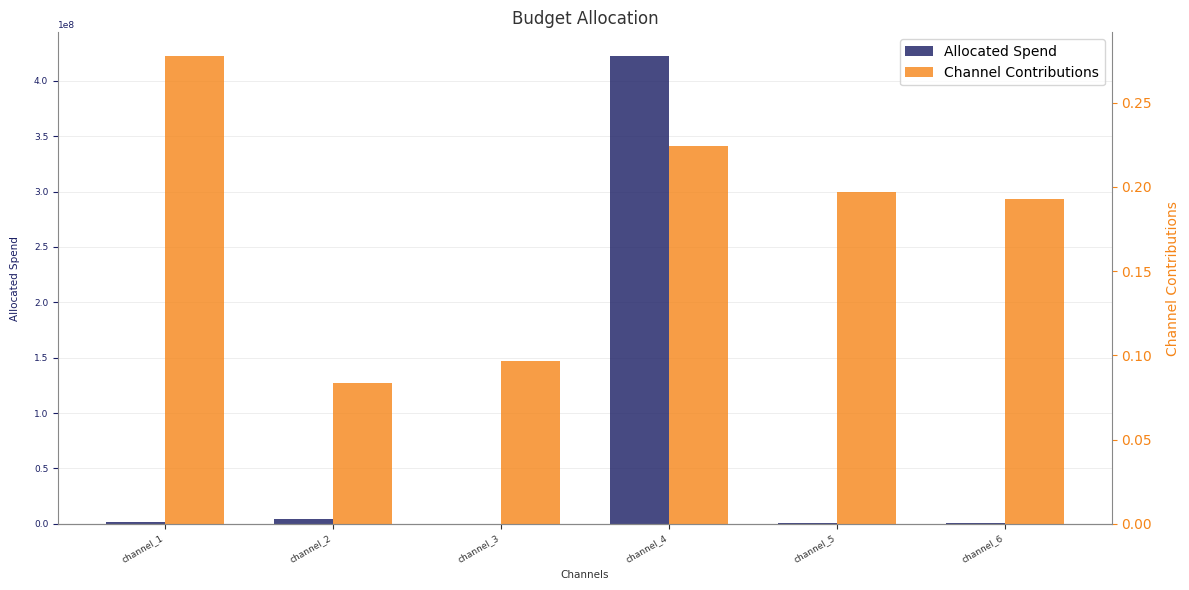
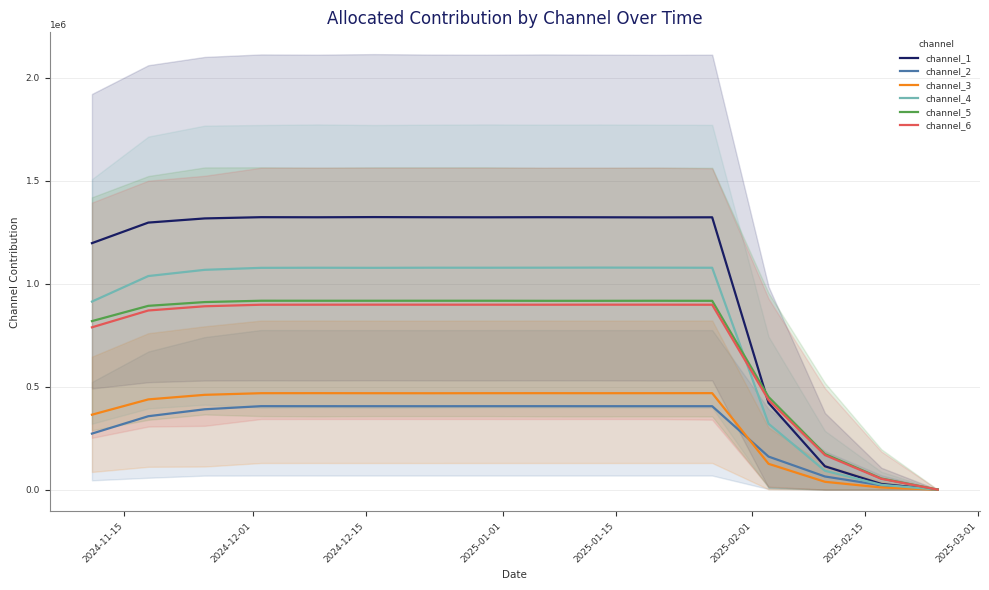
status
SciPy status code
message
Human-readable solver message
fun
Final objective value
nit
Number of iterations
x
The optimised flat parameter vector
If success is False, Abacus raises MinimizeException unless you opt in to
return_if_fail=True on the underlying BudgetOptimizer.
callback_info
When callback=True, Abacus records one entry per solver iteration. Each entry
includes:
x
fun
jac
constraint_info when constraints are active
Use this when you need to diagnose solver behaviour rather than just consume the
final allocation.
Simulate the optimised plan
The optimiser itself returns only the allocation. To estimate spend paths and
contributions over the requested window, call sample_response_distribution().
Set noise_level=0.0 when you want the spend path to match the requested
allocation exactly.
What response_samples contains
The wrapper builds a synthetic future dataset, samples posterior predictive
draws, and then merges the requested allocation and simulated spend path back
into the result.
response_samples therefore contains:
Variable
Source
Meaning
allocation
Added by the wrapper
Requested allocation without a date dimension
One variable per channel
Added by the wrapper
Simulated spend path over the future dates
mmm.output_var
Posterior predictive sample
Model output variable
channel_contribution
Posterior predictive sample
Channel contribution on model scale
total_media_contribution_original_scale
Posterior predictive sample
Total media contribution on the original target scale
If you pass additional_var_names, Abacus also includes those variables when
they exist in the model graph.
Carryover and evaluation window
include_carryover=True changes how Abacus builds the synthetic future window.
Abacus extends the generated dates by adstock.l_max periods.
It then zeroes the tail spend rows after the requested window.
The extra dates let posterior predictive sampling include lagged effects from
the planned spend.
This is why the simulated dataset can cover a longer evaluated window than the
requested start_date to end_date range, while still preserving the same
total spend.
Plot the result
The plotting helpers under mmm.plot are designed to work directly with the
response dataset returned by the wrapper.
split_by="geo" or another dimension to create separate subplots
original_scale=True to prefer original-scale contribution variables when
they are available
Example optimisation output:
Read the Stage 70 pipeline artefacts
If you run optimisation through python -m abacus.pipeline.runner, Stage 70
writes both the low-level optimiser output and several interpretation files.
Use this section when you want to compare historical, manual, and optimised
future plans with abacus.scenario_planner.
The scenario planner is a higher-level planning surface than the low-level
optimisation wrapper. It works in total horizon spend units, returns structured
comparison tables, and includes a supported workspace app for fitted runs.
Pages
Supported Surface: The recommended planner entry
points, fitted-run contract, persisted workspace state, and beta limits.
Overview and Workflow: What the planner does,
how it differs from low-level optimisation, and how scenario windows work.
Scenario Specifications: The public scenario
spec classes, allocation shapes, bounds, and budget distributions.
Python API: How to use ScenarioPlanner.evaluate(...) and
the supported workspace helpers from Python.
Comparison Outputs: The structure and meaning of
ScenarioResult, ScenarioComparison, and the output tables.
Dash App: How to launch the supported workspace UI from a
fitted run, work with saved workspaces, and understand background jobs.
Subsections of Scenario Planning
Overview and Workflow
Use the scenario planner when you want to compare whole plans rather than run a
single low-level optimisation call.
The planner combines three things:
typed scenario specifications
a Python comparison service
a supported workspace app for fitted results directories
For the supported beta entry points and current limits, see
Supported Surface.
What the planner compares
The retained planner supports three scenario types:
Scenario type
Purpose
Public spec
Current
Use observed history as a reference plan
CurrentScenarioSpec
Manual allocation
Simulate a user-defined future plan
ManualAllocationScenarioSpec
Fixed-budget optimised
Optimise a future plan at a fixed budget
FixedBudgetOptimizedScenarioSpec
Planner units versus optimiser units
The most important distinction is budget units.
Surface
Public budget contract
PanelBudgetOptimizerWrapper
Per-period spend
ScenarioPlanner
Total spend over the whole scenario horizon
For example, if a four-period scenario has a total budget of 900_000, the
planner converts that to per-period units internally before it calls the
wrapper or response sampler.
Requested and evaluated windows
Each scenario has a requested window from start_date to end_date.
For simulated scenarios, the evaluated window can be longer than the requested
window when you set include_carryover=True. Abacus extends the synthetic
future path so lagged adstock effects can continue after the requested end
date.
The planner reports both windows in the metadata output.
Historical overlap for current scenarios
CurrentScenarioSpec is strict about history.
Its requested window must overlap observed data. Abacus does not reinterpret a
future-only window as “use the latest history instead”.
Typical workflow
The common workflow is:
Fit PanelMMM.
Build one or more scenario specs.
Either run ScenarioPlanner.compare(...) or launch the workspace app from
the fitted run directory.
Inspect the comparison tables, save workspaces, and export the planning
outputs you need.
Mixing up total horizon spend and per-period spend
Using a future-only window in CurrentScenarioSpec
Forgetting that carryover can extend the evaluated window
Scenario Specifications
This page documents the public spec classes under abacus.scenario_planner.
Most users create one of the three concrete scenario specs:
CurrentScenarioSpec
ManualAllocationScenarioSpec
FixedBudgetOptimizedScenarioSpec
Abacus also exposes shared base models such as
HistoricalReferenceScenarioSpec and SimulatedScenarioSpec, but you do not
normally instantiate those directly.
Shared fields
All public scenario specs inherit these core fields:
Field
Meaning
name
Display name for the scenario
start_date
Requested scenario start date
end_date
Requested scenario end date
scenario_id
Stable scenario key used in outputs
If you do not set scenario_id, Abacus derives one by slugifying name.
Scenario IDs must be unique within one ScenarioPlanner.compare(...) call.
CurrentScenarioSpec
Use CurrentScenarioSpec for a historical reference plan.
ScenarioComparison is a row-wise concatenation of the individual scenario
results, with scenario identifiers added to every table.
totals
totals has one row per scenario.
It includes:
scenario_id
scenario_name
scenario_type
total_spend
contribution_mean
contribution_median
contribution_hdi_94_lower
contribution_hdi_94_upper
efficiency_metric
efficiency_mean
efficiency_median
efficiency_hdi_94_lower
efficiency_hdi_94_upper
efficiency_metric is ROAS for revenue targets and CPA for conversion
targets.
channels
channels has one row per (scenario, channel).
It includes:
scenario identifiers
channel
spend
spend_share
spend_per_period
contribution summary columns
contribution-per-period columns
efficiency summary columns
efficiency_metric
The planner aggregates non-channel panel dims before it builds this table. For
example, a (geo, channel) model still returns one row per channel here.
contributions_over_time
contributions_over_time has one row per (scenario, date, channel).
It includes:
scenario identifiers
date
channel
contribution_mean
contribution_median
contribution_hdi_94_lower
contribution_hdi_94_upper
Like channels, this table aggregates non-channel panel dims before
summarising.
allocations
allocations keeps the original allocation grain.
It includes:
scenario identifiers
the allocation dims, such as channel, geo, or brand
allocation
realized_spend
For current scenarios, allocation is the summed historical spend over the
reference window. For simulated scenarios, allocation is the requested total
horizon allocation and realized_spend is the realised spend from the response
simulation.
metadata
metadata is the audit table for each scenario.
Shared fields include:
scenario_id
scenario_name
scenario_type
start_date
end_date
evaluated_start_date
evaluated_end_date
num_periods
target_type
efficiency_metric
Additional fields depend on scenario type.
Current scenario metadata
Current scenarios add:
reference_window_dates
Manual scenario metadata
Manual scenarios add:
requested_total_budget
total_budget
reference_window_dates
budget_unit
Fixed-budget optimised metadata
Optimised scenarios add:
requested_total_budget
total_budget
optimization_success
optimization_status
optimization_message
optimization_objective_value
reference_window_dates
budget_unit
Requested versus evaluated windows
The metadata table is the best place to check whether the evaluated window
matches the requested window.
When include_carryover=True, the evaluated end date can be later than the
requested end_date.
ScenarioComparison.to_store_payload() converts the comparison tables into a
JSON-friendly dict of record lists:
payload=comparison.to_store_payload()
This is the payload format consumed by the supported workspace app.
Common pitfalls
Reading channels as if it retained non-channel panel dims
Ignoring metadata when carryover is enabled
Comparing requested allocation with realised spend without checking the
allocations table
Supported Surface
Use this page to understand which Scenario Planner entry points Abacus
supports for beta evaluation.
The planner has two primary surfaces:
a Python comparison API for scripted planning workflows
a workspace-based Dash app for interactive scenario editing and review
Recommended entry points
Use these entry points in preference order.
Entry point
Use it when you want to
Notes
ScenarioPlanner
evaluate or compare scenarios from Python
Best fit for notebooks, scripts, and testable planning flows
python -m abacus.scenario_planner
launch the supported interactive app from a fitted run directory
Starts the workspace UI with file-backed persistence
create_app_from_results_dir(...)
embed the supported app in your own Python launcher
Returns app, run_context, workspace_service, and workspace
load_workspace_bundle(...)
load the fitted run and active workspace without starting Dash
Useful for custom wrappers around the supported app
WorkspaceService
work with saved workspaces programmatically
Advanced surface for cloning, saving, evaluating, sweeping, and exporting
Advanced integration surfaces
Abacus also exposes lower-level objects such as:
create_scenario_planner_dash_app(...)
ThreadedScenarioPlannerJobRunner
SynchronousScenarioPlannerJobRunner
WorkspaceStore
These are public, but they are more implementation-shaped than the recommended
entry points above. Use them when you need to embed the planner into a custom
application or override the default job runner or storage behaviour.
Results directory contract
The supported launcher and load_workspace_bundle(...) expect a fitted run
directory, not raw modelling inputs.
The run directory must include:
Requirement
Why it matters
run_manifest.json
Abacus uses it to locate the config and saved artefacts
a fit-stage idata artefact
Abacus attaches the saved posterior to the rebuilt model
When metadata-stage config artifacts are present, Abacus prefers those
in-run files when rebuilding the saved PanelMMM:
00_run_metadata/config.resolved.yaml
00_run_metadata/config.original.yaml
the copied config file under 00_run_metadata/
Only when those in-run config artifacts are absent does the planner fall back
to run_manifest.json["config_path"].
That makes the supported loader more portable when the original config path is
no longer available, but it does not guarantee full relocation across
machines. The chosen config can still reference dataset files outside the run
directory.
The planner can also load these optional optimisation artefacts when they are
present:
70_optimisation/budget_response_curves.csv
70_optimisation/budget_bounds_audit.csv
When these files are available, the app can show saved saturation-reference
response-curve and bounds-audit views.
What the app persists
The workspace app stores its own planning state under the fitted run
directory:
Abacus includes a supported Dash app for workspace-based scenario planning.
Use it when you already have a fitted run directory and want to inspect,
edit, evaluate, compare, sweep, and export scenarios without writing the
entire workflow by hand.
The app does not fit PanelMMM. It loads an existing fitted run, reuses the
saved idata, and evaluates planner scenarios against that fitted model.
For the recommended entry points and beta scope, see
Supported Surface.
Install the optional dependencies
python -m pip install -e ".[planner]"
The planner extra installs the Dash and Plotly dependencies used by the UI.
Launch the supported app
Use the supported module launcher for fitted pipeline results:
This launcher is the recommended interactive entry point for beta evaluation.
It loads the fitted run, opens or seeds a planner workspace, and starts the
app with the threaded job runner used by the supported UI.
Useful flags:
--workspace-id to open one previously saved workspace
--workspace-name to control the seeded workspace name
--current-periods and --future-periods to change the default seeded windows
--budget-scale to scale the default future budget
--build-only to validate the run and print a summary without starting Dash
Abacus also still exposes the lower-level
create_scenario_planner_dash_app(...) factory when you already have a
ScenarioComparison or ScenarioWorkspace.
What the launcher requires
The supported launcher expects a fitted results directory that contains:
run_manifest.json
a fit-stage idata artefact
When the metadata stage is present, the launcher prefers the in-run config
artifacts under 00_run_metadata/ and only falls back to
run_manifest.json["config_path"] if those files are absent.
In build-only mode, the launcher prints the selected config path and its
provenance so you can see whether the planner loaded:
resolved_in_run
original_in_run
copied_in_run
external_manifest_path
This makes the launcher more portable when the original config path no longer
exists, but the chosen config can still fail if it references dataset files
that are not present on the current machine.
When these optional files are present, the app also loads them for richer UI
views:
70_optimisation/budget_response_curves.csv
70_optimisation/budget_bounds_audit.csv
What the UI includes
The current app has five tabs:
Plan Setup for run context, workspace metadata, saved workspaces, draft inventory, and the launch path into Scenario Builder
Scenario Builder for editing one draft at a time and evaluating it back into the workspace
Review for cross-scenario totals, deltas, rankings, movers, and approval/export readiness
Explain for response curves, operating-region views, lift comparisons, and diagnostics/audit surfaces
Export for reproducible export bundles and deterministic sensitivity output selection
What the app saves
The workspace app persists planning state under the fitted run directory:
Path
What Abacus saves
scenario_planner/workspaces/
workspace JSON files and compact manifests
scenario_planner/cache/
cached evaluated scenarios and cache index
scenario_planner/exports/
export bundles and zipped archives
This means a planner session stays attached to one fitted run.
Plan Setup page
The Plan Setup page shows the loaded run context and the active planner
workspace. It also lets you:
open a different saved workspace for the same run
clone the current workspace into a new planning branch
edit workspace name, owner, tags, and notes
inspect revision history, job history, and evaluation-cache reuse
launch the current workspace into Scenario Builder
This page is the planner launch surface: planning context stays visible first,
while operational details remain available through collapsed secondary
sections.
Scenario Builder page
The Scenario Builder page is interactive. You can:
create current, manual_allocation, and fixed_budget_optimized drafts
duplicate or delete drafts
edit names, dates, carryover, budget, and manual allocations
capture scenario owner, workflow status, approvals, pinning, tags, and notes
evaluate and save the draft back into the workspace
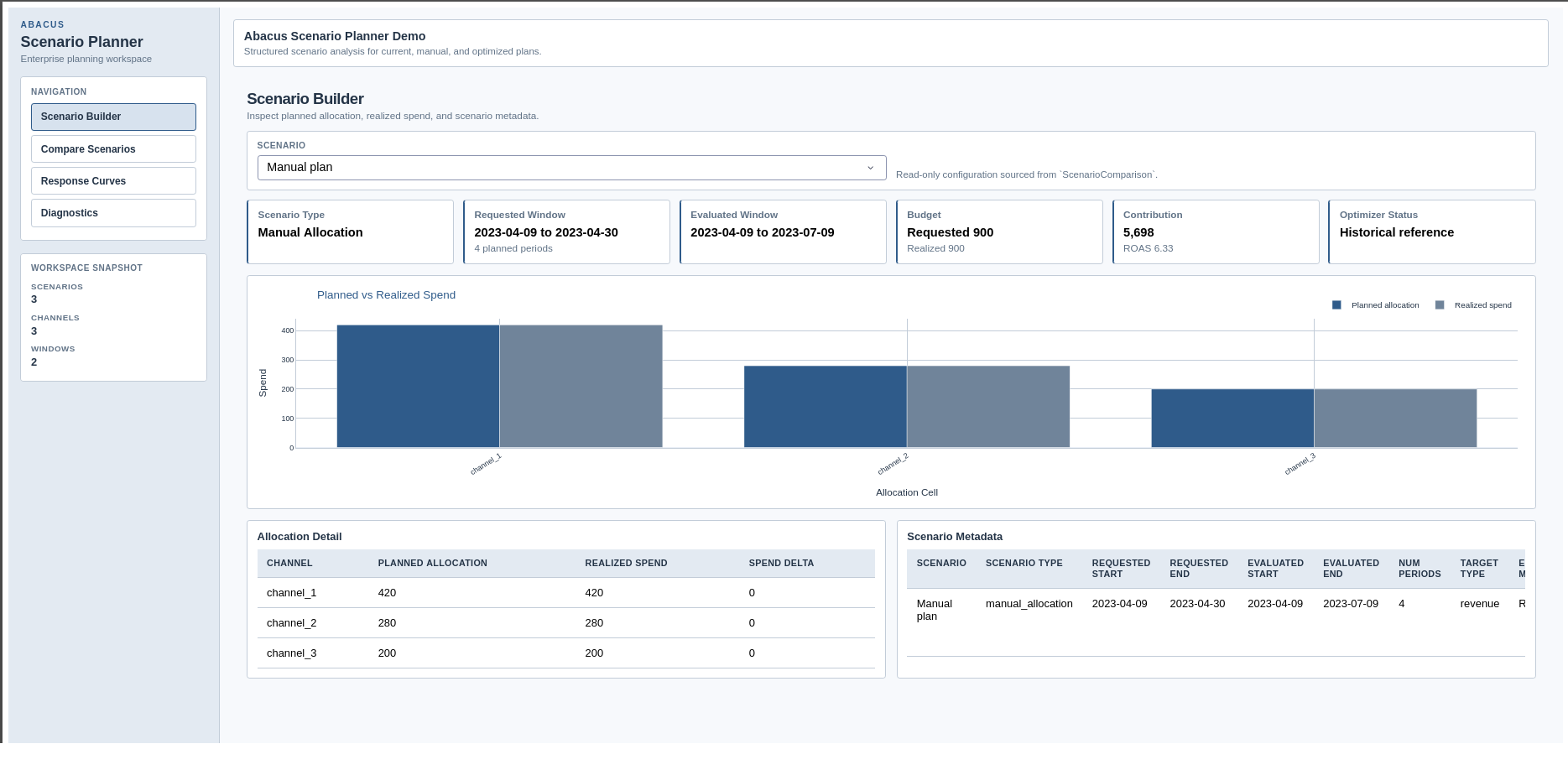
When a draft has been evaluated, the page shows planned versus realised spend,
allocation detail, and scenario metadata. When a draft has changed but has not
yet been re-evaluated, the page shows a draft preview instead.
Scenario Builder page in the supported Dash app.
Review page
The Review page focuses on scenario-to-scenario trade-offs and review
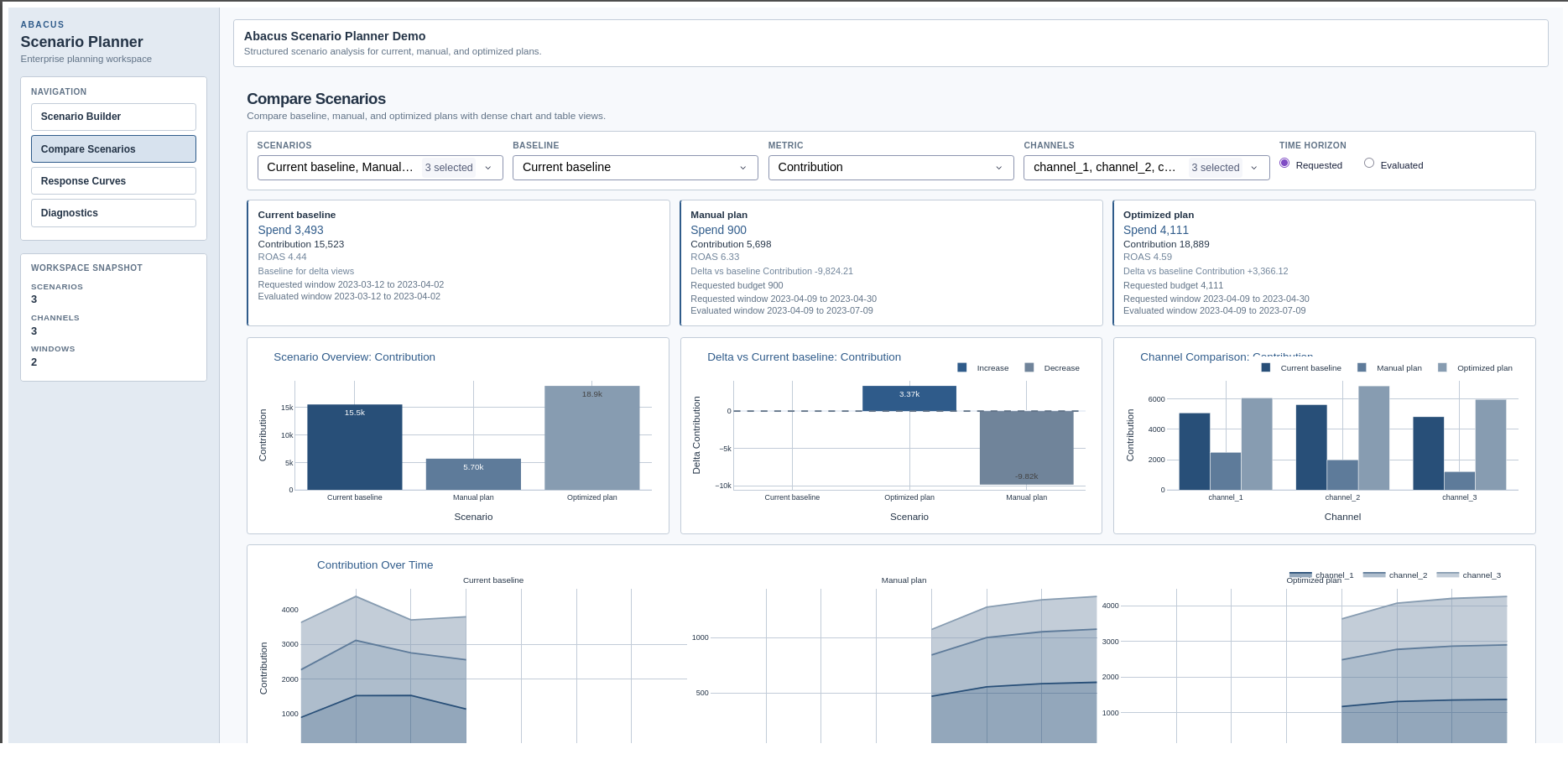
readiness. It includes:
scenario summary cards
overview and delta charts
channel comparison charts
scenario ranking and top-mover tables
contribution-over-time comparisons
Compare Scenarios page in the supported Dash app.
Explain and Export pages
The remaining tabs build on the same workspace state:
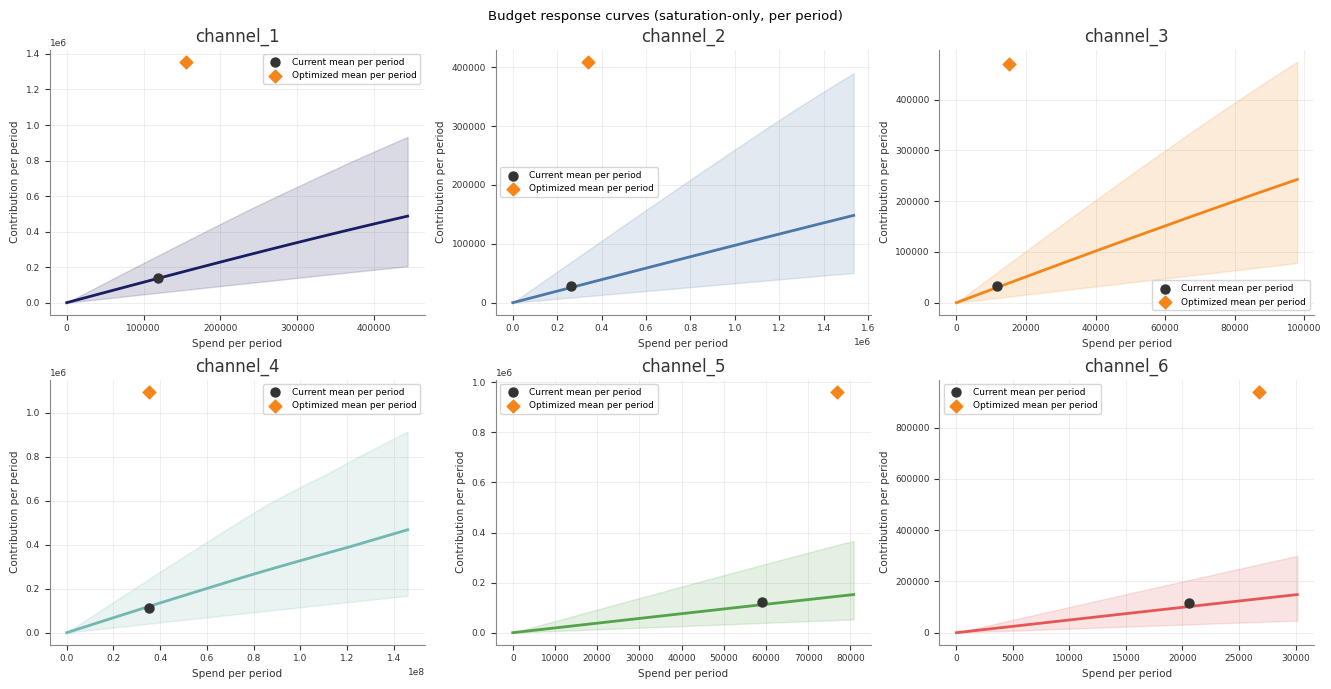
Explain overlays scenario reference points on the saved Stage 70 saturation-only response-curve artefact when available
the plotted marker position follows the saved reference curve at each scenario’s spend-per-period level
marker hover text also shows the actual evaluated average contribution so you can compare the scenario outcome with the reference-curve position
Explain also surfaces scenario warnings, optimiser status, bounds audit, allocation reconciliation, operating-region views, and lift comparisons
Export writes reproducible bundles under the run directory and exposes any saved sensitivity output selections
Background jobs
The supported app runs draft evaluation and sensitivity sweeps as background
jobs.
In the current beta:
the app queues draft evaluation and sensitivity sweeps
the UI polls the active job and refreshes the workspace when the job completes
export runs synchronously, but Abacus still records it in job history
The UI currently tracks one active planner job at a time. Finish the current
evaluation or sweep before starting another one.
Practical guidance
Launch the app from a fitted results directory, not from raw input data.
Use separate cloned workspaces for competing planning narratives.
Re-evaluate a draft after changing dates, budget, or allocation values.
Check both requested and evaluated windows when carryover is enabled.
Review the Diagnostics page before exporting or sharing a scenario set.
Treat the built-in launcher as a local beta workflow rather than a production deployment surface.
Common pitfalls
Launching the app without installing .[planner]
Pointing the launcher at a directory without run_manifest.json and fit artefacts
Expecting the app to fit a model from scratch
Interpreting a draft preview as evaluated output before clicking Evaluate and Save
Starting a second evaluation or sweep while another planner job is still running
Pipeline Runner
This section covers the structured abacus.pipeline runner: how it loads a
config and dataset, executes the retained stage sequence, and writes
reproducible run artefacts to disk.
Pages
Runner Overview - How run_pipeline(...) works, which
stages run, and when the optimisation stage is skipped.
YAML Configuration - Which YAML keys the runner
consumes and how they map to model build, data loading, holidays, and
optimisation.
CLI Reference - The thin python -m abacus.pipeline.runner
interface and its supported flags.
Output Directory Schema - The run directory
layout, manifest schema, stage statuses, and main artefacts.
Extending the Runner - How to add a stage or wire
in reporting without bypassing the manifest and artifact helpers.
Subsections of Pipeline Runner
Runner Overview
Use the pipeline runner when you want a full disk-backed PanelMMM run instead
of only an in-memory fit.
The runner loads a YAML config and a CSV dataset, builds the model, executes a
fixed stage sequence, and writes each stage’s artefacts into a structured run
directory. When validation is enabled, the runner performs a second train-window
fit for the blocked holdout stage, so the run takes longer than a pure
full-sample fit.
The path to run_manifest.json inside that directory
What the runner does
run_pipeline(...) performs these steps:
Load the YAML config with load_yaml_config(...).
Load X and y from CSV using load_pipeline_data(...).
Merge CLI sampler overrides with YAML fit through
build_model_kwargs(...).
Create the output directory tree and initialise run_manifest.json.
Run the retained stages in order, updating the manifest after every stage.
The model is built in Stage 00 by build_mmm_from_yaml(...), then stored in the
shared PipelineContext for the remaining stages. Runner-only roots such as
diagnostics and validation stay on the pipeline context and are stripped
before the public MMM builder validates the model YAML.
Stage order
The runner uses a fixed stage list.
Stage key
Directory
Purpose
Optional
metadata
00_run_metadata
Build the model and write resolved config and dataset metadata
No
preflight
10_pre_diagnostics
Prior predictive draws and plot
No
fit
20_model_fit
Fit the model, save InferenceData, write trace and summary
Raw input screening, MCMC, predictive, and residual diagnostics
No
curves
60_response_curves
Saturation-only, forward-pass direct contribution, and adstock curve artefacts
No
optimisation
70_optimisation
Budget optimisation artefacts
Yes
The validation stage is marked skipped when the YAML config does not contain
validation or it is disabled. The optimisation stage is also optional; it
returns None and is marked skipped when the YAML config does not contain an
optimization block.
PipelineRunConfig controls runtime settings that sit outside the YAML model
specification.
Field
Purpose
config_path
YAML file to load
output_dir
Root directory under which the run directory is created
run_name
Optional run-name override; otherwise the config filename stem
dataset_path
Optional combined dataset CSV override
x_path, y_path
Optional feature and target CSV overrides
holidays_path
Optional holiday CSV override
target_column
Target column name used during CSV loading
prior_samples
Number of prior predictive samples for Stage 10
draws, tune, chains, cores, random_seed
Sampler overrides merged onto YAML fit
curve_samples, curve_points
Curve sampling settings for Stage 60
Only sampler settings are merged into model construction. Other overrides are
used by the runner itself during data loading, holiday resolution, diagnostics
reporting, and output setup.
The pipeline runner reads the same YAML model specification used by
build_mmm_from_yaml(...), then adds a small set of runner-specific conventions
for data loading, optional blocked holdout validation, and Stage 70
optimisation.
This page documents the keys that the runner actually consumes.
Root keys
Key
Required
Used for
data
Usually
Resolve dataset paths when you do not pass dataset_path, x_path, or y_path through PipelineRunConfig
target
Yes
Define the target column and business target type
dimensions
No
Declare panel-dimension columns such as geo or brand
media
Yes
Define channel/control columns and transform types
scaling
No
Configure target/channel scaling rules
effects
No
Append additive effects in YAML order before build_model(...)
priors
No
Override model-level priors and prefixed transform priors
fit
No
Default sampler settings for Stage 20 fitting
holidays
No
Add holiday events before model build
original_scale_vars
No
Add original-scale contribution variables before fitting
inference_data
No
Attach existing InferenceData when the file exists
The builder appends each effect to model.mu_effects in YAML order before
calling build_model(...).
holidays
The holidays block is optional.
Supported keys used by the builder include:
Key
Meaning
path
Holiday CSV path
enabled
Set to false to disable holiday loading
prefix
Prefix for generated holiday effect coordinates
countries
Optional country filter for catalogue-style holiday CSV input
Example:
holidays:path:"holidays.csv"prefix:"holiday"
The CLI or PipelineRunConfig.holidays_path overrides holidays.path.
If you omit both path and the override but still configure holidays,
Abacus falls back to the bundled abacus.data:holidays.csv.
original_scale_vars
Use original_scale_vars when you want specific contribution variables to be
available on the original target scale:
original_scale_vars:- channel_contribution- y
The builder applies these through
model.add_original_scale_contribution_variable(...) before fitting.
inference_data
inference_data.path is passed through to the YAML builder. If the file exists, Abacus
attaches that InferenceData to the built model during Stage 00.
Important: the structured runner still executes Stage 20 and fits the model
again. inference_data.path does not currently skip fitting.
optimization
Add an optimization block when you want Stage 70 to run. If this block is
absent, Stage 70 is marked skipped.
The YAML builder validates this block when the config is loaded. The required
scalar fields below must be present, and unknown top-level optimization keys
are rejected.
Set to false to skip Stage 35 while keeping the stage in the manifest
holdout_observations
Number of unique dates to reserve for the blocked holdout window
include_last_observations
Keep lag history for carryover-sensitive holdout scoring
coverage_levels
Coverage levels reported in Phase 10; use the fixed 50, 80, and 94 percent defaults
sampler
Optional validation-only sampler overrides for the train-window refit
Phase 10 reports coverage as coverage_50, coverage_80, and
coverage_94. Keep those defaults unless the implementation and tests are
updated together.
The validation stage builds a clean train-window model for holdout scoring and
ignores inference_data.path so the refit does not inherit attached posterior
state from Stage 00.
Override precedence
For the runner, precedence is:
Setting
Higher precedence
Lower precedence
Combined dataset path
dataset_path / --dataset-path
data.dataset_path
Split CSV paths
x_path, y_path / --x-path, --y-path
data.x_path, data.y_path
Holiday CSV path
holidays_path / --holidays-path
holidays.path
Sampler settings
PipelineRunConfig or CLI overrides
fit
Target column for CSV loading
target_column / --target-column
target.column, then "y"
Diagnostics thresholds
diagnostics.thresholds
retained Stage 50 defaults
Common pitfalls
Using Parquet paths in the pipeline data block. The runner data loader reads
CSV only.
Providing only one of data.x_path or data.y_path.
Treating optimization.total_budget as total horizon spend instead of
per-period spend.
Assuming diagnostics is part of the public MMM builder schema. It is a
runner-only block.
Assuming inference_data.path skips Stage 20 fitting. It does not.
Forgetting that relative paths are resolved from the YAML file directory, not
from the shell working directory.
Output Directory Schema
Each pipeline run creates a timestamped directory under the configured
output_dir:
<output_dir>/<run_name>_<YYYYMMDD_HHMMSS>
The timestamp is generated in UTC. The runner creates every stage directory up
front, then updates run_manifest.json as stages start, complete, skip, or
fail.
a copy of the original config under its source filename
config.original.yaml
config.resolved.yaml
session_info.txt
dataset_metadata.json
model_metadata.json
data_dictionary.csv
design_matrix_manifest.csv
spec_summary.csv
holiday_feature_manifest.csv when holidays are configured
config.resolved.yaml normalises configured data and holiday paths to absolute
paths and records the effective sampler configuration on the model.
10_pre_diagnostics
Main files:
prior_predictive.nc
prior_predictive.png
20_model_fit
Main files:
model.nc
trace.png
posterior_summary.csv
30_model_assessment
Main files:
posterior_predictive.nc
posterior_predictive.png
posterior_predictive_summary.csv
observed.csv
fitted.csv
fit_timeseries.png
fit_scatter.png
residuals.csv
residuals_timeseries.png
residuals_hist.png
residuals_vs_fitted.png
This stage is the in-sample or training-fit assessment. It uses the same data
the model was fit on and should not be read as the pipeline’s out-of-sample
validation layer.
35_holdout_validation
Main files:
validation_metadata.json
holdout_posterior_predictive.nc
holdout_predictive_summary.csv
holdout_predictive_report.json
holdout_observed.csv
holdout_fitted.csv
holdout_residuals.csv
holdout_timeseries.png
holdout_residuals_acf.png
The holdout summary and report include uncertainty-aware metrics such as
crps, bias, and fixed coverage columns for coverage_50, coverage_80,
and coverage_94.
This stage is optional. When validation is absent or disabled in YAML, the
directory still exists and the stage is marked skipped.
40_decomposition
Main files:
waterfall_components_decomposition.png
weekly_media_contribution.png
channel_contributions.csv
baseline_contributions.csv
mean_contributions_over_time.csv
50_diagnostics
Main files:
design_summary.csv
design_report.json
vif_report.csv
mcmc_summary.csv
mcmc_report.json
predictive_summary.csv
predictive_report.json
residual_diagnostics.csv
residuals_acf.png
diagnostics_report.csv
diagnostics_summary.txt
chain_diagnostics.txt
The design-oriented files are raw input screening outputs. In particular,
diagnostics_report.csv labels the corresponding phase as
raw_input_screening rather than design.
60_response_curves
Main files:
saturation_curve.nc
saturation_curve_summary.csv
saturation_curve.png
forward_pass_contribution_curve.nc
forward_pass_contribution_curve_summary.csv
forward_pass_contribution_curve.png
adstock_curve.nc
adstock_curve_summary.csv
adstock_curve.png
These artefacts are intentionally different:
saturation_curve.* is the sampled saturation transformation on the scaled
channel axis, exported with original-scale contribution values for easier
reading. The PNG overlays that saturation-only curve against posterior mean
realised contributions.
forward_pass_contribution_curve.* is a full-model direct contribution
artefact. It rescales the observed historical spend path from 0% to 200%,
runs that spend through the fitted adstock and saturation path, and records
the resulting total channel contribution in original target units.
adstock_curve.* is the sampled carryover-weight profile for one impulse.
70_optimisation
This directory is present for every run, but the stage is skipped unless the
YAML config contains an optimization block.
Main files when the stage runs:
optimized_allocation.nc
optimized_allocation.csv
response_distribution.nc
optimize_result.json
budget_summary.csv
budget_response_points.csv
budget_impact.csv
budget_bounds_audit.csv
budget_roi_cpa.csv
budget_response_curves.csv
budget_mroi.csv
budget_optimisation.json
several PNG plots for allocation, contribution over time, response curves,
impact, bounds audit, and ROI or CPA
run_manifest.json
The manifest is the machine-readable index for the whole run.
Top-level fields include:
Field
Meaning
run_name
Effective run name
timestamp
UTC run timestamp
config_path
Original config path
output_dir
Run directory path
status
Overall run status
model_class
Set after Stage 00 builds the model
data
Basic dataset metadata
stages
Per-stage manifest records
warnings
Run-level warnings
error
Run-level failure payload when the pipeline aborts
data includes:
x_shape
y_length
target_column
x_columns
Stage records
Each stage record contains:
Field
Meaning
directory
Stage directory name
status
Current stage status
started_at
ISO timestamp when the stage started
finished_at
ISO timestamp when the stage finished
artifacts
Mapping of artefact labels to root-relative paths
warnings
Stage warnings
error
Error string when the stage fails
The artifacts mapping uses root-relative paths such as
20_model_fit/model.nc.
Stage statuses
Status
Meaning
pending
Stage has not started yet
running
Stage is currently running
completed
Stage finished successfully
skipped
Stage returned None intentionally
failed
Stage raised an exception
not_reached
A previous stage failed before this one ran
Common cases:
Stage 35 is skipped when validation is missing or disabled from YAML.
Stage 70 is skipped when optimization is missing from YAML.
Later stages become not_reached after the first failure.
Practical use
Use the run directory when you want:
a stable folder for downstream reporting
a machine-readable audit trail through run_manifest.json
stage-level links to artefacts without hard-coding filenames
The retained runner is static, not plugin-based. To add a stage or integrate
custom status reporting, extend the existing runner surfaces instead of
bypassing them.
return a dict[str, str] of artefact labels to root-relative paths when the
stage succeeds
return None when the stage is intentionally skipped
raise an exception when the stage fails and should abort the run
The runner handles manifest updates around the stage call. Do not update
context.manifest directly from a normal stage implementation unless you are
changing core runner behaviour.
What is available in PipelineContext
PipelineContext gives each stage access to:
Field
Use it for
run_config
Runtime settings such as output root, seeds, and curve sample counts
raw_cfg
The loaded YAML config as a mutable mapping
X, y
Loaded dataset inputs
paths
Stage directories and manifest path
manifest
Current run manifest
model_kwargs
Effective sampler overrides passed into model build
Use context.paths.relative(path) when building the artefact mapping that the
stage returns. The manifest expects root-relative paths, not absolute paths.
fromabacus.pipeline.artifactsimportwrite_dataframedefrun_custom_stage(context):ifcontext.modelisNone:raiseValueError("Model has not been initialized before the custom stage.")stage_dir=context.paths.stage_dirs["custom"]output_path=stage_dir/"custom_summary.csv"frame=context.model.summary.total_contribution(output_format="pandas")write_dataframe(output_path,frame)return{"custom_summary":context.paths.relative(output_path),}
Optional stage pattern
If a stage should only run when a config block is present, follow the same
pattern as Stage 70:
This section collects longer-form answers to recurring MMM, Bayesian, and
panel-econometrics questions that come up when practitioners move from
classical econometrics to PanelMMM.
The pages are written for technical readers who already understand regression,
panel data, and causal inference, but want the Abacus framing.
This document addresses common concerns that econometricians have about Bayesian priors, reframes them using familiar econometric concepts, and discusses the practical trade-offs between “tight” and “loose” prior specifications in the context of Marketing Mix Modeling.
1. Are priors subjective? Don’t they bias the results?
This is the most common objection from econometricians. The short answer is: you are already using priors, you just call them something else.
Priors You Already Use in Classical Econometrics
Every constraint or modelling decision an econometrician makes is, mathematically, a prior belief imposed on the parameter space:
Classical Econometric Practice
Bayesian Equivalent
“Media coefficients must be non-negative” (sign restriction)
A HalfNormal or truncated prior that places zero probability on negative values
“The intercept should be positive because sales can’t be negative”
A LogNormal prior on the intercept
Ridge regression (L2 penalty)
A Normal(0, sigma) prior on all coefficients, where sigma controls the penalty strength
LASSO regression (L1 penalty)
A Laplace(0, b) prior on all coefficients
Excluding a variable from the model entirely
An infinitely tight prior at exactly zero (a point mass)
Including a variable with no constraints
A uniform prior over $(-\infty, +\infty)$ — the so-called “non-informative” prior
The difference is not whether you impose assumptions, but whether you are explicit about them. In classical econometrics, these assumptions are hidden inside the model specification (variable selection, functional form, sign restrictions). In Bayesian modeling, they are declared openly as Prior objects, making them auditable, debatable, and reproducible.
Why “Letting the Data Speak” Is Itself a Prior
When a classical econometrician says “I let the data speak,” they are implicitly choosing a uniform (flat) prior: every parameter value from $-\infty$ to $+\infty$ is equally plausible before seeing the data. This sounds objective, but it has real consequences:
It assigns equal prior probability to a media ROI of 0.01 and a media ROI of 10,000,000.
In small samples (typical in marketing data: 100–200 weekly observations), this flat prior provides no regularization, leading to extreme, unstable coefficient estimates.
It is equivalent to running OLS with no penalty — which econometricians already know is fragile when $p$ is large relative to $N$.
A well-chosen weakly informative prior (e.g., HalfNormal(sigma=2) for media coefficients) does not “bias” the model. It says: “We believe media effects are positive and probably modest, but we are open to being surprised.” If the data strongly disagrees, the posterior will override the prior. If the data is ambiguous (as it often is with 150 weekly observations and 7 correlated media channels), the prior prevents the model from hallucinating absurd coefficient values.
2. How does Abacus specify priors?
In Abacus, priors are declared using Prior objects from the pymc_extras library. These are composable, hierarchical, and fully serializable. Here is a simple example:
frompymc_extras.priorimportPrior# A weakly informative prior for media channel betas:# "Media effects are positive, probably modest, but could be larger"beta_channel=Prior("HalfNormal",sigma=2)# A prior for the intercept:# "Baseline sales are positive and log-normally distributed"intercept=Prior("LogNormal",mu=0,sigma=5)# A hierarchical prior for adstock decay:# "Carryover is moderate, skewed toward shorter decay"alpha=Prior("Beta",alpha=1,beta=3)
Each Prior object is a first-class citizen in the model configuration. It can be inspected, overridden, serialized to YAML, and version-controlled — unlike classical econometric constraints, which are typically buried in code or verbal documentation.
3. What is the difference between “tight” and “loose” priors?
This is one of the most consequential modelling decisions in Bayesian MMM. Two real-world configurations from our repositories illustrate the spectrum.
Tight Priors: The DSAMbayes Approach
In the DSAMbayes R/Stan library, tight priors are implemented via explicit boundary constraints on media coefficients:
What this does: Every media coefficient is hard-bounded to be non-negative. Combined with the package’s default priors (which are relatively concentrated), this creates a model that is strongly constrained. The data can move the coefficients within the allowed region, but the model will never produce a negative media effect.
Pros of tight priors:
Stability: Results are robust even with very small sample sizes (e.g., 52 weeks). The model cannot produce economically nonsensical results like “TV advertising reduces sales.”
Interpretability: Stakeholders can trust the sign and rough magnitude of every coefficient.
Convergence: The MCMC sampler explores a smaller parameter space, converging faster and with fewer divergences.
Reproducibility: Different analysts fitting the same data will obtain very similar results because the prior dominates the likelihood in ambiguous regions.
Cons of tight priors:
Risk of masking genuine effects: If a media channel truly has zero or negligible effect, a tight positive prior will force the model to assign it some positive contribution, creating a false positive. The model cannot “discover” that a channel is worthless.
Prior-data conflict: If the data strongly suggests a negative relationship (e.g., due to confounding — heavy TV spend coincides with a recession), the tight prior will suppress this signal. The analyst will not see the conflict unless they explicitly check for it.
Overconfidence: The posterior credible intervals will be artificially narrow, because the prior has eliminated large regions of the parameter space. This can make the model appear more certain than it actually is.
Loose Priors: The AMMM Approach
In the AMMM Python library, priors are specified with wider distributions and fewer hard constraints:
# From: AMMM data-config/demo_config.ymlcustom_priors:intercept:dist:LogNormalkwargs:mu:0sigma:5# Very wide — allows intercept to range enormouslybeta_channel:dist:HalfNormalkwargs:sigma:1# Moderately wide positive prioralpha:# Adstock decaydist:Betakwargs:alpha:1beta:3# Weakly informative, skewed toward short decaylam:# Saturation ratedist:Gammakwargs:alpha:3beta:1# Moderately informative
What this does: The priors are “weakly informative” — they encode soft directional beliefs (media effects are positive via HalfNormal, intercept is positive via LogNormal) but with wide spreads that allow the data substantial room to determine the final estimates.
Pros of loose priors:
Data-driven: The posterior is dominated by the likelihood, not the prior. Results are closer to what an unconstrained MLE would produce, which may feel more “honest” to econometricians.
Discovery: The model can reveal surprising patterns (e.g., a channel with near-zero effect will have a posterior concentrated near zero, rather than being artificially inflated).
Honest uncertainty: Posterior credible intervals reflect genuine estimation uncertainty, including uncertainty about effect direction.
Cons of loose priors:
Instability in small samples: With only 100–200 weekly observations and 7+ correlated media channels, a loose prior provides insufficient regularization. Coefficients can be wildly unstable across different random seeds or slight data perturbations.
Economically nonsensical results: Without strong regularization, the model may produce results that are statistically plausible but economically absurd (e.g., display advertising having a larger effect than TV despite 10x less spend).
Harder convergence: The MCMC sampler must explore a vast parameter space, leading to longer runtimes, more divergences, and lower effective sample sizes.
4. Which should we use: tight or loose?
Neither extreme is correct in isolation. The right choice depends on your sample size, number of media channels, and tolerance for false positives vs. false negatives.
The Practical Recommendation
Scenario
Recommended Approach
Small sample ($N < 104$ weeks), many channels ($k > 5$)
Tight priors. The data simply cannot identify 5+ correlated media effects independently. Without strong regularization, the model is fundamentally underidentified.
Medium sample ($104 < N < 208$ weeks), moderate channels
Weakly informative priors (the Abacus default). Encode directional beliefs (positive media effects) but allow the data to determine magnitude.
Large sample ($N > 208$ weeks), few channels ($k \leq 3$)
Loose priors are defensible. The data volume is sufficient to overwhelm even a weak prior, so the choice matters less.
Any sample size, with lift test calibration
Loose priors become safer, because the lift test data injects external causal evidence that compensates for the weak regularization of the prior.
The Key Insight for Econometricians
In classical econometrics, you are trained to believe that constraints reduce efficiency (you “lose information” by restricting the parameter space). In Bayesian statistics, the opposite is often true for small samples: a well-chosen prior increases efficiency by concentrating the sampler on the economically plausible region of the parameter space. It is the Bayesian equivalent of using economic theory to improve your estimator, which is exactly what structural econometricians (e.g., in IO or macro) have always done.
The prior is not a bias. It is a statement of economic theory. If you believe advertising cannot reduce sales, encoding that belief is not “cheating” — it is incorporating domain knowledge, just as a structural econometrician incorporates equilibrium conditions or rational expectations into their likelihood.
5. Can I check whether the prior is dominating the posterior?
Yes. This is a critical diagnostic step. In Abacus (and any PyMC-based workflow), you should always compare the prior predictive distribution to the posterior distribution for each parameter.
If the posterior looks very similar to the prior, the data has not updated your beliefs. This means either: (a) the prior is too tight and is suppressing the data, or (b) the data genuinely contains no information about that parameter.
If the posterior is substantially narrower or shifted relative to the prior, the data has successfully updated your beliefs, and the prior served only as a sensible starting point.
This comparison is the Bayesian analogue of checking whether your classical constraints are binding. If they are always binding, you should question whether the constraints are appropriate.
Adstock and Saturation
In classical econometrics, you model diminishing returns by taking the logarithm of spend: $\log(\text{spend})$ enters the regression, and the coefficient captures an elasticity. Carryover effects, if considered at all, are handled with lagged dependent variables or Koyck distributed lags. These approaches are simple and familiar. They are also, for media measurement, inadequate.
This document explains the two non-linear transformations at the heart of every modern Marketing Mix Model — adstock (carryover) and saturation (diminishing returns) — and shows why they are more flexible, more interpretable, and more economically grounded than the classical alternatives. We also address a subtle but important modelling decision: whether to apply adstock before saturation, or saturation before adstock.
1. The Problem with Log-Linear Specifications
The classical $\log(\text{spend})$ specification makes a single, rigid assumption: the marginal return to an additional pound of media spend decreases at a rate governed by the reciprocal of current spend. Doubling spend from £100 to £200 produces the same incremental effect as doubling from £1,000 to £2,000. The curvature is fixed by the functional form. You cannot learn it from the data.
This creates two problems in practice.
The first is that the log transform cannot capture saturation at high spend levels. If a channel is already saturated — say, you have bought every available TV slot in the UK — the log transform will still predict positive incremental returns for every additional pound. The curve never flattens. In reality, the marginal return from saturated media is effectively zero, and you need a function that can reach a ceiling.
The second is that the log transform says nothing about carryover. A TV advertisement aired in week 10 does not affect sales only in week 10. Viewers remember the ad. Brand salience persists. The effect decays over subsequent weeks. A pure $\log(\text{spend}_t)$ specification attributes the entire effect to the week the money was spent, ignoring the temporal diffusion of advertising impact. You can add lagged terms manually ($\log(\text{spend}_{t-1})$, $\log(\text{spend}_{t-2})$, and so on), but each lag consumes a degree of freedom, and you must choose the lag length arbitrarily.
Abacus replaces both of these ad hoc treatments with two purpose-built, parameterised transformations whose shapes are learned jointly from the data inside the Bayesian graph.
2. Adstock: Modelling Carryover
Adstock captures a simple economic intuition: advertising has a lingering effect. A pound spent on TV in week 10 generates some response in week 10, a smaller response in week 11, a still smaller response in week 12, and so on until the effect has fully decayed.
The default implementation in Abacus is geometric adstock. The transformation takes the raw weekly spend series and replaces each observation with a weighted sum of current and past spend, where the weights decay geometrically:
$$x^*_t = x_t + \alpha \cdot x^*_{t-1}$$
The parameter $\alpha$ (between 0 and 1) controls the rate of decay. When $\alpha$ is close to zero, the effect is concentrated in the week of exposure — the ad is forgotten almost immediately. When $\alpha$ is close to one, the effect persists for many weeks — the brand impression lingers. The maximum lag length l_max truncates the convolution at a finite horizon for computational efficiency.
For an econometrician, recognise that this is precisely a Koyck distributed lag model, but with two critical differences. First, the decay parameter $\alpha$ is not estimated from lagged dependent variables (which introduces Nickell bias in short panels). It is estimated directly as a parameter of the transformation, with its own Bayesian prior — by default a Beta(1, 3) distribution that gently favours shorter decay while allowing the data to push toward longer persistence if warranted. Second, you do not need to choose the lag length by hand. You set l_max as a generous upper bound (say, 8 or 12 weeks), and the geometric decay structure ensures that distant lags receive negligible weight automatically.
Abacus also provides alternative adstock functions, including Weibull PDF and Weibull CDF adstock, which allow for non-monotonic decay patterns (an effect that peaks one or two weeks after exposure rather than immediately). These capture the empirical reality that some channels — particularly upper-funnel brand advertising — take time to build mental availability before generating measurable sales response.
3. Saturation: Modelling Diminishing Returns
Saturation captures the second economic intuition: each additional pound of spend on a channel is worth less than the last. The first £10,000 of TV spend reaches new audiences and generates substantial incremental sales. The next £10,000 reaches many of the same people again and generates less. Eventually, you have saturated the available audience, and further spend generates almost nothing.
The default implementation in Abacus is logistic saturation:
Two parameters govern the shape. The parameter $\lambda$ controls the steepness of the curve — how quickly diminishing returns set in. A large $\lambda$ means the channel saturates rapidly (steep initial response, early flattening). A small $\lambda$ means the channel has a long runway before saturation (gradual response, late flattening). The parameter $\beta$ controls the asymptotic maximum — the ceiling of the response, representing the maximum possible contribution from this channel regardless of spend.
Compare this to the classical $\log(\text{spend})$ specification. The logistic saturation curve has a genuine asymptote: beyond a certain spend level, the curve is effectively flat. The log specification has no such ceiling. The logistic curve also has a tunable inflection point (governed by $\lambda$), allowing the data to determine where diminishing returns begin. The log curve always bends at the same relative rate.
The default priors in Abacus encode mild economic beliefs. The prior on $\lambda$ is Gamma(3, 1), which centres mass on moderate saturation rates while allowing the data to push toward very steep or very gradual curves. The prior on $\beta$ is HalfNormal(sigma=2), which keeps the channel contribution positive and moderately scaled.
4. Joint Estimation Inside the Bayesian Graph
Here is the critical difference between the Abacus approach and classical pre-processing. In many legacy MMM implementations (and in some textbook treatments), the adstock and saturation transformations are applied as a pre-processing step: the analyst picks fixed values for $\alpha$ and $\lambda$ (perhaps through grid search or “expert judgement”), transforms the raw spend data, and then runs a linear regression on the transformed data.
This approach severs the chain of uncertainty. The regression treats the transformed spend as a known quantity, ignoring the fact that $\alpha$ and $\lambda$ were estimated (or guessed). The standard errors on the media coefficients are conditional on the pre-selected transformation parameters being exactly correct. They are too narrow.
In Abacus, the adstock parameter $\alpha$, the saturation parameters $\lambda$ and $\beta$, and the media coefficient are all estimated simultaneously inside a single PyMC model. The MCMC sampler explores the joint posterior over all parameters at once. When the sampler draws a high value of $\alpha$ (long carryover), it simultaneously adjusts $\lambda$ and the media coefficient to maintain consistency with the observed data. The resulting posterior credible intervals for media contribution honestly reflect uncertainty about the transformation shape, the coefficient magnitude, and their interactions.
This is analogous to the distinction between two-stage least squares (where the first-stage residuals inject estimation error into the second stage, requiring corrected standard errors) and full-information maximum likelihood (where all parameters are estimated jointly). The Bayesian joint estimation in Abacus is closer in spirit to FIML, but with the added benefit of prior regularisation.
5. The Ordering Decision: Adstock First or Saturation First
When you initialise a PanelMMM in Abacus, you choose adstock_first=True (the default) or adstock_first=False. This decision controls the order in which the two transformations are composed, and it encodes a substantive economic assumption about how the media channel operates.
When adstock_first=True, the pipeline is: raw spend → adstock → saturation. The economic interpretation is that carryover accumulates first in the consumer’s memory (brand salience builds up over multiple weeks of exposure), and only then does the accumulated stock of impressions hit diminishing returns. This makes sense for brand-building channels like TV, outdoor, and sponsorship, where the advertising effect is cumulative and the saturation constraint applies to the total accumulated exposure rather than to a single week’s spend.
When adstock_first=False, the pipeline is: raw spend → saturation → adstock. The economic interpretation is that diminishing returns apply immediately to each week’s spend (this week’s audience is saturated by this week’s spend alone), and only then does the already-saturated response carry over into future weeks. This makes sense for direct-response channels like paid search or performance display, where each week’s impressions hit a ceiling independently (you can only capture so many searches in a week), but the conversion effect persists.
The distinction matters quantitatively. Under adstock-first, the model allows a sequence of moderate spend weeks to accumulate into a heavily saturated state — even if no single week was high-spend on its own. Under saturation-first, each week’s spend is capped independently, so a steady moderate spend never reaches the saturation ceiling.
In practice, most MMM practitioners default to adstock-first for all channels, which is why Abacus sets adstock_first=True as the default. But if you have strong prior knowledge that a particular channel exhibits immediate per-week saturation (because the audience pool is fixed and refreshes weekly), switching the order is a principled modelling choice.
6. Why This Matters for Econometricians
The adstock-saturation framework replaces several ad hoc classical specifications with a coherent, jointly estimated non-linear model. To summarise the mapping:
The classical Koyck lag model is replaced by geometric adstock with a Bayesian prior on the decay rate. You no longer need to choose lag lengths manually or worry about Nickell bias from lagged dependent variables.
The classical $\log(\text{spend})$ specification is replaced by logistic saturation with learnable steepness and ceiling parameters. You gain a genuine asymptote (something $\log$ cannot provide) and data-driven curvature (something $\log$ fixes by assumption).
The classical two-stage approach (transform then regress) is replaced by joint Bayesian estimation. Your credible intervals honestly propagate uncertainty from the transformation parameters through to the media contribution estimates.
The result is a media response model that is more flexible than any classical specification, more honest about uncertainty, and grounded in the same economic intuitions — carryover and diminishing returns — that econometricians have always recognised. The difference is that Abacus lets the data determine the shape of these phenomena rather than imposing it through functional form.
HSGP
This document answers common questions econometricians may have when encountering HSGP (Hilbert Space Gaussian Process) approximations in the codebase, particularly regarding model flexibility and the number of basis functions.
1. Does a Hilbert Space Gaussian Process use up degrees of freedom when modelling?
Yes, but not in the strict $N - k$ counting sense used in classical OLS econometrics. Instead, Gaussian Processes (and their HSGP approximations) use “effective degrees of freedom” (EDF) due to Bayesian regularization.
Here is how to map HSGPs to classical econometrics concepts:
The Mechanical Setup (Looks like it uses $m$ degrees of freedom)
In classical econometrics, if you want to model a non-linear time trend, you might add polynomial terms or a Fourier series (sines and cosines). If you add $m$ sine/cosine terms to your OLS model, you lose exactly $m$ degrees of freedom.
An HSGP is mathematically very similar to a Fourier series. It approximates an infinite-dimensional Gaussian Process by using $m$ basis functions (the m parameter in the code, often set to 50–200).
If this were OLS, estimating those 200 basis function coefficients would cost 200 degrees of freedom, potentially breaking your model if $N < 200$.
The Bayesian Reality (Effective Degrees of Freedom)
In an HSGP, those $m$ coefficients are not freely estimated. They are bound together by a hierarchical prior structure governed by hyperparameters, specifically the lengthscale ($\ell$) and the amplitude/variance ($\eta$).
Because the coefficients share a prior that heavily shrinks most of them toward zero, we measure the flexibility using Effective Degrees of Freedom (EDF).
Like Ridge Regression: Think of HSGP as running a Ridge Regression (L2 regularization) on 200 Fourier terms. Even though there are 200 parameters, the L2 penalty restricts their variance. The “effective” degrees of freedom might only be 4 or 5.
Data-driven penalty: The amount of shrinkage is controlled by the lengthscale ($\ell$).
If the data shows a smooth, slowly moving trend, the model learns a large lengthscale. This imposes massive shrinkage on the high-frequency (wiggly) basis functions, meaning the HSGP uses very few effective degrees of freedom (acting almost like a simple linear trend).
If the data is highly volatile, the model learns a short lengthscale, relaxing the shrinkage, allowing the curve to wiggle, and consuming more effective degrees of freedom.
Summary: While you might instantiate an HSGP with 100 basis functions ($m=100$), it does not subtract 100 from your denominator. It dynamically consumes exactly as much “effective” flexibility as the data proves is necessary, heavily penalizing unnecessary complexity (wiggliness) via its priors. You are completely safe from the classical $N - k < 0$ matrix inversion failures.
2. Is it up to the analyst to decide how many basis functions to set? Will this result in specification hunting?
This is a very valid concern. In standard OLS, if Analyst A uses a 5th-order Fourier series and Analyst B uses a 20th-order Fourier series, they will get wildly different results, opening the door for specification hunting.
In the Abacus HSGP implementation, this risk is mitigated in two ways: Automated Heuristics (code design) and Approximation Limits (mathematical design).
1. Automated Selection (The Code Design)
The library is specifically designed so analysts do not have to guess or manually set the number of basis functions ($m$).
In the HSGP class, the factory method parameterize_from_data calculates $m$ automatically using an algorithm (approx_hsgp_hyperparams) based on published literature (Ruitort-Mayol et al., 2022).
It calculates $m$ deterministically based on two things:
The span of the time-series data (e.g., 3 years of weekly data).
The lower bound of the lengthscale prior (the shortest time-span over which we believe the effect could realistically change).
This guarantees that two analysts modeling the same dataset with the same assumptions will end up with the exact same $m$.
2. $m$ dictates “Resolution”, not “Complexity” (The Mathematical Design)
Even if an analyst decided to bypass the automation and manually force a massive number of basis functions, it would not result in overfitting or specification hunting.
In an HSGP, $m$ is just the resolution limit of the approximation to the true infinite-dimensional Gaussian Process.
If $m$ is too small: The model lacks the resolution to capture fast-moving trends (it will artificially smooth things out).
If $m$ is exactly right (e.g., $m=50$): The model perfectly approximates the true Gaussian Process.
If $m$ is absurdly large (e.g., $m=500$): The model will yield the exact same curve as $m=50$.
Why? Because the extra 450 basis functions represent very high-frequency, rapid wiggles. The Bayesian lengthscale prior mathematically forces the coefficients for those extra high-frequency basis functions exactly to zero.
The only penalty for setting $m$ too high is computation time. The MCMC sampler will run much slower because it has to drag around useless matrices, but the statistical fit will remain identical. Therefore, an analyst cannot “p-hack” or specification-hunt by artificially inflating $m$.
3. We often model trend/seasonality using explicit Fourier terms (e.g., sin52_1 + cos52_1 + ...). This uses up degrees of freedom and often causes severe multicollinearity (high VIF) with our media or control variables. Does HSGP solve this?
Yes. Explicitly adding Fourier terms to a linear formula creates structural problems that HSGP elegantly sidesteps.
1. The Degrees of Freedom Problem
As discussed in Section 1, explicitly adding 10 sine/cosine terms to a regression permanently burns 10 degrees of freedom. The model is forced to independently estimate an unpenalized coefficient for every single wave, regardless of whether that specific frequency is actually present in the data.
The HSGP Solution:
HSGP uses Effective Degrees of Freedom (EDF). It evaluates a large number of basis functions (which are essentially Fourier terms), but ties them all together under a single hierarchical Gaussian Process prior. If the data doesn’t exhibit a certain high-frequency wiggle, the GP lengthscale prior dynamically crushes the coefficients of those specific basis functions toward zero. You get the flexibility of 100 sine waves, but only “pay” for the effective degrees of freedom the data actually demands.
2. The Multicollinearity (High VIF) Problem
When you add explicit Fourier terms, they act as independent regressors. If one of your media channels (e.g., m_tv) happens to have a seasonal spending pattern that correlates strongly with sin52_1, the model suffers from classic multicollinearity. The VIF skyrockets, standard errors blow up, and the coefficient for m_tv becomes completely unstable (the “backdoor” bias).
The HSGP Solution:
HSGP mitigates this through structured regularization.
Orthogonal Basis: The basis functions generated internally by the HSGP are orthogonal to each other.
Shared Shrinkage: More importantly, the coefficients for the HSGP basis functions are not estimated independently. They are strictly regularized by the GP’s lengthscale ($\ell$) and variance ($\eta$) hyperparameters.
Because the GP is mathematically constrained to behave like a smooth, cohesive curve, it cannot arbitrarily spike a single basis function’s coefficient just to “steal” variance from a highly correlated m_tv variable. The GP prior strongly penalizes such isolated, un-smooth coefficient spikes. Consequently, the model focuses on capturing the true underlying baseline trend, leaving the media coefficients much more stable than they would be against unpenalized, explicit Fourier regressors.
4. Should we feed in holiday dummy variables instead?
No. You do not need to manually construct binary 1/0 dummy variables (e.g., is_black_friday) or step functions in your input data.
The recommendation is to pass the raw dates of the holidays directly into the model via a separate DataFrame. Abacus’s EventAdditiveEffect API will internally calculate the distance in days from your time series to the holiday, and wrap that in a continuous basis function (like a Gaussian curve). This provides a smoother, more realistic “build-up and cool-down” effect compared to the harsh structural breaks of traditional dummy variables.
Example: Ingesting a Holidays DataFrame into Abacus
If you have a CSV of holidays (like data-config/holidays.csv), you load it as a standard Pandas DataFrame and inject it into the model configuration before building.
importpandasaspdfrompymc_extras.priorimportPriorfromabacus.mmm.panelimportPanelMMMfromabacus.mmm.eventsimportEventEffect,GaussianBasis# 1. Load your raw holidays# The dataframe must contain exactly: "name", "start_date", "end_date"df_holidays=pd.DataFrame({"name":["Black Friday 2023","Black Friday 2024","Christmas 2023"],"start_date":["2023-11-24","2024-11-29","2023-12-25"],"end_date":["2023-11-25","2024-11-30","2023-12-26"]})# 2. Define the mathematical shape of the holiday effect# We use a GaussianBasis so the effect smoothly ramps up and downholiday_effect=EventEffect(basis=GaussianBasis(),effect_size=Prior("Normal",mu=0,sigma=1),dims="holiday")# 3. Initialize your MMMmmm=PanelMMM(date_column="date",target_column="sales",channel_columns=["tv","social"],dims=("country",))# 4. Inject the raw dataframe into the API# Abacus handles all the distance calculations and basis mappings internallymmm.add_events(df_events=df_holidays,prefix="holiday",effect=holiday_effect)# 5. Build and fit as normalmmm.build_model(X,y)mmm.fit()
5. If HSGP is statistically superior for seasonality, why does the fourier.py module still exist?
This is not a contradiction. Model building requires balancing statistical elegance with computational constraints and structural assumptions. There are four reasons explicit Fourier terms are retained alongside HSGP in the library:
1. Computation Speed
HSGPs are statistically efficient but computationally expensive. The PyMC engine must invert and multiply large matrices to solve the Gaussian Process approximation. Explicit Fourier terms, by contrast, are just static columns in the design matrix. Estimating a Bayesian regression with 4 sine/cosine columns takes seconds; fitting an HSGPPeriodic can be substantially slower. For analysts iterating rapidly on a prototype or running models on large datasets, explicit Fourier terms offer a fast, “good enough” approximation.
2. Static vs. Drifting Seasonality
HSGPPeriodic allows the seasonal shape to drift slowly over time (e.g., consumer behaviour shifting gradually across 5 years). This is more realistic but requires learning extra GP hyperparameters.
Explicit Fourier forces the seasonality to be completely static: the December peak in 2021 is mathematically identical to the December peak in 2024. If the econometrician has a strong prior belief that the seasonal structure is structurally invariant, explicit Fourier terms enforce that belief more rigidly than an HSGP can.
3. The “Trend = HSGP, Seasonality = Fourier” Hybrid Pattern
A very common and practically effective architecture in Bayesian MMMs is:
Standard HSGP for the baseline trend, because trend is unbound, unpredictable, and highly prone to overfitting.
A low-order YearlyFourier (e.g., n_order=2 or 3) for seasonality, because seasonality is bounded, predictable, and structurally repetitive.
By keeping the Fourier order very low, the degrees of freedom penalty is minimal (only 4–6 parameters), and the analyst avoids the computational overhead of running two separate HSGPs simultaneously. This hybrid is often the most practical choice for weekly marketing data.
4. Backwards Compatibility and Migration
Many teams migrate to Abacus from legacy OLS frameworks or tools like Prophet, which relies heavily on explicit Fourier terms. To build trust in the new Bayesian framework, econometricians often want to first build a “baseline” model that perfectly mirrors their old model’s architecture and verify they obtain comparable results. The fourier.py module enables this 1:1 apples-to-apples comparison before upgrading the architecture to use HSGPs.
MCMC Diagnostics
If you have spent your career reading Stata output — coefficient tables, standard errors, t-statistics, p-values, and the occasional Durbin-Watson statistic — then your first encounter with MCMC output will feel disorienting. There are no p-values. There is no single “estimate.” Instead, there are thousands of draws from something called a posterior distribution, accompanied by diagnostics you have never seen: R-hat, ESS, divergences, trace plots. This document maps every one of these concepts back to something you already understand, so you can read Bayesian output with the same confidence you bring to a regression table.
1. What the Sampler Actually Does
In classical econometrics, estimation is an optimisation problem. You write down a likelihood function and find the parameter values that maximise it (MLE) or minimise a loss function (OLS, GMM). The result is a single point estimate for each parameter, and the standard errors come from the curvature of the likelihood at that point (the inverse of the information matrix).
In Bayesian estimation, we do not optimise. We integrate. The goal is to characterise the entire posterior distribution — the full landscape of parameter values that are consistent with both the data and the prior. For most models of practical interest, this integral has no closed-form solution. We cannot write down a formula for the posterior the way you can write down the OLS estimator $\hat{\beta} = (X'X)^{-1}X'y$.
MCMC (Markov Chain Monte Carlo) solves this problem by constructing a random walk through the parameter space. At each step, the sampler proposes a new set of parameter values, evaluates how well they fit the data (the likelihood) and the prior, and decides whether to accept or reject the proposal. After enough steps, the collection of accepted values — the “chain” — converges to a representative sample from the posterior distribution.
The specific algorithm used in Abacus and PyMC is called NUTS (the No-U-Turn Sampler), a variant of Hamiltonian Monte Carlo (HMC). Think of it as a physics simulation: the sampler treats the negative log-posterior as a potential energy surface and launches a particle across it. The particle rolls downhill into regions of high posterior density and rolls uphill out of regions of low density. NUTS automatically tunes the trajectory length so the particle explores efficiently without doubling back on itself.
The critical point for an econometrician: the output of this process is not a single number. It is a collection of, say, 4,000 parameter vectors (2 chains × 2,000 draws each). Every summary statistic you will ever compute — the mean, the median, credible intervals, the probability that a coefficient exceeds zero — derives from this collection of draws.
2. Trace Plots: The First Thing to Check
A trace plot displays the sampled values of a single parameter across the iterations of the chain. The horizontal axis represents the iteration number. The vertical axis represents the parameter value. If everything has gone well, the trace plot looks like a “fuzzy caterpillar” — a dense, stationary band of values oscillating around a stable mean with no visible trends, steps, or sticky regions.
If you are an econometrician, think of the trace plot as the time-series plot of an MCMC residual. You want it to look like white noise. Specifically, you want three properties.
The first is stationarity. The chain should not drift upward or downward over time. If you see a clear trend, the chain has not converged: the sampler is still searching for the high-density region of the posterior, and the draws from the early part of the chain are not representative. This is analogous to estimating an AR(1) process that has not yet reached its stationary distribution.
The second is good mixing. The chain should move rapidly across the full support of the posterior. If you see long stretches where the chain gets “stuck” at a particular value before jumping to another region, the sampler is struggling to explore the parameter space. Poor mixing inflates your effective standard errors, just as strong autocorrelation in a time series reduces the effective information content of the data.
The third is agreement across chains. If you run multiple independent chains (and you always should — Abacus defaults to at least two), they should all settle into the same band. If one chain is exploring a different region of the parameter space from the others, the model has not converged, and you cannot trust any summary statistics.
3. R-hat: The Convergence Diagnostic
R-hat ($\hat{R}$) is the single most important diagnostic number in Bayesian computation. It measures whether multiple independent chains have converged to the same distribution.
The intuition is straightforward. R-hat compares the variance of a parameter within each chain to the variance of the same parameter across chains. If all chains are sampling from the same distribution, these two variances should be roughly equal, and R-hat should be close to 1.0. If the chains disagree — one chain has settled around 0.5 while another has settled around 2.3 — the between-chain variance will be large relative to the within-chain variance, and R-hat will be substantially greater than 1.0.
For an econometrician, think of R-hat as a convergence test analogous to the Gelman-Rubin statistic (because that is exactly what it is, in its modern split-chain formulation). The threshold is conventional: R-hat below 1.01 is considered safe. Values between 1.01 and 1.05 warrant caution. Values above 1.1 indicate that the chains have not converged, and you should not interpret the results.
When R-hat is too high, the remedy is usually to run the sampler for more iterations (increase tune and draws), reparameterise the model (e.g., use non-centered parameterisations for hierarchical models), or simplify the model.
4. Effective Sample Size (ESS): Your True Degrees of Freedom
The sampler produces, say, 4,000 draws. But consecutive draws are autocorrelated — each draw is a small perturbation of the previous one. The effective sample size (ESS) measures how many independent draws your 4,000 autocorrelated draws are actually worth.
If you are an econometrician, you already understand this concept perfectly. It is identical to the Newey-West correction for autocorrelated errors in time-series regression. When your regression residuals are positively autocorrelated, the “effective” number of independent observations is smaller than the nominal sample size $N$, and your standard errors are too small if you ignore the autocorrelation. ESS performs exactly the same adjustment for MCMC draws.
There are two flavours of ESS reported in PyMC and ArviZ output. ESS-bulk measures the effective sample size in the centre of the posterior distribution (around the mean and median). ESS-tail measures the effective sample size in the tails (relevant for credible interval estimation). Both matter.
The practical threshold is simple: you want ESS-bulk and ESS-tail both above 400 for reliable inference. Below 400, your posterior summaries are noisy — the mean might be reasonable, but the 95% credible interval endpoints could shift substantially if you re-ran the sampler. Below 100, the results are unreliable and should not be reported.
When ESS is too low, the remedies are to increase the number of draws, improve the model parameterisation, or thin the chains (though thinning is rarely the best option — more draws is almost always preferable).
5. Divergences: The Red Flag You Must Not Ignore
A divergence is an event during sampling where the NUTS trajectory encounters a region of the posterior that changes so sharply that the numerical integration breaks down. The sampler detects that its simulated particle has deviated from the true Hamiltonian trajectory and flags the draw.
For an econometrician, think of a divergence as the Bayesian equivalent of a near-singular Hessian in MLE optimisation. When the likelihood surface has extremely steep ridges or sharp funnels, the MLE optimiser either fails to converge or converges to a local maximum. In MCMC, the analogous pathology manifests as divergences.
Divergences are not merely a computational nuisance. They indicate that the sampler has failed to explore some region of the posterior, which means the resulting draws are a biased sample from the true posterior. Even a handful of divergences can systematically exclude an important region of the parameter space, leading to overconfident and potentially wrong inference.
The practical rule is unforgiving: zero divergences is the target. A small number (fewer than 10 out of 4,000 draws) may be tolerable if they occur during the early warmup phase and do not cluster in a particular region. But if you see hundreds of divergences, the model is misspecified or poorly parameterised, and no amount of additional sampling will fix the problem.
The most common remedies are increasing target_accept (the target acceptance probability for NUTS, analogous to tightening the step size), reparameterising the model (switching from a centred to a non-centred parameterisation for hierarchical priors), or simplifying the model to remove the pathological geometry.
In classical econometrics, a 95% confidence interval means: “If we repeated this experiment infinitely many times and constructed an interval each time, 95% of those intervals would contain the true parameter.” Crucially, it does not mean that there is a 95% probability that the true parameter lies in this particular interval. The true parameter is fixed. The interval is random.
A 95% Bayesian credible interval means exactly what you always wished the confidence interval meant: “Given the data and the model, there is a 95% probability that the parameter lies in this interval.” The parameter is treated as a random variable (with a posterior distribution), and the interval directly quantifies our uncertainty about its value.
The Highest Density Interval (HDI), which Abacus and ArviZ report by default, is a specific type of credible interval: the narrowest interval that contains 95% (or 94%, the ArviZ default) of the posterior mass. For symmetric posteriors, the HDI coincides with the equal-tailed credible interval. For skewed posteriors (common for variance parameters or media effects bounded at zero), the HDI is narrower and more informative.
7. Mapping Bayesian Output to Classical Hypothesis Testing
econometricians are trained to ask: “Is this coefficient statistically significant?” In Bayesian inference, the question is reframed as: “What is the probability that this coefficient exceeds (or falls below) a particular threshold?”
The mapping is direct. When a 94% HDI for a media coefficient excludes zero — meaning the entire interval lies above zero — this is the Bayesian analogue of rejecting the null hypothesis at roughly the 6% significance level. When a 90% HDI excludes zero, the analogy is rejection at the 10% level.
But Bayesian inference offers richer answers than a binary significant/not-significant verdict. You can compute the exact posterior probability that the coefficient exceeds zero: $P(\beta > 0 \mid \text{data})$. If this probability is 0.98, you have strong evidence that the media channel has a positive effect. If it is 0.62, you have weak and inconclusive evidence. The posterior probability gives you a continuous measure of evidential strength, not a binary decision forced by an arbitrary 5% threshold.
You can also compute the posterior probability that the coefficient exceeds a practically meaningful threshold. “Is there at least a 90% probability that the ROI for TV exceeds 1.0?” is a more useful question for a media planner than “Is the TV coefficient significantly different from zero?” Bayesian inference answers the first question naturally.
8. A Diagnostic Checklist
When you receive MCMC output from an Abacus model run, work through the following checks in order.
Start with R-hat. Examine R-hat for every parameter. If any R-hat exceeds 1.01, stop. The chains have not converged, and every downstream summary is unreliable. Increase tune and draws, or investigate the model parameterisation.
Next, check for divergences. If the sampler reports more than a handful of divergences, the posterior geometry is pathological. Increase target_accept to 0.95 or 0.99. If divergences persist, the model likely needs reparameterisation or simplification.
Then examine ESS. Verify that ESS-bulk and ESS-tail exceed 400 for every parameter of interest. If ESS is low despite good R-hat, the chains are highly autocorrelated. Increase the number of draws.
Now inspect trace plots. Visually confirm that each chain looks like stationary white noise and that multiple chains overlap. Look for any sticky regions, trends, or bimodality.
Finally, interpret the posteriors. Report the posterior mean or median as your point estimate, the HDI as your interval estimate, and the posterior probability of exceeding zero (or any substantive threshold) as your measure of evidential strength.
Only after all four computational diagnostics pass — R-hat, divergences, ESS, and trace plots — should you proceed to interpret the substantive results. A Bayesian model with poor diagnostics is no more trustworthy than an OLS regression with autocorrelated residuals and a Durbin-Watson statistic of 0.4. The numbers may look plausible, but they are not reliable.
Prior Predictive Checks
If you come from classical econometrics, you are used to checking assumptions
after estimation: residual plots, heteroskedasticity tests, outlier influence,
and maybe out-of-sample fit. Bayesian workflow adds one earlier question:
Before fitting anything, do my priors imply plausible behaviour for the
target variable?
That is what prior predictive checking answers.
1. Why parameter-level priors are not enough
A prior can look sensible when you inspect it in isolation and still imply
absurd behaviour once it flows through the whole model.
For example:
an intercept prior may look “weakly informative” on paper
a channel coefficient prior may look “reasonably positive”
a likelihood sigma prior may look “safely diffuse”
But jointly, those choices might imply:
weekly revenue that is far above anything you could ever observe
negative conversions for a business where the target is always non-negative
far more volatility than the real series could possibly have
Classical econometrics rarely forces you to check this explicitly because you
usually specify penalties or constraints directly on the coefficient space.
Bayesian MMM requires one more layer of discipline: inspect the implied
distribution of y, not just the configured priors on the parameters.
2. What prior predictive checking does
Prior predictive checking asks:
If the priors were true, what kinds of target series would this model
generate before seeing the actual data?
The workflow is:
Build the model with your chosen priors and structure.
Sample from the prior predictive distribution.
Compare those simulated target draws with the scale and shape of the real
target series.
This is not a convergence check and it is not a causal test. It is a
plausibility check on the model you are about to fit.
3. How Abacus supports it
Abacus exposes prior predictive sampling directly on PanelMMM:
In the structured runner, this is Stage 10, the preflight stage. The pipeline
writes:
10_pre_diagnostics/prior_predictive.nc
10_pre_diagnostics/prior_predictive.png
Abacus currently gives you the sampled draws and the plot. It does not
apply an automatic plausibility score or a hard pass/fail gate for you.
4. What to look for
A useful prior predictive check is not about matching the data exactly. That
would defeat the point of a prior. The question is whether the implied target
behaviour is at least in the right universe.
Look for the following.
Level
Do the simulated draws live on roughly the same order of magnitude as the
observed target?
If your historical weekly revenue is in the low millions, prior predictive
draws in the billions are a red flag.
Dispersion
Is the implied volatility remotely plausible?
If the prior predictive distribution is much wider than the observed series,
your likelihood sigma or contribution priors are probably too loose.
Sign and support
Does the model imply values that violate business reality?
For example:
negative conversions
implausibly negative revenue
large oscillations around zero for a strictly positive KPI
These are often signs that the prior scale is too permissive relative to the
data scaling and likelihood choice.
Time pattern
Do the implied trajectories look structurally plausible?
You are not looking for a perfect seasonal pattern before fitting, but you
should ask whether the prior predictive draws look like something that could
have come from your business rather than from a random-number generator with no
economic interpretation.
5. Common failure modes
Several practical pathologies show up repeatedly.
The intercept is too loose
A very wide intercept prior can dominate the prior predictive distribution,
especially when the target has been scaled but the intercept prior is still too
diffuse for the transformed space.
The likelihood sigma is too loose
If the prior predictive draws look far too noisy, the problem is often not the
media priors at all. It is the observation model allowing implausibly large
residual variance.
Media transformation priors are too permissive
Adstock and saturation priors that allow unrealistically persistent carryover
or unrealistically steep response can imply contributions that are wildly too
large before the data has had any say.
Flexible baseline terms are too unconstrained
Time-varying intercepts, seasonality, events, and other additive effects can
all inject structure into the prior predictive distribution. If those priors
are too loose, the target series can become implausibly volatile or
pattern-heavy before fitting.
6. What to do when the prior predictive check looks bad
Do not proceed directly to posterior interpretation. Fix the model first.
Typical remedies:
tighten the intercept prior
tighten the likelihood sigma prior
make media priors more weakly informative in the economically plausible
region rather than completely diffuse
reduce unnecessary model flexibility before the data has justified it
check whether your scaling choices make the configured priors too wide or too
narrow on the model scale
This is the Bayesian analogue of catching a broken specification before you
start arguing about p-values.
7. What prior predictive checks do not tell you
Passing a prior predictive check does not mean:
the model is causally identified
the model will fit well
the posteriors will converge cleanly
the attribution decomposition will be trustworthy
It only means the configured priors do not imply obviously absurd target
behaviour before seeing the data.
Treat prior predictive checking as a standard pre-fit step, not as an optional
extra for purists.
In Abacus terms, the workflow should usually be:
Specify the model and priors.
Run sample_prior_predictive(...).
Inspect the implied target behaviour.
Revise the priors if needed.
Fit only once the prior predictive behaviour is broadly plausible.
That sequence is usually cheaper than fitting a badly specified Bayesian MMM
and then discovering that the posterior is unstable for reasons you could have
caught before sampling.
Posterior Predictive Checks
Posterior predictive checking asks a simple question:
After fitting the model, can it reproduce the main features of the observed
data?
For a classically trained econometrician, this is the Bayesian analogue of
residual diagnostics, fitted-versus-observed checks, and out-of-sample
sanity-checking, but with one important difference: the checks are based on the
full posterior distribution, not a single point estimate.
1. What the check actually is
After fitting, you sample from the posterior predictive distribution:
That assessment stage is the closest Abacus comes to a retained,
systematically-produced posterior predictive diagnostics bundle.
4. What to inspect
Observed versus fitted over time
Start with the time-series overlay.
Ask:
Does the fitted mean track the major movements in the target?
Are the predictive intervals wide enough to cover the observed series
reasonably often?
Does the model systematically lag turning points or seasonal peaks?
If the observed line keeps sitting outside the predictive interval in
structured ways, the model is missing something systematic rather than merely
being noisy.
Residual structure
Residuals should not show strong unresolved patterns.
In practice, look for:
long runs of positive residuals followed by long runs of negative residuals
clear seasonality left in the residuals
residual variance increasing with fitted values
one panel slice fitting much worse than the others
The presence of structure in the residuals usually means the model is still
under-specified for the data.
Scatter of fitted versus observed
The fitted-versus-observed scatter is not a formal test, but it quickly shows:
compression toward the mean
systematic underprediction at high values
systematic overprediction at low values
This is the Bayesian cousin of the fitted-value plots you would inspect after a
classical regression.
5. What “good” posterior predictive behaviour looks like
A good posterior predictive check does not mean the model matches every
wiggle exactly.
You are looking for something more practical:
the main level and variation are captured
the observed series falls inside plausible predictive ranges often enough
residuals are not strongly structured
panel slices are not failing in obviously asymmetric ways
The question is whether the model is adequate for interpretation, not whether
it is perfect.
6. What posterior predictive checks cannot prove
This is the most important warning.
A model can pass posterior predictive checks and still fail as a causal model.
Why? Because posterior predictive checks evaluate prediction of the target,
not causal attribution of the components.
Two models can predict sales equally well while assigning very different shares
of those sales to:
baseline
media
controls
seasonality
events
That is why posterior predictive checking must be paired with:
If the fitted line misses broad movements or regime changes, the model may need
more structural flexibility, for example in trend, seasonality, controls, or
events.
The model is too flexible in the wrong place
You may see good in-sample fit but strange residual behaviour or unstable
attribution because the model is fitting noise through components that should
remain more constrained.
Media is carrying baseline structure
If media spend is strongly correlated with time patterns, the model may let
media soak up baseline variation that should have been handled by intercept,
seasonality, controls, or other additive structure.
Baseline is carrying media structure
The reverse can also happen: a very flexible baseline can absorb variation that
you would otherwise attribute to media.
8. What to do when checks fail
If posterior predictive checks look bad, resist the temptation to jump straight
to interpreting coefficients anyway.
Instead:
Check convergence first.
Inspect residual structure rather than only aggregate fit.
Revisit baseline specification, controls, seasonality, events, and media
transformation choices.
Refit and compare again.
In other words, use posterior predictive checking as a model-development tool,
not just as a reporting plot.
9. Practical recommendation
In Abacus, the robust sequence is:
Run prior predictive checks before fitting.
Fit the model and verify MCMC diagnostics.
Run posterior predictive checks and inspect residuals.
Only then move to contributions, optimisation, or causal interpretation.
That order mirrors how a careful econometrician would already work, except that
the Bayesian workflow makes the predictive-check step much richer and more
honest about uncertainty.
Model Comparison
You have spent your career comparing models with AIC, BIC, adjusted $R^2$, and the occasional likelihood ratio test. These tools are elegant, fast, and deeply embedded in econometric practice. They are also, in the Bayesian setting, either inapplicable or subtly misleading. This document explains the Bayesian model comparison toolkit — LOO-CV, ELPD, posterior predictive checks — by mapping each concept back to something you already understand. We also discuss the pitfalls that arise when comparing ELPD across models, because this is where even experienced practitioners make mistakes.
1. Why AIC and BIC Do Not Transfer Cleanly
AIC and BIC are derived from the maximised log-likelihood and a penalty term that counts the number of free parameters. The logic is intuitive: a model that fits the data well (high log-likelihood) but uses many parameters (high complexity) is penalised, preventing overfitting.
In a Bayesian model, the concept of “number of free parameters” becomes ambiguous. Consider a hierarchical prior on media coefficients: eight channel-level coefficients are partially pooled toward a shared group mean. Are there eight free parameters, or one? The answer depends on how much pooling the data induces. If the group mean dominates, the effective number of parameters is closer to one. If each channel estimate ignores the group mean, the effective number is closer to eight. The truth lies somewhere in between, and it changes depending on the data.
BIC fares no better. Its derivation assumes that the posterior concentrates on a single point (the MLE) as the sample size grows. In a fully Bayesian model with informative priors and moderate sample sizes — precisely the setting of most MMMs — this assumption fails. The posterior is a genuine distribution, not a spike, and BIC’s penalty term does not account for the regularisation imposed by the prior.
You can still compute AIC and BIC from a Bayesian model by plugging in the posterior mean and the nominal parameter count, and some software will do this for you. But the resulting numbers do not have their usual theoretical justification, and they can mislead you into selecting the wrong model.
2. LOO-CV: The Gold Standard for Predictive Model Comparison
The Bayesian replacement for information criteria is Leave-One-Out Cross-Validation (LOO-CV), computed via an efficient approximation called Pareto-Smoothed Importance Sampling (PSIS-LOO). The implementation in ArviZ (which Abacus uses) makes this computation fast enough to run routinely.
The intuition maps directly to something every econometrician understands: out-of-sample prediction. Imagine you have $N$ observations. For each observation $i$, you refit the model on the remaining $N - 1$ observations and compute the predictive density for the held-out observation $i$. The average of these $N$ predictive densities, on the log scale, gives you the Expected Log Pointwise Predictive Density (ELPD).
In practice, you do not actually refit the model $N$ times. PSIS-LOO uses importance sampling to approximate each leave-one-out posterior from the full-data posterior, making the computation nearly free once the model has been fitted. The Pareto-smoothing step stabilises the importance weights, and the shape parameter of the fitted Pareto distribution (the Pareto-$k$ diagnostic) tells you how reliable each approximation is.
For an econometrician, ELPD is the Bayesian analogue of the out-of-sample log-likelihood that motivates AIC. In fact, AIC can be interpreted as an asymptotic approximation to LOO-CV. The difference is that LOO-CV makes no asymptotic assumptions, fully accounts for the prior, and works correctly even when the effective number of parameters is ambiguous.
3. Reading the ELPD Output
When you run az.loo() in ArviZ (or access LOO diagnostics through an Abacus model), the output reports several quantities that deserve careful interpretation.
The first is elpd_loo, the estimated expected log pointwise predictive density. This is a single number that summarises the model’s out-of-sample predictive performance. Higher (less negative) values indicate better predictive accuracy. On its own, the absolute value of ELPD is not very informative — it depends on the scale of the data and the number of observations. ELPD becomes useful only when you compare it across models fitted to the same data.
The second is p_loo, the effective number of parameters. This quantity captures the complexity of the model as measured by how much each observation influences its own prediction. A model with strong regularisation (tight priors, heavy pooling) will have a small $p_\text{loo}$ relative to its nominal parameter count, because the priors constrain the flexibility. A model with weak regularisation will have $p_\text{loo}$ closer to the nominal count. If $p_\text{loo}$ exceeds the nominal number of parameters, the model is misspecified or the PSIS approximation has broken down.
The third is se_elpd_loo, the standard error of the ELPD estimate. This is crucial for model comparison and is where many practitioners make errors. We address this in detail below.
4. Comparing Models: The ELPD Difference and Its Standard Error
Suppose you have fitted two models to the same dataset and computed ELPD for each. Model A has $\text{ELPD}_A = -320$ and Model B has $\text{ELPD}_B = -315$. Model B appears to predict better. But is the difference meaningful, or is it within noise?
The function az.compare() in ArviZ computes the difference $\Delta\text{ELPD} = \text{ELPD}_B - \text{ELPD}_A$ and its standard error. The standard error of the difference is computed from the pointwise ELPD values (one per observation), accounting for the correlation between the two models’ predictions.
The interpretation is analogous to a classical hypothesis test. If $|\Delta\text{ELPD}|$ is large relative to its standard error (say, greater than 2 SE), you have reasonable evidence that one model predicts better than the other. If the difference is smaller than 2 SE, the models are indistinguishable in predictive performance, and you should prefer the simpler or more interpretable model on non-statistical grounds.
However — and this is the critical caveat — the standard error of $\Delta\text{ELPD}$ is itself an estimate, and it can be unreliable when the pointwise ELPD differences are heavy-tailed. A handful of influential observations (outliers that one model handles much better than the other) can inflate the standard error dramatically, making a genuine difference look insignificant. Conversely, if both models fail on the same outliers in the same way, the standard error can be artificially small, making a meaningless difference look significant.
The practical recommendation is to always inspect the pointwise ELPD differences alongside the aggregate comparison. If a small number of observations drive most of the difference, investigate those observations individually before concluding that one model is superior.
5. Pareto-k Diagnostics: When to Trust the Approximation
The PSIS-LOO approximation relies on importance sampling, and importance sampling can fail when individual observations are highly influential — that is, when removing a single observation substantially changes the posterior. The Pareto-$k$ diagnostic measures this influence for each observation.
For an econometrician, Pareto-$k$ plays a role analogous to Cook’s distance or leverage in OLS diagnostics. A high-leverage observation in OLS disproportionately influences the coefficient estimates. A high Pareto-$k$ observation in LOO-CV disproportionately influences the ELPD estimate, and the importance sampling approximation for that observation may be unreliable.
The conventional thresholds are straightforward. Pareto-$k$ values below 0.7 indicate that the PSIS approximation is reliable for that observation. Values between 0.7 and 1.0 indicate marginal reliability — the estimate is usable but noisy. Values above 1.0 indicate that the importance sampling approximation has broken down for that observation, and the reported ELPD is not trustworthy.
When you encounter high Pareto-$k$ values, several remedies are available. The simplest is moment matching, an option in ArviZ that improves the approximation for problematic observations. If that fails, you can refit the model with the offending observations actually held out (exact LOO-CV for those points only). More fundamentally, high Pareto-$k$ values often signal that the model is misspecified for those observations — perhaps they are genuine outliers, or the model’s functional form fails in that region of the data. Investigating why specific observations are influential is often more valuable than fixing the diagnostic.
6. Posterior Predictive Checks: The Bayesian Goodness-of-Fit Test
ELPD and LOO-CV are relative metrics: they tell you which model predicts better, but they cannot tell you whether any of your models predict well in an absolute sense. For that, you need posterior predictive checks.
The idea is simple. Once you have fitted a model, you generate simulated datasets from the posterior predictive distribution — that is, you sample parameter values from the posterior and then simulate new data from the likelihood. You then compare the distribution of these simulated datasets to the observed data. If the simulations look like the real data, the model is capturing the key features of the data-generating process. If not, the model is missing something important.
For an econometrician, posterior predictive checks are the Bayesian analogue of residual diagnostics, but more powerful. Instead of checking whether residuals are normally distributed or homoscedastic, you can check any feature of the data. Does the model reproduce the seasonal pattern? Does it capture the right degree of week-to-week volatility? Does the distribution of simulated total annual sales match the observed total? Each of these questions becomes a visual or numerical comparison between the real data and the posterior predictive distribution.
The key advantage over classical residual analysis is that posterior predictive checks incorporate parameter uncertainty. Classical residuals are computed at the point estimate, which can mask model deficiencies when the standard errors are large. Posterior predictive simulations are drawn from the full posterior, so they honestly reflect how much the model’s predictions could vary even if the model is correctly specified.
In practice, we recommend running posterior predictive checks before computing ELPD or comparing models. If the posterior predictive distribution fails to reproduce basic features of the data (the mean, the variance, the seasonal pattern), the model is misspecified at a fundamental level, and comparing its ELPD to another model’s ELPD is an exercise in choosing the least bad option rather than selecting a good model.
7. When Model Comparison Is Meaningful and When It Is Not
Not all model comparisons are informative, and econometricians should exercise the same caution here that they would when comparing nested versus non-nested classical specifications.
ELPD comparisons are meaningful when the two models are fitted to exactly the same dataset, with exactly the same observations and the same target variable. If one model drops missing values differently, or transforms the target variable (e.g., one model predicts $y$ and the other predicts $\log(y)$), the ELPD values are on different scales and cannot be compared directly. This is analogous to the well-known prohibition against comparing $R^2$ across models with different dependent variables in classical econometrics.
ELPD comparisons are also meaningful only when the Pareto-$k$ diagnostics are acceptable for both models. If one model has many observations with Pareto-$k$ above 1.0, its ELPD estimate is unreliable, and the comparison is confounded by approximation error rather than genuine predictive differences.
ELPD comparisons are less informative when the models differ in ways that do not affect prediction but do affect causal interpretation. Two models might produce nearly identical ELPD values — predicting sales equally well out of sample — while attributing completely different proportions of sales to TV versus search. This is the identification problem discussed in the causal identification FAQ: predictive equivalence does not imply causal equivalence. A model that attributes 30% of sales to TV and 10% to search might predict just as well as a model that attributes 20% to each, because the total media contribution is the same. ELPD cannot distinguish between these models, because it evaluates prediction, not attribution.
For this reason, we recommend treating ELPD as a necessary but not sufficient criterion for model selection. Use it to eliminate models that predict poorly. Use posterior predictive checks to verify that the surviving models capture the essential features of the data. Then use substantive economic reasoning, lift test calibration, and domain expertise to choose among predictively equivalent models based on the plausibility of their causal attributions.
8. A Practical Mapping from Classical to Bayesian Model Selection
To consolidate the discussion, here is how each classical tool maps to its Bayesian replacement.
Adjusted $R^2$ measures in-sample fit penalised by the number of parameters. The Bayesian analogue is the posterior predictive $R^2$ proposed by Gelman, Goodrich, Gabry, and Vehtari (2019), which computes $R^2$ from the posterior predictive distribution rather than a point estimate. Unlike classical adjusted $R^2$, posterior predictive $R^2$ comes with a full distribution (one value per posterior draw), so you can report its uncertainty.
AIC measures asymptotic out-of-sample predictive performance. The Bayesian analogue is ELPD estimated via PSIS-LOO. ELPD is more general (no asymptotic assumptions), fully accounts for the prior, and handles hierarchical models correctly.
BIC targets model identification rather than prediction (it is consistent for the true model as $N \to \infty$). There is no direct Bayesian analogue that serves the same purpose, because Bayesian model comparison via ELPD is inherently predictive. If you want to identify the “true” model in a Bayesian framework, you would use Bayes factors, but Bayes factors are sensitive to the prior specification in ways that ELPD is not, and we do not generally recommend them for MMM applications.
The likelihood ratio test compares nested models by examining whether the additional parameters significantly improve the likelihood. The Bayesian replacement is the ELPD difference with its standard error. If the ELPD difference exceeds roughly 2 standard errors, the more complex model predicts meaningfully better. If not, prefer the simpler model.
Classical residual diagnostics (Durbin-Watson, Breusch-Pagan, Q-Q plots) check model assumptions after fitting. The Bayesian replacement is posterior predictive checking, which is more flexible (you can check any data feature, not just residual properties) and more honest (it incorporates parameter uncertainty).
In every case, the Bayesian tool is at least as informative as its classical counterpart and often more so. The cost is unfamiliarity. We hope this document has reduced that cost.
Causal Identification
If you are a classically trained econometrician, you have every right to be sceptical of Marketing Mix Models. The causal identification strategy underpinning MMM is weaker than the methods you were taught to trust. This document confronts that reality head-on: we explain what MMM can and cannot claim causally, where the identifying assumptions break down, and how modern calibration techniques partially rescue the framework. We also place MMM on the “causal ladder” relative to the gold-standard methods you already know.
Our goal is not to oversell MMM. It is to give you an honest accounting of the trade-offs, so you can deploy the tool where it is defensible and flag where it is not.
1. The Identification Problem, Plainly Stated
Every causal claim rests on an identification strategy — a logical argument for why the estimated relationship reflects a true causal effect rather than a statistical artefact. In classical econometrics, you learned several strategies, each with a well-understood set of assumptions. Consider three that you know well.
A randomised controlled trial (RCT) identifies a causal effect by physically randomising treatment assignment. Because randomisation breaks the link between treatment and all confounders (observed and unobserved), the simple difference in means is an unbiased estimator of the average treatment effect. The assumption is minimal: the randomisation was executed correctly.
An instrumental variables (IV/2SLS) estimator identifies a causal effect by exploiting an instrument — a variable that affects the outcome only through the endogenous treatment. The identifying assumptions are relevance (the instrument predicts the treatment) and the exclusion restriction (the instrument has no direct effect on the outcome). These assumptions are testable to some degree and falsifiable.
A difference-in-differences (DiD) estimator identifies a causal effect by comparing the change in outcomes over time between a treated and control group. The identifying assumption is parallel trends: absent treatment, the two groups would have followed the same trajectory. Again, this assumption is partially testable using pre-treatment data.
Now consider what MMM does. An MMM estimates media effects by regressing sales (or another KPI) on media spend and controls over time. The variation it exploits is temporal: weeks when TV spend was high are compared to weeks when TV spend was low, after controlling for seasonality, trend, and other observables.
The identifying assumption is strict exogeneity of the media regressors, conditional on the controls. In plain language: after we account for trend, seasonality, holidays, and any included control variables, the remaining variation in media spend is “as good as random” with respect to the error term. If an unobserved, time-varying confounder drives both media spend and sales simultaneously — and we have not controlled for it — the media coefficient is biased.
This is a strong assumption. And unlike the IV exclusion restriction or the DiD parallel trends assumption, it is essentially untestable. You cannot run a placebo check on an unobserved confounder you have not measured.
2. Where the Assumptions Break Down
The strict exogeneity assumption fails in practice more often than MMM practitioners care to admit. Consider three common violations.
The first is simultaneity. Media planners increase spend during periods when they expect sales to be high (Christmas, product launches, promotional windows). Sales are high in those periods not because of the advertising but because of the underlying demand shock. The MMM attributes the demand shock to the media channel, inflating its estimated effect. This is textbook endogeneity, identical to the problem that motivates IV estimation in labour economics or IO.
The second is omitted variable bias from time-varying confounders. Suppose a competitor launches an aggressive pricing campaign in Q3, simultaneously causing your sales to drop and your marketing team to increase defensive spend. The MMM sees high spend coinciding with low sales and may underestimate the media effect. If instead the competitor withdraws, the reverse happens. Without a “competitor activity” control, the media coefficient absorbs the confounding variation.
The third is functional form misspecification. Even if the true data-generating process satisfies strict exogeneity, specifying the wrong functional form (linear when the truth is concave, or missing an interaction between channels) introduces bias. MMM frameworks like Abacus mitigate this with flexible non-linear transforms (adstock, saturation), but no parametric family can guarantee correct specification.
3. How Lift Test Calibration Partially Rescues MMM
Modern Bayesian MMM frameworks, including Abacus, address the endogeneity problem through calibration with incrementality experiments (lift tests or geo-experiments). The logic works as follows.
A lift test is a controlled experiment — typically a geo-randomised or matched-market design — in which media exposure is deliberately varied across treatment and control regions. Because the variation is experimentally induced, the resulting incremental estimate is causally identified in the RCT sense, at least for the specific channel, time window, and geography tested.
When you feed this lift test estimate into the MMM (via the EventAdditiveEffect or lift test calibration API in Abacus), you inject an external piece of causal evidence into the model’s likelihood. The Bayesian machinery then updates the media coefficient posterior to be consistent with both the observational time-series data and the experimental result. In effect, the lift test acts as an anchor: it constrains the media coefficient to a causally credible region, even if the observational data alone would have produced a biased estimate.
Think of the lift test as playing a role analogous to an instrumental variable. The IV provides exogenous variation that identifies the causal effect. The lift test provides exogenous variation (from the experiment) that calibrates the observational estimate. The difference is that the IV is embedded inside the estimator, whereas the lift test enters as an informative prior or likelihood penalty.
This approach does not eliminate all bias. The lift test identifies the causal effect for one channel in one time window. Extrapolating that result across all channels and all time periods requires additional assumptions (stability of the effect over time, no interaction between the calibrated and uncalibrated channels). But it is a genuine improvement over pure observational MMM, and it brings the framework closer to the causal credibility that econometricians demand.
4. MMM on the Causal Ladder
We can place MMM relative to the methods you trust by thinking about a hierarchy of identification strategies, ordered by the strength of their causal assumptions.
At the top sits the RCT. Randomisation eliminates all confounding, and the only threat to validity is implementation failure (non-compliance, attrition, spillovers). For media measurement, the RCT analogue is a well-executed geo-experiment or a randomised holdout test. When you can run one, run one.
One rung below sits IV/2SLS. The instrument provides exogenous variation, but only if the exclusion restriction holds. In media measurement, genuine instruments are rare. Weather shocks that affect outdoor advertising exposure, or regulatory changes that force abrupt spend shifts, occasionally qualify. But most marketing datasets lack a credible instrument.
Below IV sits DiD and synthetic control methods. These exploit a treatment event (a campaign launch, a market entry) and compare treated versus control units under a parallel trends assumption. Geo-experiments with a staggered rollout fit naturally into this framework. The assumption is testable but not guaranteed.
Below DiD sits regression discontinuity (RD), which exploits a sharp threshold in treatment assignment. Media applications are uncommon because advertising spend rarely exhibits the kind of sharp discontinuity that RD requires.
And then we arrive at the observational regression — which is where standard MMM lives. The identifying assumptions are the weakest in the hierarchy: conditional exogeneity given controls, correct functional form, and no unobserved time-varying confounders. Without external calibration, this is the least credible causal claim on the ladder.
However, MMM calibrated with lift tests occupies a hybrid position. The observational regression provides the structure and the time-series variation. The lift test provides a causally identified anchor point. Together, they produce an estimate that is stronger than pure observational regression but weaker than a full RCT across all channels. In practice, this hybrid is the best that most marketing organisations can achieve at scale, because running a separate RCT for every channel, every quarter, in every market, is prohibitively expensive.
5. The Role of DAGs and Structural Thinking
If you are trained in the Pearlian causal inference tradition (directed acyclic graphs, do-calculus, the structural causal model), you will recognise that MMM implicitly assumes a particular DAG. The assumed structure looks roughly like this: media spend causes sales, seasonality and trend cause sales, controls cause sales, and (critically) nothing unobserved simultaneously causes both media spend and sales after conditioning on the included controls.
Drawing this DAG explicitly is a powerful exercise. It forces you to articulate every backdoor path between media and sales, and to verify that your control set blocks them all. If you identify a backdoor path that your controls do not block — for example, “competitor pricing → our media spend” and “competitor pricing → our sales” — you have found a source of bias that the MMM cannot resolve without either adding a control for competitor pricing or calibrating with a lift test.
We strongly recommend that every MMM engagement begins with a causal DAG workshop, even an informal one. The DAG does not make the model causal. But it forces the team to be explicit about what they are assuming, and it provides a framework for discussing where the model’s causal claims are credible and where they are not.
6. Honest Counsel for Sceptical Econometricians
We close with five points of honest counsel.
First, do not treat MMM outputs as causal estimates with the same confidence you would place in a well-identified IV or DiD result. They are not. They are conditional associations, regularised by Bayesian priors and (ideally) anchored by experimental calibration.
Second, always ask: “What is the identifying variation?” If the answer is “weeks when spend was high versus weeks when spend was low,” follow up with: “Why was spend high in those weeks? Could the same factor that drove high spend also have driven high sales independently?” If the answer is “yes” or “maybe,” the estimate is potentially confounded.
Third, calibrate wherever possible. A single well-executed lift test for your largest channel does more for the credibility of the entire model than any amount of prior tuning or functional form experimentation.
Fourth, use the model for what it does well. MMM excels at relative channel comparison (channel A versus channel B), at budget allocation (given a fixed total budget, how should we distribute it?), and at scenario planning (what happens if we increase TV spend by 20%?). These tasks require correct ranking of media effects, not unbiased point estimation. Even a moderately biased MMM can rank channels correctly if the bias is roughly proportional across channels.
Fifth, be transparent with stakeholders. Present posterior credible intervals, not point estimates. Discuss the assumptions openly. Flag where calibration data exists and where it does not. The credibility of the framework depends not on pretending the model is an RCT, but on demonstrating that the team understands its limitations and has taken concrete steps to mitigate them.
Baseline vs Media Trade-offs
One of the most confusing experiences in MMM is this:
two specifications can fit the target series almost equally well
both can have acceptable diagnostics
yet they can assign very different amounts of the target to media versus
baseline
This is not necessarily a bug in the software. It is a structural feature of
the problem.
This page explains how that trade-off appears in Abacus and why you should
expect it.
1. The decomposition problem
At a high level, Abacus builds the expected target from several additive
components.
In the retained PanelMMM build path, the mean function can include:
intercept_contribution
channel_contribution
control_contribution, if you configure control_columns
mundlak_contribution, if use_mundlak_cre=True
yearly_seasonality_contribution, if yearly_seasonality is enabled
additional additive effects you attach before build, such as events or trend
effects
The likelihood sees the sum of these pieces, not a directly observed
“ground-truth baseline” and “ground-truth media” split.
That means the total fit can be easier to identify than the decomposition.
2. Why the trade-off exists
Suppose revenue rises every December and TV spend also rises every December.
Several stories can fit the same sales data reasonably well:
December uplift is mostly seasonality
December uplift is mostly TV
December uplift is partly both
If the model includes both a seasonal term and media terms, they will compete
to explain the same observed movement.
This is the core baseline-versus-media trade-off:
the data often identify total explained variation better than they identify
which component deserves the credit
Classical econometricians already know this as collinearity and omitted-variable
competition. Bayesian MMM does not make that problem disappear. It makes the
uncertainty around it more explicit.
3. What counts as “baseline” in Abacus
In Abacus, the baseline side comes from the terms you specify inside the PyMC
graph.
Depending on configuration, that can include:
a static intercept
a time-varying intercept
yearly Fourier seasonality
controls
events
trend-like additive effects
Mundlak CRE adjustments in panel settings
So when people say “baseline absorbed the effect”, they usually mean one or
more of those components, not a separate external decomposition engine.
4. How media can lose attribution
Media can lose attribution when the non-media side of the model is too good at
explaining the same movements.
Common cases:
a flexible time-varying intercept captures medium-run swings that media could
also explain
strong seasonal terms absorb repeating peaks that coincide with campaign
timing
control variables proxy for media timing or market conditions too strongly
event effects explain demand spikes that were previously being picked up by
channel coefficients
In each case, the model may still predict well. The question is how the
variation is partitioned.
5. How media can steal attribution from baseline
The reverse failure is also common.
If the baseline side is under-specified, media channels can absorb variation
that is not truly incremental media response.
Examples:
missing seasonality leaves recurring annual structure for media to explain
missing controls leave competitor, pricing, or macro effects for media to
explain
missing events leave spikes for channels to absorb
insufficient baseline flexibility forces media to act as a trend proxy
This usually inflates media contribution and makes optimisation outputs look
better than they should.
6. Why good fit does not settle the argument
You might hope that whichever specification predicts better must also have the
more trustworthy attribution split.
Unfortunately, that does not follow.
A model can reproduce the observed target series very well while still having
ambiguous attribution. Predictive adequacy is necessary, but it is not enough
to identify the correct media decomposition.
7. Signs that the trade-off is driving your result
Be cautious when you see any of the following:
very similar model fit with materially different channel contributions
large channel swings after adding or removing a seasonal or trend term
media ROI rankings that flip after adding controls or events
one highly flexible baseline term dominating decomposition while media
contributions collapse
implausibly smooth media contributions paired with a very wiggly baseline, or
vice versa
These are not proofs of misspecification, but they are strong prompts for
sensitivity analysis.
8. What to do in practice
A disciplined Abacus workflow is usually better than trying to argue
theoretically about the “right” split in the abstract.
Recommended approach:
Start with a specification that has the minimum baseline structure you can
defend.
Add seasonal, control, event, or time-varying terms only when you can
justify them substantively or diagnostically.
Refit and compare decomposition stability, not just target fit.
Report instability when attribution changes materially across defensible
specifications.
Where possible, bring in external evidence such as lift tests or
calibration.
The important point is not to force one narrative prematurely. It is to show
which attribution conclusions remain stable after reasonable specification
changes.
9. Abacus-specific interpretation
In Abacus, you should treat the decomposition outputs as conditional on the
configured structure:
the chosen controls
whether yearly_seasonality is on
whether the intercept is time-varying
whether media effects are time-varying
whether you added events or other additive effects
whether use_mundlak_cre=True
Change the structure, and the attribution can change even when predictive fit
does not move much.
That is normal. It is the software telling you where the data alone are not
decisive.
10. Bottom line
Baseline-versus-media trade-offs are unavoidable in MMM because the observed
target only reveals the sum of the contributing processes.
Abacus makes this explicit by fitting all configured terms inside one additive
Bayesian graph. That is a strength, but it also means you need to read the
decomposition as a conditional statement:
given this model structure, priors, and data, this is the most plausible
attribution split
That is much more defensible than pretending the split is uniquely observed in
the data.
Mundlak Specification Test
Background
Classical panel econometrics uses the Mundlak specification test (also
called the Chamberlain–Mundlak test) to decide whether random effects (RE) or
fixed effects (FE) should be preferred. Stata 19 implements this as
estat mundlak — a Wald test on the auxiliary Mundlak γ coefficients:
H₀: RE is consistent (γ = 0 jointly), so the simpler RE model is adequate.
H₁: RE is inconsistent (γ ≠ 0), so CRE or FE is needed.
This test is the cluster-robust-compatible replacement for the classical
Hausman test, which breaks under heteroskedasticity or within-cluster
correlation.
Why It Does Not Apply to Abacus
Abacus is a fully Bayesian MMM framework. The Mundlak specification test
is a frequentist hypothesis test and does not translate directly:
No frequentist rejection framework. There is no Wald statistic or
asymptotic chi-squared distribution. Bayesian inference does not produce
p-values or binary accept/reject decisions.
The posterior already answers the question. When
use_mundlak_cre=True, the Mundlak γ coefficients receive priors and are
estimated jointly with all other model parameters. If the posteriors of γ
are concentrated near zero, the baseline panel specification was adequate.
If they are clearly non-zero, the CRE correction is absorbing meaningful
between-group confounding. You read the posterior — you do not need a
separate test.
Bayesian pooling is a continuum, not a binary choice. In Abacus,
hierarchical shrinkage only appears when you encode it in the priors.
Default PanelMMM panel priors are indexed by the panel coordinates, not
automatically hierarchical. Once you choose hierarchical priors, there is
no clean “pure RE” versus “pure FE” dichotomy to test between.
What to Do Instead
Inspect the γ posteriors directly
After fitting with use_mundlak_cre=True, examine the Mundlak coefficients:
If the 94% HDI includes zero for all channels, the CRE correction is doing
little. If the HDI excludes zero, the correction is absorbing real
between-group correlation.
The diagnostics surface also reports these:
mmm.diagnostics.mcmc_summary()
Bayesian model comparison (optional, not currently in scope)
The formal Bayesian analog of the specification test is model comparison via
LOO-CV (leave-one-out cross-validation using Pareto-smoothed importance
sampling):
Fit with use_mundlak_cre=False.
Fit with use_mundlak_cre=True.
Compare ELPD (expected log predictive density) via az.compare().
This is currently out of scope for Abacus. LOO/WAIC were explicitly
deferred in the project backlog. If formal Bayesian model comparison is needed
later, it would be a separate feature.
Prior predictive checks
Verify that the prior on γ is not dominating the posterior. This is standard
Bayesian workflow and is already supported via mmm.sample_prior_predictive().
Summary
Approach
Framework
Available in Abacus
Mundlak specification test (estat mundlak)
Frequentist
No — does not apply
Posterior inspection of γ
Bayesian
Yes — az.summary() / mmm.diagnostics
LOO-CV model comparison
Bayesian
Not yet — deferred in backlog
Prior predictive check
Bayesian
Yes — sample_prior_predictive()
The recommendation is to inspect the γ posteriors rather than implement a
frequentist specification test. The Bayesian posterior provides a richer and
more directly interpretable answer than a binary reject/fail-to-reject
decision.
References
Mundlak, Y. (1978). “On the Pooling of Time Series and Cross Section Data.”
Econometrica, 46(1), 69–85.
Vehtari, A., Gelman, A., & Gabry, J. (2017). “Practical Bayesian model
evaluation using leave-one-out cross-validation and WAIC.”
Statistics and Computing, 27(5), 1413–1432.
Contributing
Use this section when you are changing Abacus itself rather than using it as a
library. The contributor docs focus on three questions:
How do you get a working local environment?
Where should new code live?
What do you need to run before you consider a change complete?
Abacus is intentionally local-first. The source of truth for development
workflow is the combination of the repo Makefile,
ARCHITECTURE.md, and the verification scripts in
sandbox/.
Start Here
Development Setup explains the supported local
environment, editable install, and the verification commands you are expected
to use.
Architecture explains the module boundaries, dependency
direction, and where new code should land.
Testing explains the test layout, recommended pytest commands,
and when to run the heavier local verification scripts.
Recommended Contributor Flow
Create or refresh your local environment.
Read the architecture page before touching abacus/mmm/panel.py or the
extracted panel modules.
Make the smallest coherent code change that solves the task.
Run targeted lint and tests for the touched area.
For substantial work, run make verify_local.
If packaging, imports, or bundled assets changed, run make verify_package.
Related Documents
README.md for the product-level overview and quick-start
examples.
ARCHITECTURE.md for the fuller contributor-facing
module map.
Abacus is structured so that the public MMM API stays small while the
implementation can evolve behind stable seams. The most important rule is that
PanelMMM is a facade, not the place where new core behaviour should
accumulate.
For the complete module map, read ARCHITECTURE.md in
the repository root. This page summarises the parts that matter most when you
are deciding where to put new code.
Design Principles
PanelMMM stays thin. Constructor normalisation, data prep, graph
construction, prediction, calibration, runtime helpers, and serialisation
live under abacus/mmm/models/.
Compute comes before presentation. Diagnostics, summaries, and plotting
should consume structured outputs from the model layer rather than embedding
analytical logic in presentation code.
Dependencies flow downward. Shared root infrastructure can be imported by
MMM modules, but MMM-specific modules should not leak back into the shared
layer.
Compatibility is deliberate. If you move imports or rename internals, keep
facades or compatibility shims where public usage would otherwise break.
Data conversion, scaling, Mundlak support, prediction-data prep
abacus/mmm/models/panel_data.py
PyMC graph construction
abacus/mmm/models/panel_build.py
Posterior predictive or response-curve sampling
abacus/mmm/models/panel_predict.py
Serialisation or save/load compatibility
abacus/mmm/models/panel_serialize.py and shared helpers in abacus/modeling/io.py
Diagnostics compute
abacus/mmm/diagnostics/
Summary tables and exported curve summaries
abacus/mmm/summarization/
Static charts
abacus/mmm/plotting/
Budget optimisation logic
abacus/mmm/optimization/
Adstock or saturation behaviour
abacus/mmm/components/ and abacus/mmm/transforms/
Shared model-builder infrastructure
abacus/modeling/
Dependency Rules
Allowed
Shared root modules can be imported by MMM modules.
abacus/mmm/models/ can depend on MMM primitives and shared root modules.
Facades such as panel.py can depend on the extracted panel modules.
Plotting, summaries, diagnostics, and optimisation can depend on model
outputs and extracted helpers.
Avoid
Importing panel.py from abacus/mmm/models/*.
Adding plotting or summary logic to core model-building modules.
Adding MMM-specific behaviour to the shared abacus/modeling/ layer unless
it is genuinely reusable.
Defaulting to panel.py for new features just because it is visible.
Practical Guidance
When you touch a feature area, check whether there is already an extracted seam
for it before adding a new helper. Examples:
Plot behaviour should usually land in abacus/mmm/plotting/, not in
abacus/mmm/plot.py.
Serialisation changes should usually land in
abacus/mmm/models/panel_serialize.py, not directly in PanelMMM.
Time-varying parameter behaviour should use the HSGP and TVP support modules
rather than embedding new logic in plotting or builders.
Before You Merge
Confirm the change landed in the correct layer.
Keep public facades thin.
Preserve public API compatibility unless the change is explicitly breaking.
Add or update tests in the matching test area.
Run the local verification commands described in Testing.
Development Setup
This page describes the supported local setup for working on Abacus. The
project is maintained with local verification scripts rather than a CI-first
workflow, so your development environment needs to be able to run linting,
pytest, and the packaging smoke checks directly.
Prerequisites
Python 3.12
A local environment manager such as Conda
A writable temporary directory such as /tmp for PyTensor caches and package
verification artefacts
Create the Development Environment
The simplest supported path is the repository environment file:
If you know you will be running linting and tests frequently, install the
optional extras as well:
python3 -m pip install .[lint,test]
Local Runtime Defaults
Some parts of the stack need writable cache directories. In restricted or
sandboxed environments, set the same defaults used by the repo’s local
verification scripts:
The Makefile already applies these defaults for make test and
make smoke_mmm.
Common Commands
Lint and format
make check_lint
make lint
make check_format
make format
These targets cover the package, tests, scripts, and the local verification
entry points in sandbox/.
Tests
make testpytest tests/<path>/test_*.py -v
Use targeted pytest first when you are working on a narrow area. Run the wider
verification commands before closing substantial changes.
Local verification
make smoke_mmm
make verify_local
make verify_package
make verify_local_all
What these commands do:
make smoke_mmm runs a short end-to-end MMM smoke path against the demo
config and demo data.
make verify_local runs the retained local verification matrix from
sandbox/run_local_verification.py.
make verify_package builds package artefacts and validates an installed
package smoke path.
make verify_local_all runs the local verification matrix and includes the
packaging smoke step.
Important Working Files
File
Why it matters
Makefile
Primary local entry point for lint, test, smoke, and package verification
environment.yml
Supported dev environment definition
pyproject.toml
Packaging metadata, extras, Ruff, MyPy, and pytest configuration
sandbox/run_local_verification.py
Authoritative local verification matrix
sandbox/run_package_verification.py
Package build and installed-wheel smoke verification
ARCHITECTURE.md
Contributor-facing module map and dependency rules
Local-Only Areas
The repo contains some directories that are useful locally but are not part of
the shipped library surface:
.archive/ for archived planning and reference material
assets/engineering/standards/ for local documentation and writing standards
sandbox/ for local scripts and verification entry points
Keep temporary scripts in sandbox/ rather than mixing them into the package.
Troubleshooting
PyTensor cache permission errors
If you see errors related to .pytensor lock files or compiledir creation,
export the runtime defaults shown above and rerun the command.
Package verification fails because build is missing
Run:
python3 -m pip install build
The make verify_package target does this automatically.
You are not sure which command to run
As a rule:
run targeted pytest and ruff while iterating
run make verify_local before finishing non-trivial code changes
run make verify_package when packaging, imports, or bundled assets changed
Testing
Abacus uses pytest for automated tests, plus local verification scripts for the
broader confidence checks that glue linting, smoke paths, and packaging
together. The expected workflow is to run targeted tests while you iterate and
then run the wider local verification commands before you finish substantial
work.
Test Layout
Path
What it covers
tests/test_*.py
Shared infrastructure such as model IO, paths, package identity, and root-level helpers
tests/mmm/
MMM behaviour at the public surface
tests/mmm/models/
Extracted panel implementation seams
tests/mmm/components/
Adstock and saturation component behaviour
tests/mmm/plotting/
Static plotting helpers and theme/layout behaviour
tests/mmm/optimization/
Budget optimisation logic and wrappers
tests/mmm/diagnostics/
Structured diagnostics compute
tests/mmm/summarization/
Summary/export helpers
When you change a specific module seam, add or update tests in the matching
test area instead of only asserting through a broad end-to-end test.
If you change model serialisation, identity strings, or import compatibility,
add tests that prove older saved data or old import paths still work where that
compatibility is expected.
Packaging and bundled assets
If you add or move package data, use make verify_package so the change is
checked against an installed wheel rather than only the editable repo checkout.
What to Run Before You Finish
Small, localised change
Targeted pytest
Targeted ruff check
Moderate code change
Targeted pytest
make check_lint
make smoke_mmm
Broad or risky change
make verify_local
make verify_package if packaging or bundled assets changed
Writing Good Tests
Test observable behaviour, not implementation noise.
Keep fixtures close to the layer you are testing.
Prefer additive compatibility tests when preserving old behaviour.
Use small synthetic data where possible.
For plotting and serialisation, assert the stable contract rather than
fragile internals.
API Reference
This section is a hand-curated reference for the retained public Abacus API.
It focuses on stable entry points that users are expected to import directly.
It does not try to document every internal module under abacus.mmm.models,
abacus.mmm.summarization, or abacus.pipeline.stages.
For task-oriented workflows, use the main documentation sections first. Use
this reference when you need the exact import path, object name, or the scope
of a public surface.
Main module groups
Module
Primary public surface
abacus.mmm.panel
PanelMMM
abacus.mmm
Adstock, saturation, Fourier, HSGP, and trend classes
abacus.mmm.optimization
PanelBudgetOptimizerWrapper and advanced optimisation helpers
Build the PyMC graph for the current configuration
fit(X, y, **kwargs)
Sample the posterior and store idata
approximate_fit(X, y, ...)
Fit with variational inference instead of NUTS
sample_prior_predictive(X, y, ...)
Sample prior and prior predictive draws
sample_posterior_predictive(X, ...)
Sample posterior predictive draws
predict(X, ...)
Return posterior mean predictions
predict_posterior(X, ...)
Return posterior predictive samples for output_var
save(path, **kwargs)
Save idata to NetCDF
load(path, check=True)
Load a saved model from NetCDF
load_from_idata(idata, check=True)
Rebuild from an in-memory InferenceData
fit(...), sample_prior_predictive(...), predict(...), save(...), and
the load helpers come from the shared model-builder base classes but are part
of the user-facing PanelMMM surface.
Post-fit model methods
PanelMMM also exposes model-specific post-fit methods: