Posterior Predictive Checks
Use posterior predictive draws to check in-sample fit and to generate predictions for new rows that follow the fitted panel layout.
For diagnostic metrics after sampling, see Diagnostics. For table export, see Summary and Export.
Sample posterior predictive draws
Use PanelMMM.sample_posterior_predictive(...) on a fitted model:
sample_posterior_predictive(...):
- requires
X - uses the fitted posterior stored on
mmm.idata - reshapes
Xinto the model’s panel xarray layout - runs
pymc.sample_posterior_predictive(...) - returns an extracted
xarray.Dataset
By default, combined=True, so the returned dataset uses a sample
dimension. If you want separate chain and draw dimensions, set
combined=False.
Store or return only
By default, Abacus also writes the predictive samples back to mmm.idata:
With extend_idata=True, Abacus adds:
idata.posterior_predictiveidata.posterior_predictive_constant_data
If you only want the returned samples and do not want to update mmm.idata,
set extend_idata=False.
Check training-fit values against observed data
For an in-sample check, pass the same design matrix you used for fitting. This is the same pattern used by the pipeline’s Stage 30 training-fit assessment:
Example posterior predictive output:
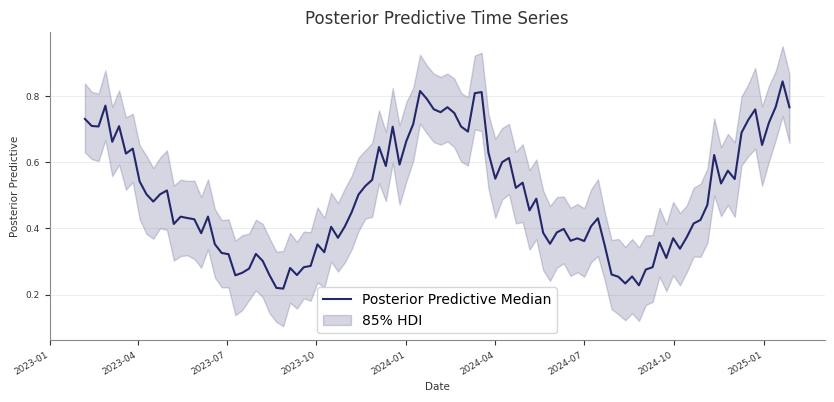
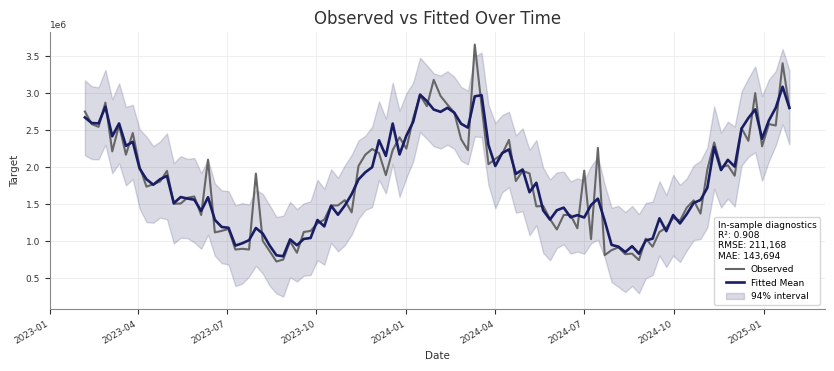
mmm.summary.posterior_predictive() returns a table with:
- observed target values
- posterior predictive mean and median
- HDI bound columns such as
abs_error_94_lowerandabs_error_94_upper
You can also access the predictive draws directly:
Blocked holdout validation
For the structured pipeline’s Stage 35 validation, Abacus fits a fresh model on the training window and then scores only the holdout dates:
That holdout path is different from the in-sample check above:
- the model is fit on
X_trainandy_trainonly - the holdout
Xcontains only future dates include_last_observations=Truekeeps lag history for adstock carryover- the returned samples are used to compute holdout metrics such as RMSE, MAE, NRMSE, NMAE, CRPS, bias, and coverage at 50%, 80%, and 94%
The holdout stage is more expensive than the in-sample check because it adds a second fit.
Predict on new dates
For future prediction, pass a new X with the same structural columns as the
training data:
sample_posterior_predictive(...) does not take y. For a holdout or future
window, keep the actual target outside the model and align it yourself if you
want external evaluation.
Use include_last_observations correctly
Set include_last_observations=True when the forecast window needs lag history
for adstock carryover.
When enabled, Abacus:
- prepends the last
adstock.l_maxtraining observations internally - samples posterior predictive values on the padded data
- removes the prepended rows from the returned result
This only works when the input dates do not overlap with the training dates.
If they do overlap, Abacus raises a ValueError.
Practical guidance
- Use the training
Xfor fitted-versus-observed checks. - Use future-only dates for forward prediction.
- Use the training-window refit pattern for blocked holdout validation.
- Keep
combined=Trueif you want a simplersampledimension. - Use
combined=Falseif you need explicitchainanddrawdimensions. - Call
sample_posterior_predictive(...)before usingmmm.diagnostics.predictive_summary()ormmm.summary.posterior_predictive().
Common pitfalls
- Calling
sample_posterior_predictive(...)withoutX - Expecting
yto be passed into the predictive method - Using
include_last_observations=Trueon dates that overlap with training data - Forgetting that the returned object is extracted samples, while the stored
idata.posterior_predictivegroup keeps the native posterior predictive structure